Page 1 of 2

San Juan-Princess Juliana

PostPosted: Sat Apr 28, 2007 12:58 pm
by Double_Farvel
Enjoy!

Re: San Juan-Princess Juliana

PostPosted: Sat Apr 28, 2007 1:08 pm
by a1
A tad bit more AA i'll say. Very good though. ;)

Re: San Juan-Princess Juliana

PostPosted: Sat Apr 28, 2007 1:40 pm
by Double_Farvel
A tad bit more AA i'll say. Very good though. ;)


I don't necessarily understand why I still have jaggies when the filter is at trilinear and I have the AA box checked.. :-/

Re: San Juan-Princess Juliana

PostPosted: Sat Apr 28, 2007 1:56 pm
by ATI_7500
Don't set it in FS, set it in your vid card drivers.

AA is fine, your blurry ground textures aren't 'though.

Re: San Juan-Princess Juliana

PostPosted: Sat Apr 28, 2007 3:04 pm
by Double_Farvel
Don't set it in FS, set it in your vid card drivers.

AA is fine, your blurry ground textures aren't 'though.


What can I do about that? I have every  setting in the display section at maximum. :-? :-/

Re: San Juan-Princess Juliana

PostPosted: Sat Apr 28, 2007 3:36 pm
by NDSP
A tad bit more AA i'll say. Very good though. ;)


I don't necessarily understand why I still have jaggies when the filter is at trilinear and I have the AA box checked.. :-/


I have the same problem... are you running a dell too?
Re: San Juan-Princess Juliana

PostPosted: Sat Apr 28, 2007 6:44 pm
by Alonso
There is nothing like building your own PC 8-)

Re: San Juan-Princess Juliana

PostPosted: Sun Apr 29, 2007 6:12 am
by haroldkip
I don't necessarily understand why I still have jaggies when the filter is at trilinear and I have the AA box checked.. :-/

I have the same problem... are you running a dell too?

I have a 3 year old Dell (P4 3.2 Ghz - 2GB RAM - 150 GB WD Raptor - Gainward 7800 GS 512) and mine is running great!
But I must add to that I have been FS-GS'ed ... but still it ran pretty good before Michael's treatment ... but it just got better.

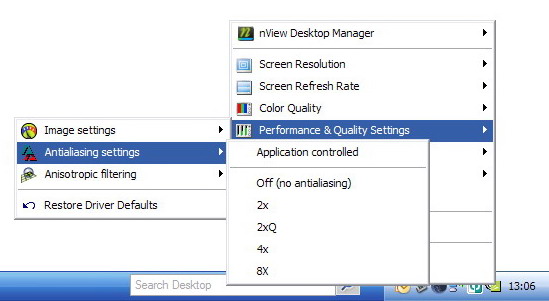
Uncheck AA in the Sim and set it on in your cards configuration panel.

Having the sim handling AA takes up unnecessary resources from CPU and RAM.
Have your GPU take care of the AA ... that is what it's there for ;)

Here's how to do it on an NVidia card ...

Image

PS ... set AA to 4x and see how it works out.
However, mine is set to 8; although some people say that FS9 does not handle 8x AA I can see the difference in graphics quality.

Just experiment with the settings. If you need any help just let me know.

Re: San Juan-Princess Juliana

PostPosted: Sun Apr 29, 2007 10:36 am
by PilotDude11
There is nothing like building your own PC 8-)

agreed

Re: San Juan-Princess Juliana

PostPosted: Sun Apr 29, 2007 12:18 pm
by bok269
very nice

Re: San Juan-Princess Juliana

PostPosted: Mon Apr 30, 2007 1:55 pm
by Double_Farvel
Thanks for the help and comments although Harold, my videocard came with the computer and I searched everywhere, but I still can't seem to find the AA settings.  :-/

Re: San Juan-Princess Juliana

PostPosted: Mon Apr 30, 2007 1:58 pm
by NDSP
Thanks for the help and comments although Harold, my videocard came with the computer and I searched everywhere, but I still can't seem to find the AA settings.  :-/


This is the same problem I have :-/

Re: San Juan-Princess Juliana

PostPosted: Mon Apr 30, 2007 3:08 pm
by fighter25
[quote][quote]Thanks for the help and comments although Harold, my videocard came with the computer and I searched everywhere, but I still can't seem to find the AA settings.

Re: San Juan-Princess Juliana

PostPosted: Tue May 01, 2007 8:55 am
by ATI_7500
Right click on desktop -> "Properties" -> "Settings" -> And the text above the screen resolution slider reads "[Your monitor] on [your graphics adapter]"

Re: San Juan-Princess Juliana

PostPosted: Tue May 01, 2007 5:58 pm
by krigl
Nice!! Have you tried editing your FS9.cfg to help with the blurries? Back up first of course... this terrain setup works fairly well for me - got it from Clipper who got it from someone, who....  :)

[TERRAIN]
TERRAIN_ERROR_FACTOR=100.000000  
TERRAIN_MIN_DEM_AREA=10.000000  
TERRAIN_MAX_DEM_AREA=100.000000  
TERRAIN_MAX_VERTEX_LEVEL=21  
TERRAIN_TEXTURE_SIZE_EXP=8  
TERRAIN_AUTOGEN_DENSITY=3  
TERRAIN_USE_GRADIENT_MAP=1  
TERRAIN_EXTENDED_TEXTURES=1  
TERRAIN_DEFAULT_RADIUS=9.000000  
TERRAIN_EXTENDED_RADIUS=9.000000  
TERRAIN_EXTENDED_LEVELS=1