Nice
 Posted: Thu Apr 12, 2007 7:13 am
No... not that place in France... just a nice day for some flying...
[center]
Click 'em for a slightly big'un...
[center]
Click 'em for a slightly big'un...
Flight Simulator and other chat
https://forums.simviation.com/phpBB3/
https://forums.simviation.com/phpBB3/viewtopic.php?f=42&t=140667
Posted: Thu Apr 12, 2007 7:13 amPosted: Thu Apr 12, 2007 7:14 am .. but how do you get the edges to be so smooth
  Posted: Thu Apr 12, 2007 7:21 amPosted: Thu Apr 12, 2007 8:02 am
AA (Anti-Aliasing)
I just tick the AA box in the FS display settings tab... and hey presto!

 Posted: Thu Apr 12, 2007 8:09 am
AA (Anti-Aliasing)
I just tick the AA box in the FS display settings tab... and hey presto!
No really
sorry for being sarcastic, but seriously even with my AA on I still get jaggies.... I posted about it in the Hardware section, and Nick N said I needed to turn on my AA on my videocard... I follow his instructions on how, and I couldnt get to the settings tab he told me about... so ive been really curious about how people get such smooth edges since
Nick ..
PS: Im not fully sure, If you can do me a favor, look at my screenshots... I need to know if Im overeacting or not
Posted: Thu Apr 12, 2007 8:11 amAA (Anti-Aliasing)
I just tick the AA box in the FS display settings tab... and hey presto!
No really
sorry for being sarcastic, but seriously even with my AA on I still get jaggies.... I posted about it in the Hardware section, and Nick N said I needed to turn on my AA on my videocard... I follow his instructions on how, and I couldnt get to the settings tab he told me about... so ive been really curious about how people get such smooth edges since
Nick ..
PS: Im not fully sure, If you can do me a favor, look at my screenshots... I need to know if Im overeacting or not
Probably something wrong with your graphics card...., I'm not all that great with sorting out computer problems! ::)
Posted: Thu Apr 12, 2007 3:11 pmPosted: Fri Apr 13, 2007 3:55 pm. Great job 8-). Posted: Fri Apr 13, 2007 4:27 pm
AA (Anti-Aliasing)
I just tick the AA box in the FS display settings tab... and hey presto!
No really
sorry for being sarcastic, but seriously even with my AA on I still get jaggies.... I posted about it in the Hardware section, and Nick N said I needed to turn on my AA on my videocard... I follow his instructions on how, and I couldnt get to the settings tab he told me about... so ive been really curious about how people get such smooth edges since
Nick ..
PS: Im not fully sure, If you can do me a favor, look at my screenshots... I need to know if Im overeacting or not
Posted: Fri Apr 13, 2007 4:33 pmAA (Anti-Aliasing)
I just tick the AA box in the FS display settings tab... and hey presto!
No really
sorry for being sarcastic, but seriously even with my AA on I still get jaggies.... I posted about it in the Hardware section, and Nick N said I needed to turn on my AA on my videocard... I follow his instructions on how, and I couldnt get to the settings tab he told me about... so ive been really curious about how people get such smooth edges since
Nick ..
PS: Im not fully sure, If you can do me a favor, look at my screenshots... I need to know if Im overeacting or not
Just in case you have a NVidia card, be sure not to choose the "Performance" or "Best Performance" mode. Choose either "Quality" or "Best Quality", else some of your video features will be drastically reduced by the drivers, to improve the performance instead of the video quality.
So first, set your drivers to "Best Quality", then crank up your AA slider to the max (and disable the AA checkbox in FSX setup), and see what happens.
Posted: Fri Apr 13, 2007 4:47 pm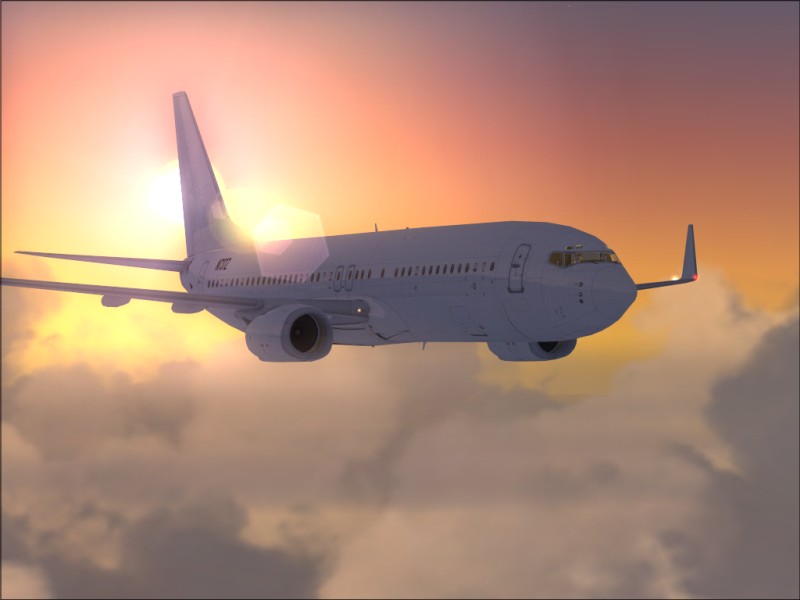
No... not that place in France
Posted: Sat Apr 14, 2007 9:36 amPosted: Sat Apr 14, 2007 10:47 am