Flight Simulator Humor Part 1

Posted:
Sun Jan 21, 2007 11:07 pmby murjax
#1
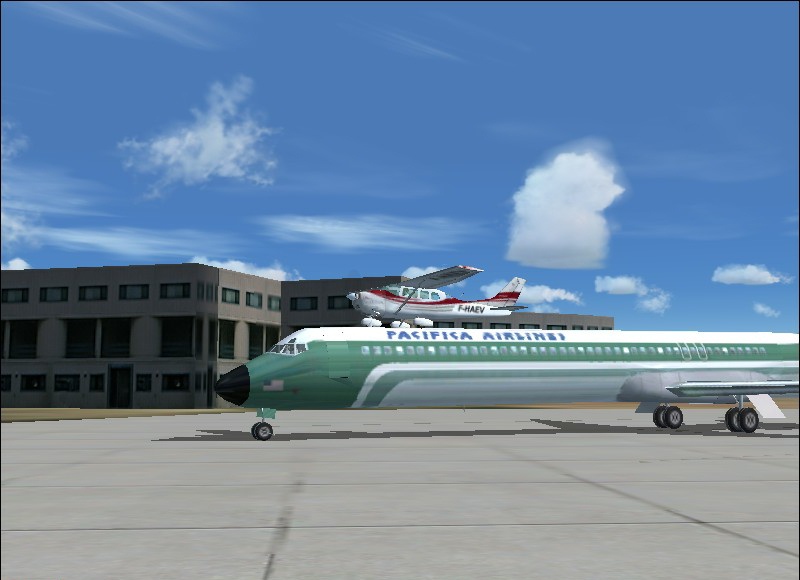
Captain, we will be carrying a little extra cargo today.
Re: Flight Simulator Humor Part 1
Posted:
Mon Jan 22, 2007 9:08 amby murjax
I guess not many people liked my screenshots. I know the second one wasn't the best but the first one I thought was really good.
Re: Flight Simulator Humor Part 1
Posted:
Mon Jan 22, 2007 9:55 amby pepper_airborne
You should give people some time to reply, its still moring in the USA and only afternoon in europe.
First one looks ok, should be edited to fit in better though, also try taking the shots with AA on.
Re: Flight Simulator Humor Part 1
Posted:
Mon Jan 22, 2007 10:08 amby murjax
You should give people some time to reply, its still moring in the USA and only afternoon in europe.
First one looks ok, should be edited to fit in better though, also try taking the shots with AA on.
What exactly does AA mean?
Re: Flight Simulator Humor Part 1
Posted:
Mon Jan 22, 2007 10:43 amby Sir_Crashalot
Anti Aliasing. It takes away the jaggy edges in games, thus in screenshots. You can turn it on by going to the settings of your videocard.
Crash

Re: Flight Simulator Humor Part 1
Posted:
Mon Jan 22, 2007 11:18 amby FSGT Gabe
#1 is pretty good
. Can't really see the plane in #2 though... :-/

.
- Kevin

Re: Flight Simulator Humor Part 1
Posted:
Mon Jan 22, 2007 11:29 amby Fozzer
You should give people some time to reply, its still moring in the USA and only afternoon in europe.
First one looks ok, should be edited to fit in better though, also try taking the shots with AA on.
What exactly does AA mean?
AA:
Automobile Association.
Alcoholics Anonymous.
Architectural Association.
American Airlines.
Advertising Association.
Anti-Aircraft.
...and....
Anti-Aliasing.
...etc...etc...
Paul...
...!
Re: Flight Simulator Humor Part 1
Posted:
Mon Jan 22, 2007 12:14 pmby Mr.Mugel
AA: Americas Army, great game...
No, in FS speak, AA means Anti Aliasing, it smoothes the corners when there are lines with big contrast that do not run horizontal across the screen, have a look at the border from building top to sky, it has those jagged edges, with AA, it will be a smooth line...
But make sure you activate it on your hardware, not in the flight simulator settings ! The setting in FS will just unsharpen the sim and take most of your FPS away, while the hardware AA will make the sim smooth and nice, and it won
Re: Flight Simulator Humor Part 1
Posted:
Mon Jan 22, 2007 12:28 pmby ashaman
Advanced Alarm smooths only
most of the jaggies, though. Even at the super-duper 8X some jaggy remains, though smaller.
Never been able to set it higher than 8X, though I reckon higher values should work even better.