Page 1 of 1

737 repaint

PostPosted: Sat Oct 28, 2006 7:00 am
by Scudrunners
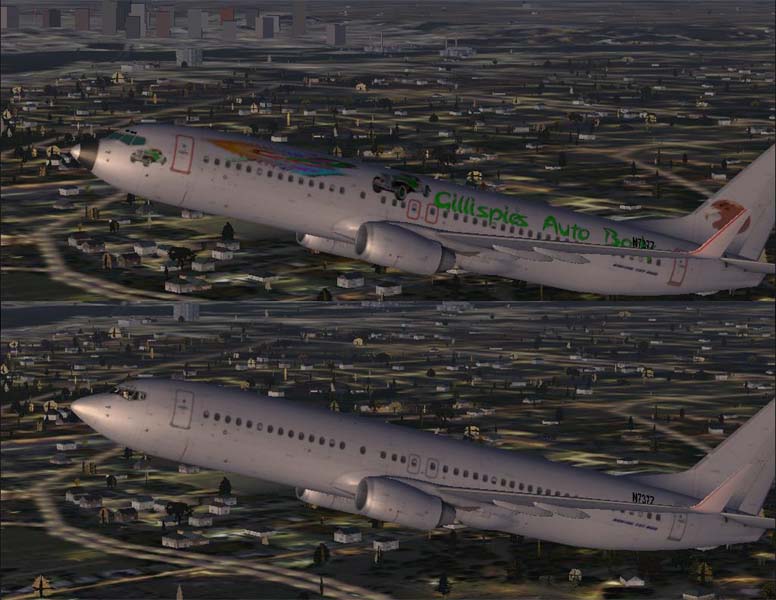
I have been playing around with repaints and have the following problem. I have a program called DXTBmp to convert DDS files in FS to BMP files that my paint programs will work with. I then convert them back to DDS files but don't know which format to use. I have the following options. DDS DXT1 (no alpha), DDS DXT1, DDS DXT3, DDS DXT5, DDS 444-4 (16 bit), DDS 555-1(16 bit), DDS 888-8(32 bit), DDS 888-8 (24 bit), DDS 555 15, or DDS 256 color. I took the following screenshot of a repaint I did along with the original. Notice the windshield is no longer transparent. After I did the repaint, I saved the file as a BMP then converted it to DDS DXT5 in DXTBmp. Am I using the wrong DDS format?
Image

Thanks for any help you can give... Skidmark..

Re: 737 repaint

PostPosted: Sat Oct 28, 2006 1:43 pm
by masmith
This should be in the repaint section...prepare to be moved ;)

Re: 737 repaint

PostPosted: Sun Oct 29, 2006 7:09 am
by Scudrunners
You can go ahead and remove it all together. I guess all the good repainters don't want novices fooling around. I will just work it out on my own.

Skidmark

Re: 737 repaint

PostPosted: Sun Oct 29, 2006 8:35 am
by ashaman
No reason to get all worked up, fact is that you'll find help easier on the repaint section that here.

Take me for example. I've never been able to repaint even the defaults, and so my suggestions would be pretty much useless.

Yes, it may happen that a repainter passes through and answers you here in the free screenshots, but it'd be easier for you to receive an answer in the right section of the forum. ;)

Re: 737 repaint

PostPosted: Sun Oct 29, 2006 2:59 pm
by Scudrunners
Not all worked up. Not at all. Just being realistic. I got it figured out on my own.

When you open the original texture file in DXTBmp, you need to first export (and save) the alpha layer as a bmp. Then save the DDS file as a bmp, do your work on it and save it again as bmp. Now open that saved file in DXTBmp and import the original alpha that you exported. Save the whole thing as a DDS DXT5 and your transparencys will be good as new. I know it sounds confusing, it does to me too. See, I don't edit (paint) the file in DXTBmp. I do that in Xara Extreme. It is the most user friendly program for working with vector image I have found and very affordable (at <$80.00). It is possible to paint the DDS images in DXTBmp but to me it is not as user friendly as Xara.

Re: 737 repaint

PostPosted: Sun Oct 29, 2006 4:16 pm
by KDSM
I have been playing around with repaints and have the following problem. I have a program called DXTBmp to convert DDS files in FS to BMP files that my paint programs will work with. I then convert them back to DDS files but don't know which format to use. I have the following options. DDS DXT1 (no alpha), DDS DXT1, DDS DXT3, DDS DXT5, DDS 444-4 (16 bit), DDS 555-1(16 bit), DDS 888-8(32 bit), DDS 888-8 (24 bit), DDS 555 15, or DDS 256 color. I took the following screenshot of a repaint I did along with the original. Notice the windshield is no longer transparent. After I did the repaint, I saved the file as a BMP then converted it to DDS DXT5 in DXTBmp. Am I using the wrong DDS format?

Image

Thanks for any help you can give... Skidmark..


Did you save the alpha channel?

Re: 737 repaint

PostPosted: Sun Oct 29, 2006 4:17 pm
by KDSM
NVM I posted before I read the whole thread  ;D