Page 1 of 1

uhhhhhhhhhhhhh oh.....

PostPosted: Thu May 11, 2006 7:39 pm
by Peanut1234
hey guys,

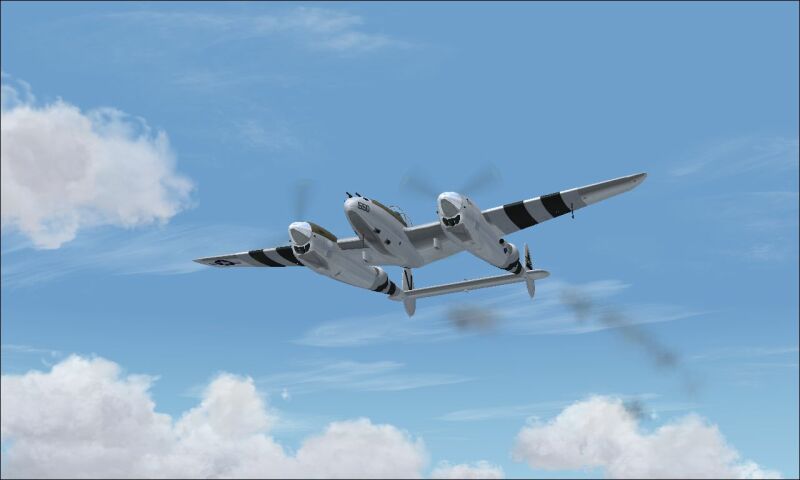
I signed up a little late of the earliest date for the screenshot contest, but I just liked this shot.... somehow. I know it's nothing like what I've seen, but it's a start.

Just a weeeeeeeee bit of an engine problem over Washington/Oregon in a good old P-38.

IMAGE REMOVED DUE TO NOT BEING WITHIN FORUM GUIDELINES!
[url=http://www.simviation.com/cgi-bin/yabb/YaBB.cgi?board=screen;action=display;num=1136648799]Please read the Guidelines for posting in the Forum!
Posting Images here at Simviation![/url]
THANK YOU!


Feedback appreciated,

peanut1234

P.S: The compression really took its toll on this shot.[img]URL[/img]

Re: uhhhhhhhhhhhhh oh.....

PostPosted: Thu May 11, 2006 8:14 pm
by Staiduk
Very nice, peanut. :)

A few hints: place {img} and {/img} around the image url to have it posted on this site. (Replacing { with [ ).

An idea to reduce compression damage: make sure your screenshot program saves the image in bitmap format - it give the maximum amount of detail. After you've made whatever adjustments you need, then make sure of your aspect ratio then compress to jpg. It provides a clearer image. :)

Re: uhhhhhhhhhhhhh oh.....

PostPosted: Thu May 11, 2006 8:33 pm
by Jakemaster
uhhh oh is right, this is WAY too big!  800 pixels wide max!
 

Re: uhhhhhhhhhhhhh oh.....

PostPosted: Thu May 11, 2006 8:39 pm
by VVM
lol, ill post my comment before this is removed.  neat pic mate   8)

Re: uhhhhhhhhhhhhh oh.....

PostPosted: Thu May 11, 2006 9:19 pm
by Airshow_lover
yeah, I would QUICKLY change that pic to make it smaller.

I was going to re-upload your photo but the new pic system doesn't let you do that...which can be a really good thing.

Re: uhhhhhhhhhhhhh oh.....

PostPosted: Thu May 11, 2006 10:18 pm
by Threadkiller
fixed ;D

Image

nice shot! you might wanna land soon :P 8)

Re: uhhhhhhhhhhhhh oh.....

PostPosted: Thu May 11, 2006 10:48 pm
by Peanut1234
thanks threadkiller, but I go to Infranview,then to resize, then I make it 800 wide and 480 tall.. and it made it that big... so can you help me??

Re: uhhhhhhhhhhhhh oh.....

PostPosted: Thu May 11, 2006 11:32 pm
by Peanut1234
does it matter if I have a widescreen, which I do, because I go to Infranview and go to resize, then I go to the right side and click 800 by 600, but it automatically does to 800 by 480, then I upload it like that and it's so big. Its that or I might be uploading the original pic and not the resized one......

Confused,

peanut1234

Re: uhhhhhhhhhhhhh oh.....

PostPosted: Thu May 11, 2006 11:33 pm
by Staiduk
thanks threadkiller, but I go to Infranview,then to resize, then I make it 800 wide and 480 tall.. and it made it that big... so can you help me??


I use Pix Resizer. Quick, easy, free.

...and hurry up before they eat your Lightning. ;D

Re: uhhhhhhhhhhhhh oh.....

PostPosted: Thu May 11, 2006 11:37 pm
by Peanut1234
THANKS A LOT MAN!!!! ;D ;D ;D I owe you one... somehow ;)