Sosa needs help!

Flight Simulation Screenshots displaying your Flight Simulation Experience. MSFS, FSX, Prepar3D, XPlane and other Flight Simulators. Focus is your Flight Simulator Experience. Please upload to Simviation (Button at top right)

Sosa needs help!

Postby SosaPilot » Fri Mar 24, 2006 3:57 pm

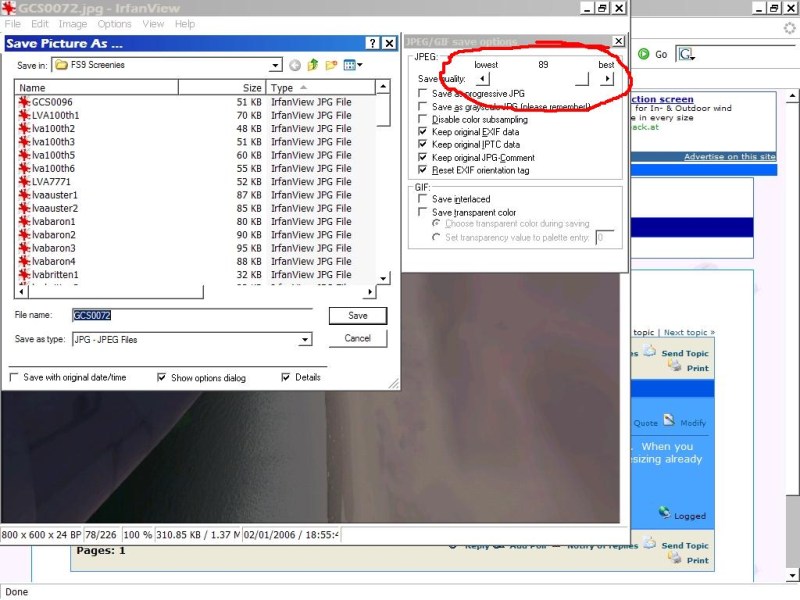
Hey guys, I'm about to put up some of my random pictures, but I have a question.  When you save the shot in irfanview, to get the 100k, what do you do?  I know about the resizing already by the way..
Living the good life :)
User avatar
SosaPilot
2nd Lieutenant
2nd Lieutenant
 
Posts: 239
Joined: Fri Jan 13, 2006 6:53 pm

Re: Sosa needs help!

Postby LVA157 » Fri Mar 24, 2006 4:04 pm

Image

move the slider and save it, after go to save it again and check the file size, if its too big move the slider down a little and save again, hope that helps ;)
Last edited by LVA157 on Fri Mar 24, 2006 4:10 pm, edited 1 time in total.
Image
^^The first plane I flew!! :)

Gigabyte GA-K8N pro SLI
AMD Opteron 148 w/ Thermaltake XP-120 h/s
2x 1GB Corsair RAM w/ heatsinks
PNY tech 7600GT @ 560Mhz core
LVA157
1st Lieutenant
1st Lieutenant
 
Posts: 366
Joined: Thu Jul 14, 2005 3:35 pm
Location: Andover

Re: Sosa needs help!

Postby Triple_7 » Fri Mar 24, 2006 4:29 pm

Or you could do what I do...Open the raw shots up and resize them in Irfanview.  Then open up the default Windows Paint program.  Open each shot and click save.  Nearly no quality loss and you can drop a lot of weight off most shots ;)

Some shots in Irfanview can take a lot of quality loss while trying to drop the weight in that program itself ;)
Triple_7
 

Re: Sosa needs help!

Postby SosaPilot » Fri Mar 24, 2006 4:53 pm

Thanks, will be posting some shots shortly!!
Living the good life :)
User avatar
SosaPilot
2nd Lieutenant
2nd Lieutenant
 
Posts: 239
Joined: Fri Jan 13, 2006 6:53 pm


Return to Simulation Screenshots Showcase

Who is online

Users browsing this forum: No registered users and 588 guests