What to use, What to use

Flight Simulation Screenshots displaying your Flight Simulation Experience. MSFS, FSX, Prepar3D, XPlane and other Flight Simulators. Focus is your Flight Simulator Experience. Please upload to Simviation (Button at top right)

What to use, What to use

Postby Airshow_lover » Thu Mar 02, 2006 4:20 pm

What should i use for screenshots?!?!?!

I have tried Irfanview and ive tried FRAPS

and i seem to like Fraps better

what is your opinion?

(BTW if i use Fraps can i still enter the contests?)
C/SMSgt - Civil Air Patrol
User avatar
Airshow_lover
Major
Major
 
Posts: 1615
Joined: Mon Jan 09, 2006 3:18 pm
Location: LaVergne, TN

Re: What to use, What to use

Postby Tweek » Thu Mar 02, 2006 4:27 pm

FSScreen. 24kb to download, and extremely easy to use. Load the program, and start taking screenshots! And it captures the shot how you see it. None of that 'disappearing aircraft' effect in Irfanview, or softening of screenshots when they're taken in some programs.

http://www.flusiforum.de/reviews/fsscre ... 20FSScreen

Oh yeah, and despite the name 'FSScreen', it works in any program (on the desktop, too).
Last edited by Tweek on Thu Mar 02, 2006 4:29 pm, edited 1 time in total.
Tweek
 

Re: What to use, What to use

Postby Souichiro » Thu Mar 02, 2006 4:57 pm

What he said! and use irfanview to resize!
Image
User avatar
Souichiro
Ground hog
Ground hog
 
Posts: 0
Joined: Tue Aug 28, 2007 11:34 am

Re: What to use, What to use

Postby igs942 » Thu Mar 02, 2006 5:36 pm

Hi Airshow_lover. I do something a bit like Tweek except I use Fraps for the capture instead of FSScreen. All you gotta do is start Fraps, minimise it, start FS9 and fly. Then whenever you want a screenshot you press F10. The shots will be saved in the location of your choice, just specify in the Fraps window when you first start using it.

For resizing, go to that location, find your shot, right-click and choose 'Open with Irfanview'. Once opened press CTRL+R and select 800x600 and hit OK. The shot will be automatically resized and you can then save it as normal by just pressing 'S'.

Job's a goodun

Have a play around and see what best suits you - everyone has their own way. Hope this helps ;)

Ian
User avatar
igs942
Captain
Captain
 
Posts: 792
Joined: Tue Dec 28, 2004 1:28 pm
Location: Oxford, UK

Re: What to use, What to use

Postby MIKE JG » Thu Mar 02, 2006 10:49 pm

FSScreen......

So easy to use, winner hands down....
-Mike G.

Image

Military AI traffic packages and scenery for the Microsoft Flight Simulator series.
User avatar
MIKE JG
Captain
Captain
 
Posts: 844
Joined: Wed Apr 07, 2004 5:46 pm
Location: Ohio

Re: What to use, What to use

Postby casino » Fri Mar 03, 2006 12:16 am

i use a prog called SnagIt ...worrks really well
Image
User avatar
casino
2nd Lieutenant
2nd Lieutenant
 
Posts: 123
Joined: Thu Dec 15, 2005 7:58 am
Location: London,UK

Re: What to use, What to use

Postby Staiduk » Fri Mar 03, 2006 12:38 am

I use one no-one's ever heard of apparently; a little app called 'Howie's Quickscreen Capture'. (One of 'Howie's Funware'.) It's about as bare-bones as you can get; quick and simple. :-)
Image
Staiduk
Major
Major
 
Posts: 1070
Joined: Thu Jan 01, 2004 8:12 am

Re: What to use, What to use

Postby BFMF » Fri Mar 03, 2006 12:41 am

I use Multi Grab by Martin Wright ;)
BFMF
Colonel
Colonel
 
Posts: 16266
Joined: Mon Feb 25, 2002 6:06 pm
Location: Pacific Northwest

Re: What to use, What to use

Postby SkyNoz » Fri Mar 03, 2006 12:46 am

I use one no-one's ever heard of apparently; a little app called 'Howie's Quickscreen Capture'. (One of 'Howie's Funware'.) It's about as bare-bones as you can get; quick and simple. :-)


NICE FIND!!!!!!!!!!!!!! ;D
Project Kfir!
Image
My Gmax page
Aircraft modeler/Aircarft painter

Aye the key!
[GeneralEngineData]
//0=Piston, 1=Jet, 2=N
SkyNoz
Major
Major
 
Posts: 1703
Joined: Sat Aug 06, 2005 11:02 am

Re: What to use, What to use

Postby Airshow_lover » Sat Mar 04, 2006 10:36 pm

ok umm how do i take a screen shot with FSscreen?

when i start the ".exe" it icons and thats it...what is the hot key for capture?
C/SMSgt - Civil Air Patrol
User avatar
Airshow_lover
Major
Major
 
Posts: 1615
Joined: Mon Jan 09, 2006 3:18 pm
Location: LaVergne, TN

Re: What to use, What to use

Postby rootbeer » Sat Mar 04, 2006 10:47 pm

OK; I installed Howie's screen capture tool. Now how do I use it?
emachines T6212; AMD Athlon64 3800+ (2.40 GHz; Venice core); Allied AL-B500E 500W power supply; 2048Mb PC3200 DDR400; Westinghouse LCM-22w2 wide-screen LCD monitor; eVGA e-GeForce 7900 GS KO X16 PCIe video card; Logitech Extreme 3D Pro flight controller;<
User avatar
rootbeer
Captain
Captain
 
Posts: 846
Joined: Wed Aug 03, 2005 9:50 pm
Location: Fernley, Nevada

Re: What to use, What to use

Postby rootbeer » Sat Mar 04, 2006 11:24 pm

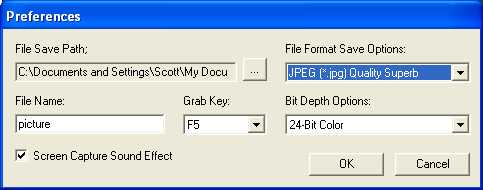
I must have done something right because I'm hearing the shutter of a camera click and the sound of a motor drive when I hit F12. I assume I am capturing a screenie. Now I just have to find them. I have no idea where they are. I don't know how to specify a path or filename or whatever Howie asks you to do to actually retrieve the images saved. Gimme a hand, gents.
emachines T6212; AMD Athlon64 3800+ (2.40 GHz; Venice core); Allied AL-B500E 500W power supply; 2048Mb PC3200 DDR400; Westinghouse LCM-22w2 wide-screen LCD monitor; eVGA e-GeForce 7900 GS KO X16 PCIe video card; Logitech Extreme 3D Pro flight controller;<
User avatar
rootbeer
Captain
Captain
 
Posts: 846
Joined: Wed Aug 03, 2005 9:50 pm
Location: Fernley, Nevada

Re: What to use, What to use

Postby Airshow_lover » Sun Mar 05, 2006 12:04 am

I must have done something right because I'm hearing the shutter of a camera click and the sound of a motor drive when I hit F12. I assume I am capturing a screenie. Now I just have to find them. I have no idea where they are. I don't know how to specify a path or filename or whatever Howie asks you to do to actually retrieve the images saved. Gimme a hand, gents.


tried this?

Image
C/SMSgt - Civil Air Patrol
User avatar
Airshow_lover
Major
Major
 
Posts: 1615
Joined: Mon Jan 09, 2006 3:18 pm
Location: LaVergne, TN

Re: What to use, What to use

Postby rootbeer » Sun Mar 05, 2006 12:05 am

I used Search... and found them. They have no path; they're just there.

I even got them into my FS Screenshots folder-- all by myself.  No razzing...
emachines T6212; AMD Athlon64 3800+ (2.40 GHz; Venice core); Allied AL-B500E 500W power supply; 2048Mb PC3200 DDR400; Westinghouse LCM-22w2 wide-screen LCD monitor; eVGA e-GeForce 7900 GS KO X16 PCIe video card; Logitech Extreme 3D Pro flight controller;<
User avatar
rootbeer
Captain
Captain
 
Posts: 846
Joined: Wed Aug 03, 2005 9:50 pm
Location: Fernley, Nevada

Re: What to use, What to use

Postby rootbeer » Sun Mar 05, 2006 12:07 am

Did you fill in the File Save Path yourself? It's blank when you get it from Howie.
emachines T6212; AMD Athlon64 3800+ (2.40 GHz; Venice core); Allied AL-B500E 500W power supply; 2048Mb PC3200 DDR400; Westinghouse LCM-22w2 wide-screen LCD monitor; eVGA e-GeForce 7900 GS KO X16 PCIe video card; Logitech Extreme 3D Pro flight controller;<
User avatar
rootbeer
Captain
Captain
 
Posts: 846
Joined: Wed Aug 03, 2005 9:50 pm
Location: Fernley, Nevada

Next

Return to Simulation Screenshots Showcase

Who is online

Users browsing this forum: No registered users and 569 guests