Page 1 of 4

runway from hell ;p

PostPosted: Sun Mar 20, 2005 9:46 pm
by Yurei
hey guys!

just did a short flight for some screenshots of my beautiful new Courchevel scenery. all credit goes to bj

Re: runway from hell ;p

PostPosted: Sun Mar 20, 2005 9:48 pm
by Sock
Where is that scenery?

Re: runway from hell ;p

PostPosted: Sun Mar 20, 2005 9:54 pm
by Yurei
oh ok, i was just gonna post the link ;)
yeah, is struggled all night to get it all installed properly, since i can't speak a word of french. ;D
oh and thanks  :)

Re: runway from hell ;p

PostPosted: Sun Mar 20, 2005 9:55 pm
by xFLAMESx
LOL, is the runway surface actually uneven, or is it just to look good?

Re: runway from hell ;p

PostPosted: Sun Mar 20, 2005 9:57 pm
by Yurei
no it's actually uneven ;D. it is in real life too as far as i know

Re: runway from hell ;p

PostPosted: Sun Mar 20, 2005 10:02 pm
by xFLAMESx
OH MAN! I HAVE TO GET THAT!

Wonder if it would be possible to import the runway to other airports? ::)

Cheers,

GM

Re: runway from hell ;p

PostPosted: Sun Mar 20, 2005 10:18 pm
by Yurei
yeah that would be brilliant but i doubt that's possible :(

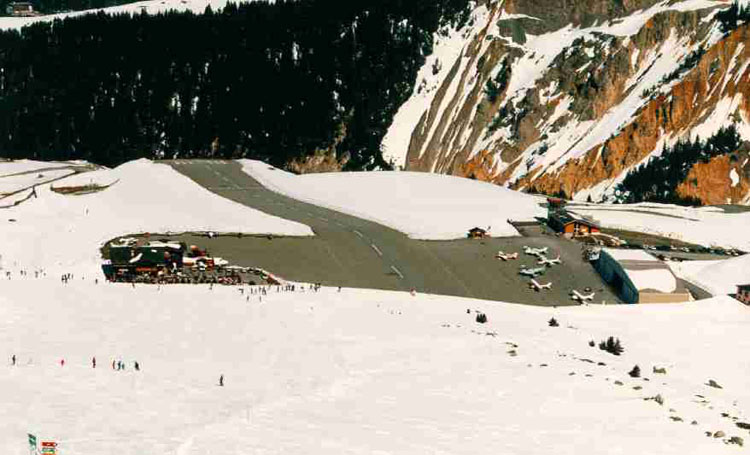
anyway, here's a shot of the real thing for comparison (sorry you've probably seen it a million times but i don't care ;D)

Image

Re: runway from hell ;p

PostPosted: Sun Mar 20, 2005 10:21 pm
by xFLAMESx
Yeah love that place 8)

I don't suppose you'd mind giving a quick description of roughly where the files should go?
My French is as good as my Latin ;). . . . . ;D

Cheers,
GM

Re: runway from hell ;p

PostPosted: Sun Mar 20, 2005 10:23 pm
by Yurei
ok gnat hang in there, let me try to remember how i did it. i'll get back to you in a minute ;D

ok, here's how i did it. i'm not sure yet wether i messed up anything with that stuff so please back up your folders ;D!

- get all the texture zips from that french site. in the installation manual it says you need "textures1" and "textures2" but you actually need all the files so get "textures_alps1-4" aswell. the instructions confused me big time so i just chucked them all in the main fs9 texture folder (and it worked).

- now create a new folder (name it "courchevel") in your addon scenery folder and create a subfolder ( name it "scenery") in that "courchevel" folder. put all the .bgl files that came with the Courchevel zip into that folder.

-open your main scenery cfg and add

 
                [Area.***]
               Title=Courchevel
               Local=addon scenery\courchevel/scenery
               Active=TRUE
               Layer = **


(with a number instead of * in order of your sceneries)

i think you only need a good mesh of the area now and that should be it. none of the ones suggested on the french site worked for me so i got another one from avsim and it works like a dream :)

good luck

Re: runway from hell ;p

PostPosted: Sun Mar 20, 2005 10:32 pm
by Stormtropper
Great shots! 8)

still need link tho ;)

Jeff

Re: runway from hell ;p

PostPosted: Sun Mar 20, 2005 10:38 pm
by xFLAMESx

Re: runway from hell ;p

PostPosted: Sun Mar 20, 2005 10:43 pm
by Yurei
thanks jeff :)
yup it's the link gnat gave. i edited my earlier post to explain how i did it since my french isn't really the best either ;D

Re: runway from hell ;p

PostPosted: Sun Mar 20, 2005 10:43 pm
by Stormtropper
The only words in French that I'll ever need is 'Pizza' 'Girls' and 'Download' ;D

...for everything else, theres MasterCard and personal translator ;D

Re: runway from hell ;p

PostPosted: Sun Mar 20, 2005 10:47 pm
by Yurei
;D right on

Re: runway from hell ;p

PostPosted: Sun Mar 20, 2005 10:48 pm
by xFLAMESx
[quote]ok gnat hang in there, let me try to remember how i did it. i'll get back to you in a minute ;D

ok, here's how i did it. i'm not sure yet wether i messed up anything with that stuff so please back up your folders ;D!

- get all the texture zips from that french site. in the installation manual it says you need "textures1" and "textures2" but you actually need all the files so get "textures_alps1-4" aswell. the instructions confused me big time so i just chucked them all in the main fs9 texture folder (and it worked).

- now create a new folder (name it "courchevel") in your addon scenery folder and create a subfolder ( name it "scenery") in that "courchevel" folder. put all the .bgl files that came with the Courchevel zip into that folder.

-open your main scenery cfg and add