Checking on the AI traffic...
 Posted: Sat Sep 11, 2004 8:32 pm
After getting a new G card and working with the settings im finaly in the process of installing AI routes. So today I was flying a couple circuts in Ampsterdam and decided to check in on a couple flights soon to depart.
Here we have KLM 641 ready for takeoff to New York and NW 6053 holding for departure to Detroit.
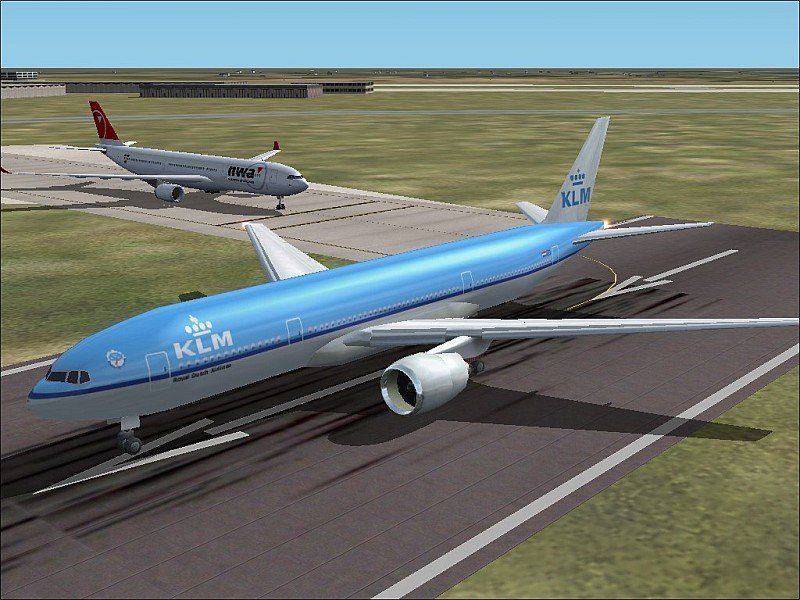
And im not sure what happened but after my first set of clear pics something happened and FS went all jaggy. It still runs smooth but im getting this... I have the AA setting to 8x on the card and the one in FS turned off. I have tried about every setting possible to get it back to clear but i seem to be stuck with this. The acual quality of the shot is down due to resizing and file shrinking but the jags are acualy there all the time. I tryed to reinstall all the drivers again but got nothing. I now have my panel back but now this... Hopefully I can get this computer upgraded more and get XP but its the fact it was clear before and not now that anoys me. If anyone has any ideas of how to fix it they would be greatly appriciated.
Thanks,
Triple_7
Here we have KLM 641 ready for takeoff to New York and NW 6053 holding for departure to Detroit.
And im not sure what happened but after my first set of clear pics something happened and FS went all jaggy. It still runs smooth but im getting this... I have the AA setting to 8x on the card and the one in FS turned off. I have tried about every setting possible to get it back to clear but i seem to be stuck with this. The acual quality of the shot is down due to resizing and file shrinking but the jags are acualy there all the time. I tryed to reinstall all the drivers again but got nothing. I now have my panel back but now this... Hopefully I can get this computer upgraded more and get XP but its the fact it was clear before and not now that anoys me. If anyone has any ideas of how to fix it they would be greatly appriciated.
Thanks,
Triple_7