
Checking on the AI traffic...

Flight Simulation Screenshots displaying your Flight Simulation Experience. MSFS, FSX, Prepar3D, XPlane and other Flight Simulators. Focus is your Flight Simulator Experience. Please upload to Simviation (Button at top right)

Checking on the AI traffic...

Postby Triple_7 » Sat Sep 11, 2004 8:32 pm

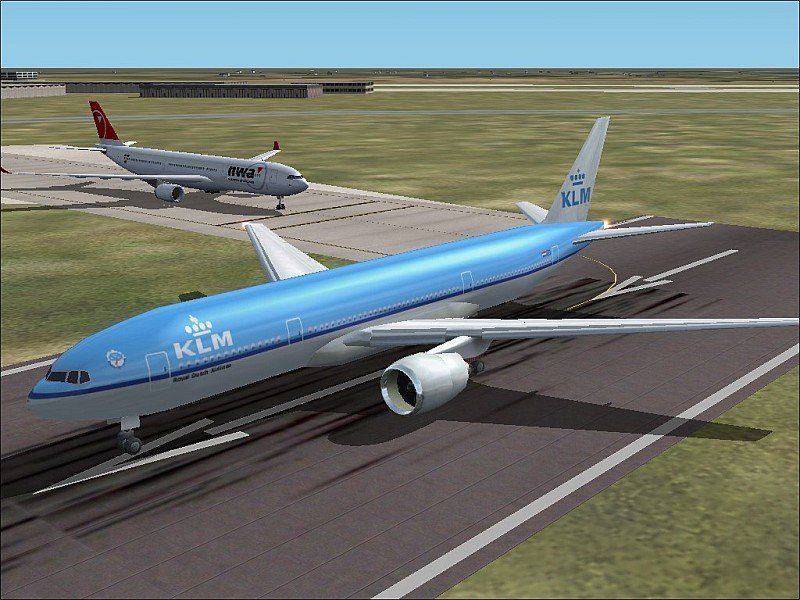
After getting a new G card and working with the settings im finaly in the process of installing AI routes.  So today I was flying a couple circuts in Ampsterdam and decided to check in on a couple flights soon to depart.

Here we have KLM 641 ready for takeoff to New York and NW 6053 holding for departure to Detroit.
Image

And im not sure what happened but after my first set of clear pics something happened and FS went all jaggy.  It still runs smooth but im getting this... I have the AA setting to 8x on the card and the one in FS turned off.  I have tried about every setting possible to get it back to clear but i seem to be stuck with this.  The acual quality of the shot is down due to resizing and file shrinking but the jags are acualy there all the time.   I tryed to reinstall all the drivers again but got nothing.  I now have my panel back but now this...  Hopefully I can get this computer upgraded more and get XP but its the fact it was clear before and not now that anoys me.  If anyone has any ideas of how to fix it they would be greatly appriciated.

Thanks,

Triple_7

Triple_7
 

Re: Checking on the AI traffic...

Postby jordonj » Sat Sep 11, 2004 9:04 pm

I would try turning it on in FS2K4...
My first flight in a 172 on August 20, 2004
Image

Doing the right thing is more important than doing the thing right. (P. Drucker)

When all think alike, then no one i
User avatar
jordonj
Lieutenant Colonel
Lieutenant Colonel
 
Posts: 5314
Joined: Mon Jun 14, 2004 11:40 pm
Location: Michigan

Re: Checking on the AI traffic...

Postby jubjub47 » Sat Sep 11, 2004 9:08 pm

Your problem can be fixed by turning your anisotrophic filtering up some more.  It's a pretty common problem, but the Anisotrophic typically should be set to equal too or greater then your antialiasing setting.
jubjub47
2nd Lieutenant
2nd Lieutenant
 
Posts: 202
Joined: Mon Oct 13, 2003 9:59 pm


Return to Simulation Screenshots Showcase

Who is online

Users browsing this forum: No registered users and 238 guests
