An Oakland foggy morning..

Flight Simulation Screenshots displaying your Flight Simulation Experience. MSFS, FSX, Prepar3D, XPlane and other Flight Simulators. Focus is your Flight Simulator Experience. Please upload to Simviation (Button at top right)

An Oakland foggy morning..

Postby tcco94 » Sat Apr 18, 2009 6:18 pm

I used print screen to get my shot and for some reason it was small?  :-?
Im pretty sure there is no button in FS9 to just take snapshots like fsx?
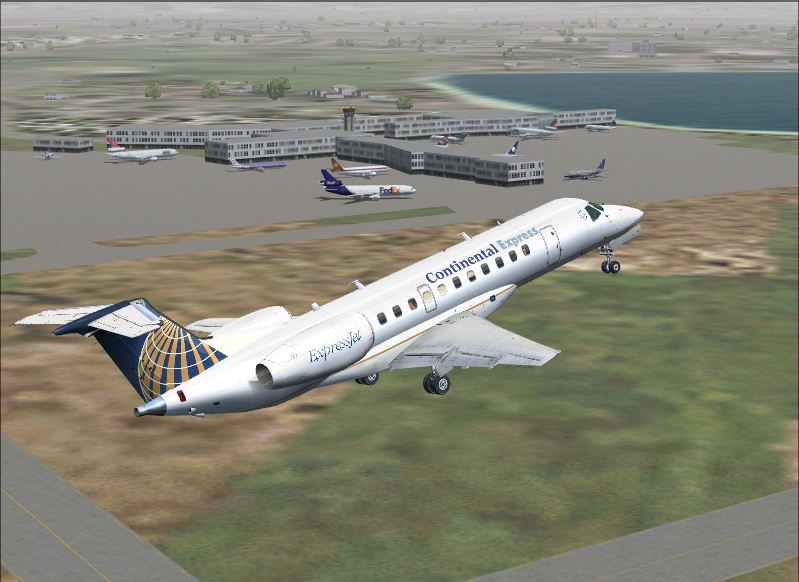
Image

Comments welcome..I tried to get all the traffic I could.

User avatar
tcco94
Major
Major
 
Posts: 3946
Joined: Mon Apr 07, 2008 1:41 am
Location: Bay Area, California

Re: An Oakland foggy morning..

Postby SubZer0 » Sat Apr 18, 2009 6:48 pm

Use FS Screen to take FS9 shots... Just load it up before you start the sim (or whenever you're about to take screenshots) and press the print screen key on the keyboard and it will save all the shots to your desktop in full size... edit them to make them .jpeg files and change the size and you're good to go ;)

http://www.flightsimworld.com/downloads ... /1058.html
[center][img]http://www.simviation.com/phpupload/uploads/1369006030.jpg[/img][/center]
User avatar
SubZer0
Major
Major
 
Posts: 3722
Joined: Fri May 04, 2007 9:29 pm
Location: KLNA

Re: An Oakland foggy morning..

Postby Fozzer » Sun Apr 19, 2009 3:31 am

...or "Grab Clip Save" which sits in your system tray, waiting for you the press "Print Screen"...>>>>

http://www.softlookup.com/display.asp?id=82468

Then manipulate the picture with "Irfanview"...>>>

http://irfanview.grafix-viewer.com/inde ... 3godH0k9GA

Paul...G-BPLF...FS 2004... 8-)...!
Last edited by Fozzer on Sun Apr 19, 2009 3:38 am, edited 1 time in total.
Win 8.1 64-bit. DX11. Advent Tower. Intel i7-3770 3.9 GHz 8-core. 8 GB System RAM. AMD Radeon HD 7700 1GB RAM. DVD ROM. 2 Terra Byte SATA Hard Drive. Philips 17" LCD Monitor. Saitek Cyborg X Fly-5 Joystick. ...and a Briggs and Stratton Petrol Lawn Mower.
User avatar
Fozzer
Colonel
Colonel
 
Posts: 27370
Joined: Thu Jan 31, 2002 3:11 pm
Location: Hereford. England. EGBS.

Re: An Oakland foggy morning..

Postby Hagar » Sun Apr 19, 2009 3:48 am

Lots of multiple screenshot software around if you care to look. It's all a matter of preference. MW's MultiGrab has always done everything I wanted.
http://www.mnwright.btinternet.co.uk/programs/mgrab.htm

I used print screen to get my shot and for some reason it was small?

What resolution are you using to run FS9? The Windows default Print Screen feature can only capture shots in the resolution selected from FS9 Display settings.
Last edited by Hagar on Sun Apr 19, 2009 3:48 am, edited 1 time in total.
Image

Founder & Sole Member - Grumpy's Over the Hill Club for Veteran Virtual Aviators
Member of the Fox Four Group
My Google Photos albums
My Flickr albums
User avatar
Hagar
Colonel
Colonel
 
Posts: 30869
Joined: Wed Jun 19, 2002 7:15 am
Location: Costa Geriatrica

Re: An Oakland foggy morning..

Postby tcco94 » Sun Apr 19, 2009 1:21 pm

Lots of multiple screenshot software around if you care to look. It's all a matter of preference. MW's MultiGrab has always done everything I wanted.
http://www.mnwright.btinternet.co.uk/programs/mgrab.htm

I used print screen to get my shot and for some reason it was small?

What resolution are you using to run FS9? The Windows default Print Screen feature can only capture shots in the resolution selected from FS9 Display settings.

Oh that must be it.
800x600 or something.
It was the only resolution that would get my 22" monitor to work?  ;D
User avatar
tcco94
Major
Major
 
Posts: 3946
Joined: Mon Apr 07, 2008 1:41 am
Location: Bay Area, California

Re: An Oakland foggy morning..

Postby olderndirt » Mon Apr 20, 2009 11:38 am

Hagar
Downloaded from the MultiGrab site - both the prerequisite and the MGrab.  Though I've created a 'screenshots' folder and tacked it onto the 'grabs' folder in program files, I'm still getting just the single screenshot.  Obviously missing something - as usual.
[img]http://www.simviation.com/yabbuploads/oldrt18.jpg
User avatar
olderndirt
Major
Major
 
Posts: 3495
Joined: Sat Dec 20, 2008 3:07 pm
Location: Rochester, WA

Re: An Oakland foggy morning..

Postby Hagar » Mon Apr 20, 2009 11:48 am

olderndirt. Run MultiGrab & click the "Start Monitoring" button. Then minimise it before starting FS. MultiGrab will then run in the background from your Taskbar. Take as many shots as you like by pressing the Print Screen key. To see your captures click on the Taskbar icon to restore it.
Last edited by Hagar on Mon Apr 20, 2009 11:49 am, edited 1 time in total.
Image

Founder & Sole Member - Grumpy's Over the Hill Club for Veteran Virtual Aviators
Member of the Fox Four Group
My Google Photos albums
My Flickr albums
User avatar
Hagar
Colonel
Colonel
 
Posts: 30869
Joined: Wed Jun 19, 2002 7:15 am
Location: Costa Geriatrica

Re: An Oakland foggy morning..

Postby olderndirt » Mon Apr 20, 2009 1:05 pm

It really helps to push the 'start monitoring' button - thanks  :).
[img]http://www.simviation.com/yabbuploads/oldrt18.jpg
User avatar
olderndirt
Major
Major
 
Posts: 3495
Joined: Sat Dec 20, 2008 3:07 pm
Location: Rochester, WA


Return to Simulation Screenshots Showcase

Who is online

Users browsing this forum: No registered users and 631 guests