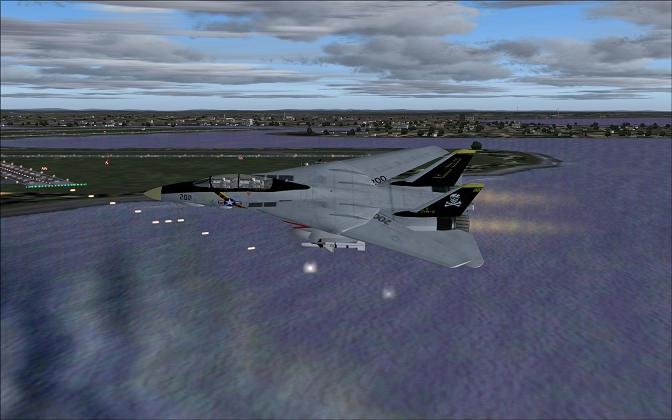
super sonic 2

Flight Simulation Screenshots displaying your Flight Simulation Experience. MSFS, FSX, Prepar3D, XPlane and other Flight Simulators. Focus is your Flight Simulator Experience. Please upload to Simviation (Button at top right)

super sonic 2

Postby Mavrick » Sun Sep 16, 2007 9:01 pm

You won't be banned ...... this time  ;D ;D ..... you'll just have the image removed

sorry every one im learning dont banned me  lol hope this is better
Last edited by eno on Mon Sep 17, 2007 3:00 am, edited 1 time in total.
Image


DIMM e521 AMD Athlon 64x2 Duel Core Processor 4000+
2.1 GHz 256 GB HD and a Nvidia Geforce 6150 le
User avatar
Mavrick
Ground hog
Ground hog
 
Posts: 25
Joined: Sun Sep 16, 2007 7:50 am
Location: Bremen Georgia

Re: super sonic 2

Postby ThomasKaira » Sun Sep 16, 2007 9:06 pm

You won't be banned for oversizing an image, don't sweat it. ;)
User avatar
ThomasKaira
Captain
Captain
 
Posts: 838
Joined: Thu Aug 02, 2007 9:29 pm
Location: Where Charlie Don't Surf

Re: super sonic 2

Postby firemonte007 » Sun Sep 16, 2007 9:10 pm

that looks alot better....stick with it and your shots will get better...believe me i know...just check mine out and you will see that they will....just listen to the advice that is given. 8-)
Image
User avatar
firemonte007
Major
Major
 
Posts: 2288
Joined: Mon Aug 20, 2007 8:24 pm
Location: northern IL, USA

Re: super sonic 2

Postby PD87 » Sun Sep 16, 2007 9:18 pm

I wasnt trying to be rude in the last thread, but you didnt need to start a new thread, just delete the wrong sized shot and replace it with the correct one in the same thread(you can practice here as the shot above is still too wide! lol). Here, read these carefully:

http://www.simviation.com/cgi-bin/yabb2 ... 1189302788

http://www.irfanview.com/

http://www.simviation.com/cgi-bin/yabb2 ... 1186723137

Study Study Study ;)
Last edited by PD87 on Sun Sep 16, 2007 9:19 pm, edited 1 time in total.
[center]Image
Jack's New Beast - GateWay GT5628 - Vista, Intel Core2 Quad 2.4GHZ, 3GB DDR2, 500GB HD, Nvidia GeForce 8600GTS-OC 256MB DDR3, Dell 22" WS LCD[/cente
User avatar
PD87
Captain
Captain
 
Posts: 618
Joined: Sun Jul 08, 2007 2:32 pm
Location: Riverside

Re: super sonic 2

Postby Isak922 » Sun Sep 16, 2007 9:21 pm

Here's a few tips:

1. The screen shot is too wide. It's nothing big, but it can be a bother with the scroll bar. The "standard" size used on this site is 800 pixels tall, by 600 pixels wide. You're at 507 high, and 955 wide!

2. Don't compress your screen shot so much! The only other limit besides height and width, is the size of your screen shot. You have a total of 100kb per shot to "spend", you've only used just under 40 here! You've got a whole lot of room left, and that can be a huge improvement over an already nice screen shot!

3. If you don't have a system powerful enough to run the settings at full without an unbearable FPS hit, I highly suggest you move everything to the right (Or, max everything out in terms of graphics). What this will do, is make your screen shot much more visually pleasing. The water will look better, the clouds won't look so "flat" (Lower cloud settings will use 2D clouds, while higher settings will use 3D clouds, which look MUCH nicer).


Other than those few things which can be easily fixed, you have one very nice screen shot here!
4GB DDR2 PC5300; 3.2GHz Pentium D 940, Nvidia 9800GT 1024MB DDR3, Windows XP Pro SP3
User avatar
Isak922
Major
Major
 
Posts: 1484
Joined: Tue Jun 27, 2006 9:09 pm
Location: Connecticut

Re: super sonic 2

Postby Dan Brown » Mon Sep 17, 2007 12:32 am

Mavrick-

Keep up the good work. The more time you spend around here, the more you will pick up. I took this picture after seeing yours to show you some ways to "spruce" up your shot. This is using FS2004.

-I put some different cloud layers in there to keep them from looking to "fake" or too "canned" like a simple theme from the weather menu.
-I also did this in front of the approach end of KBOS (not realistic, depends on what you're going for) to put more eye candy in there with the approach lights. I also took the shot at dusk so the airport lights were on.
-I used KBOS, the aircraft position, and the clouds to hide the fact that my general scenary and terrain is boring and flat looking from this angle. Hopefully the viewers eye go esfrom aircraft, to clouds, to water (which is a free addin I downloaded from this site). I didn't put the aircraft lights on because my F14 model doesn't seem to have the most realistic lights.

Please
don't think I'm trying to show you up, I'm just trying to show you what you can do to your idea to be even better! I'm sure people could jump on me and call this boring, but it was a quickie to show some techniques, as there are a lot of things to keep in mind when you plan a screenshot.  Keep on Sim'ing :)

Image
Last edited by Dan Brown on Mon Sep 17, 2007 12:39 am, edited 1 time in total.
-Dan Brown
-First Build!    E6600 stock, 2x1GB Crucial Ballistics DDR2-6400, Xion 600w PSU, Samsung 500gb SATA hd, HP 20X  lightscribe dvd burner, BFG Tech GeFor
User avatar
Dan Brown
Ground hog
Ground hog
 
Posts: 48
Joined: Tue May 08, 2007 10:58 am
Location: CO / IZ

Re: super sonic 2

Postby mpicco » Mon Sep 17, 2007 2:06 am

Ahh the Tomcat, my first love  :D
mpicco
2nd Lieutenant
2nd Lieutenant
 
Posts: 130
Joined: Thu Jul 05, 2007 2:40 pm

Re: super sonic 2

Postby haroldkip » Mon Sep 17, 2007 2:50 am

I just love how everybody is jumping in the pond to help out :D This is what SimViation (and life in general) is all about ... helping eachother out!

User avatar
haroldkip
Lieutenant Colonel
Lieutenant Colonel
 
Posts: 5906
Joined: Wed Apr 12, 2006 5:13 am
Location: Amsterdam, The Netherlands


Return to Simulation Screenshots Showcase

Who is online

Users browsing this forum: No registered users and 387 guests