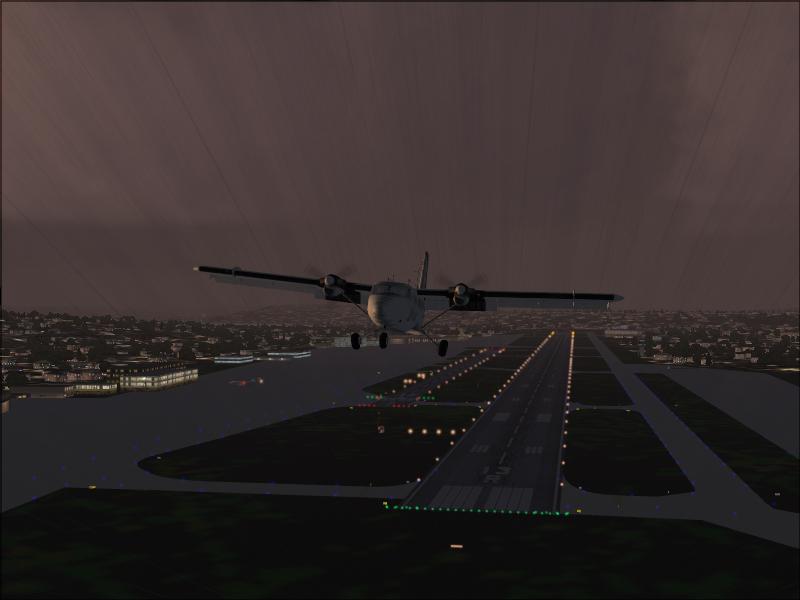

My first screenshot

Flight Simulation Screenshots displaying your Flight Simulation Experience. MSFS, FSX, Prepar3D, XPlane and other Flight Simulators. Focus is your Flight Simulator Experience. Please upload to Simviation (Button at top right)

My first screenshot

Postby Dan Morera » Wed May 23, 2007 10:48 am

:)
Image
User avatar
Dan Morera
1st Lieutenant
1st Lieutenant
 
Posts: 323
Joined: Mon May 07, 2007 7:17 pm
Location: Heredia, Costa Rica

Re: My first screenshot

Postby aussiewannabe » Wed May 23, 2007 10:55 am

That's an interesting sky! What airport are you flying out of?

I love any screenshot showing a lighted runway :)

Welcome aboard!
Last edited by aussiewannabe on Wed May 23, 2007 10:59 am, edited 1 time in total.
HP Media Center Photosmart m7260n | 3.0GHz Intel Pentium D 830 | 2 GB RAM | 320 GB HD | Sapphire X1950 GT 512MB | Silencer 610 Watt PSU

[center][img]
http://www.simviation.com/yabbuploads/aussie_sig1.jpg
User avatar
aussiewannabe
Major
Major
 
Posts: 2530
Joined: Thu May 17, 2007 11:33 am

Re: My first screenshot

Postby Dan Morera » Wed May 23, 2007 11:05 am

If I'm not wrong it was Seattle-Tacoma International Airport (SEA). And yes I forgot to turn on the plane light  :-[

Dan
User avatar
Dan Morera
1st Lieutenant
1st Lieutenant
 
Posts: 323
Joined: Mon May 07, 2007 7:17 pm
Location: Heredia, Costa Rica

Re: My first screenshot

Postby aussiewannabe » Wed May 23, 2007 11:50 am

Don't fret about the navigation lights :D

I have times where I'm climbing an ATR-42 to altitude and my airspeed indicator is dangerously low. Turns out I accidently hit the air brake (/ key).
Last edited by aussiewannabe on Wed May 23, 2007 11:50 am, edited 1 time in total.
HP Media Center Photosmart m7260n | 3.0GHz Intel Pentium D 830 | 2 GB RAM | 320 GB HD | Sapphire X1950 GT 512MB | Silencer 610 Watt PSU

[center][img]
http://www.simviation.com/yabbuploads/aussie_sig1.jpg
User avatar
aussiewannabe
Major
Major
 
Posts: 2530
Joined: Thu May 17, 2007 11:33 am

Re: My first screenshot

Postby born_2_fly » Wed May 23, 2007 12:32 pm

If I'm not wrong it was Seattle-Tacoma International Airport (SEA). And yes I forgot to turn on the plane light  :-[
Dan


That looks like Boeing Field  ;)
born_2_fly
 

Re: My first screenshot

Postby FSGT Gabe » Thu May 24, 2007 7:53 am

That's a nice shot for a first :o 8-).  I would just say maybe you could have zoomed in a bit more...and DON'T OVERCOMPRESS THAT MUCH!  You've got 100 kb...and you only used 29 kb...use them all ;).

- Kevin :D
Image
Studio V - Your destination for all your screenshot needs...
[move][color=#000066]Wi
User avatar
FSGT Gabe
Major
Major
 
Posts: 1576
Joined: Tue May 16, 2006 10:44 am
Location: Home airport: CYOO

Re: My first screenshot

Postby Dan Morera » Thu May 24, 2007 9:08 am

That's a nice shot for a first :o 8-).  I would just say maybe you could have zoomed in a bit more...and DON'T OVERCOMPRESS THAT MUCH!  You've got 100 kb...and you only used 29 kb...use them all ;).

- Kevin :D


I have no idea what you're talking about  :) :-[ I just clicked on the PrintScreen button, and pasted it into Paint and saved it as jpg. Is there another way to do it with better results?

Thanks for you comments guys

Dan
User avatar
Dan Morera
1st Lieutenant
1st Lieutenant
 
Posts: 323
Joined: Mon May 07, 2007 7:17 pm
Location: Heredia, Costa Rica

Re: My first screenshot

Postby Fitter » Thu May 24, 2007 4:55 pm

I think its a good shot as the first one...keep up the good work!
Fitter
Major
Major
 
Posts: 4204
Joined: Sat Nov 29, 2003 3:15 pm
Location: Earth

Re: My first screenshot

Postby glennlcasey » Thu May 24, 2007 6:30 pm
G'Day Mate and welcome to the V!

That was an excellent attempt for your first shot.

What i use to take screenshots, is a program called FSScreen. A simple freeware program that doesnt take much space. just google the name and you'll find out where to get it from. Before you start Flight Sim, you crank up Fsscreen. Now every time you hit the print screen button, it takes a snapshot of the screen and saves it on a clipboard, so you dont have to keep stopping the sim to save the pic. it does it for you.

Once you've finished taking your pictures. I use a program called IrfanView to resize them. Very easy program to use. You call up the picture you want then, go to resize/resample, where it gives you lots of options to choose from, including the magic 800x600 you need for the forums. After you've resized your shot, you click save as, and choose to save it as a JPEG file. There will also be a slider there as well so you can change how much compression is in the shot. Just move the slider around until you get it under the 100kb mark. Then press save. Easy as. Any problems mate, message me
Go Do that VooDOo that You Do So Well!

Image
glennlcasey
Captain
Captain
 
Posts: 887
Joined: Sat Jul 16, 2005 3:29 pm
Location: Perth Western Australia

Re: My first screenshot

Postby Dan Morera » Fri May 25, 2007 8:41 am

Thank you Glenn I'll try that

Dan
User avatar
Dan Morera
1st Lieutenant
1st Lieutenant
 
Posts: 323
Joined: Mon May 07, 2007 7:17 pm
Location: Heredia, Costa Rica

Re: My first screenshot

Postby FSGT Gabe » Fri May 25, 2007 8:53 am

G'Day Mate and welcome to the V!

That was an excellent attempt for your first shot.

What i use to take screenshots, is a program called FSScreen. A simple freeware program that doesnt take much space. just google the name and you'll find out where to get it from. Before you start Flight Sim, you crank up Fsscreen. Now every time you hit the print screen button, it takes a snapshot of the screen and saves it on a clipboard, so you dont have to keep stopping the sim to save the pic. it does it for you.

Once you've finished taking your pictures. I use a program called IrfanView to resize them. Very easy program to use. You call up the picture you want then, go to resize/resample, where it gives you lots of options to choose from, including the magic 800x600 you need for the forums. After you've resized your shot, you click save as, and choose to save it as a JPEG file. There will also be a slider there as well so you can change how much compression is in the shot. Just move the slider around until you get it under the 100kb mark. Then press save. Easy as. Any problems mate, message me


Yup, definately use Irfanview and some screenshot program to take and resize shots.  Works great...

- Kevin :D
Image
Studio V - Your destination for all your screenshot needs...
[move][color=#000066]Wi
User avatar
FSGT Gabe
Major
Major
 
Posts: 1576
Joined: Tue May 16, 2006 10:44 am
Location: Home airport: CYOO


Return to Simulation Screenshots Showcase

Who is online

Users browsing this forum: No registered users and 568 guests