All tweaked up!

Flight Simulation Screenshots displaying your Flight Simulation Experience. MSFS, FSX, Prepar3D, XPlane and other Flight Simulators. Focus is your Flight Simulator Experience. Please upload to Simviation (Button at top right)

All tweaked up!

Postby Wingo » Fri Mar 09, 2007 4:58 am

Been spending the night tweaking my cfg file, and I seem to have found a nice set of settings. I get a constant 17.4fps, locked at 18. Let me know what you all think.

System specs
WinXP
Geforce Go 7600
Centrino Core 2 Duo 1.83ghz
1 gig ram
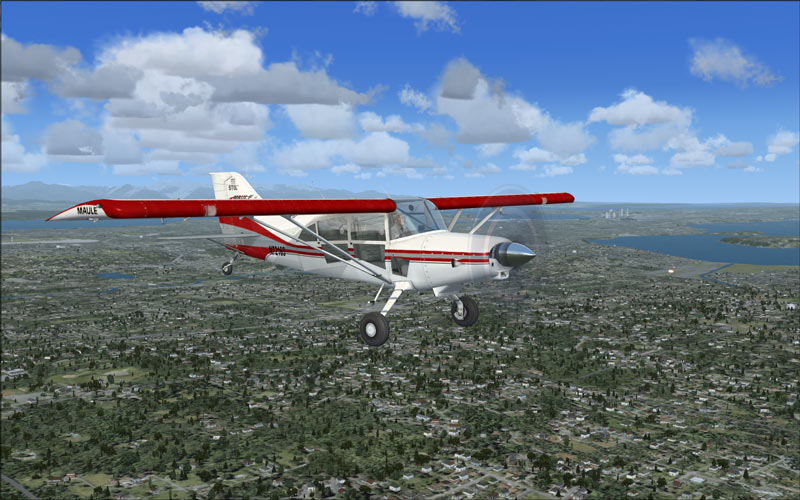

Image
Last edited by Wingo on Fri Mar 09, 2007 5:17 am, edited 1 time in total.
Image
User avatar
Wingo
Major
Major
 
Posts: 1174
Joined: Thu Jun 23, 2005 2:12 am
Location: YSBK. Back where I belong.

Re: All tweaked up!

Postby Boca » Fri Mar 09, 2007 5:09 am

Looking good is what I think.  What kind of PC are you working with here ( so I can assess my readiness for FSX ) ?
User avatar
Boca
Captain
Captain
 
Posts: 622
Joined: Mon Jul 10, 2006 8:33 am
Location: Scotland

Re: All tweaked up!

Postby Wingo » Fri Mar 09, 2007 5:17 am

WinXP
Geforce Go 7600
Centrino Core 2 Duo 1.83ghz
1 gig ram

Read through the topic "SLI in FSX" in the FSX forum. From about page 2 til about 10 there is a lot of info of what to tweak and what to look for when changing specific settings. The more interesting info is towards age 10, but you'll find it helpful to read the lot.
Last edited by Wingo on Fri Mar 09, 2007 5:19 am, edited 1 time in total.
Image
User avatar
Wingo
Major
Major
 
Posts: 1174
Joined: Thu Jun 23, 2005 2:12 am
Location: YSBK. Back where I belong.

Re: All tweaked up!

Postby Daube » Fri Mar 09, 2007 5:37 am

That's quite a nice result, your autogen is at maximum, right ?
I see that your self-shadowing is ON too, ans it seems to me that the water reflections are active.
You could get some additionnal performance if you would turn OFF those two options (put the water on high 1x), but you would loose some graphical features, right...

Just a question: did you just tweak your FSX.cfg, or did you install the autogen textures and descriptions too ? If not, I think this would let you get pass the 20 FPS at least :)
Last edited by Daube on Fri Mar 09, 2007 5:39 am, edited 1 time in total.
User avatar
Daube
Lieutenant Colonel
Lieutenant Colonel
 
Posts: 6611
Joined: Wed Oct 05, 2005 8:34 am
Location: Nice (FR)

Re: All tweaked up!

Postby Boca » Fri Mar 09, 2007 6:06 am

WinXP
Geforce Go 7600
Centrino Core 2 Duo 1.83ghz
1 gig ram

Read through the topic "SLI in FSX" in the FSX forum. From about page 2 til about 10 there is a lot of info of what to tweak and what to look for when changing specific settings. The more interesting info is towards age 10, but you'll find it helpful to read the lot.


Rather similiar to mine... AMD64 3500+ (939 skt), XFX 7600GT oc'd to 590Mhz, 2 GB pc3200 ram, XP pro.  :)  ( the first thing I'll be doing is upgrading that CPU...I bought it for
User avatar
Boca
Captain
Captain
 
Posts: 622
Joined: Mon Jul 10, 2006 8:33 am
Location: Scotland

Re: All tweaked up!

Postby FridayChild » Fri Mar 09, 2007 3:33 pm

It's hard to have an opinion without seeing it run.
Founder of A.A.A.A.A.A.A. (Aircraft Amateurs' Association Against Absurd Aviation Acronyms) My system specifications: FLIGHT SIMULATOR 2004 - AMD Athlon 64 3200+ CPU - 3 GB PC-3200 DDR400 dual channel RAM - 500 GB Seagate B
User avatar
FridayChild
Major
Major
 
Posts: 1570
Joined: Thu Dec 23, 2004 11:22 am
Location: Italia

Re: All tweaked up!

Postby Wingo » Sat Mar 10, 2007 1:17 am

Daube - It's a dense, one below maximum. I already have all the autogen fixes on, but i'm thinking about going to original textures just to see its effect. I'm not really after good frame rates, 18 is fine for me. I'm after smooth flight and nice eye candy, so I'm keeping the reflections and shadows. In a simulator you don't need high frame rates, its not like a FPS where something could happen in between frames.

Friday - I'm not sure where you are coming from with that. If you are thinking I paused it and let all textures load before the screen shot, I actually took it during flight. So that is what I see when flying. If you're thinking more of stutters and hiccups, I have already answered that. I get constant 17.4fps and smooth flight. So you don't need to see it flying, as long as everything is taken right.

Boca - Damn, that hurts. a nice PC though. The first thing I'm doing when I get my Vista upgrade is 3 or 4 gigs of ram to support the OS and FSX.
Image
User avatar
Wingo
Major
Major
 
Posts: 1174
Joined: Thu Jun 23, 2005 2:12 am
Location: YSBK. Back where I belong.


Return to Simulation Screenshots Showcase

Who is online

Users browsing this forum: No registered users and 295 guests
