Page 1 of 2
Serious Erosion Problem

Posted:
Tue Mar 25, 2008 5:42 pmby Bob70
Looks like the city of Laughin Nevada has got a serious river erosion problem.
Re: Serious Erosion Problem
Posted:
Tue Mar 25, 2008 6:37 pmby NickN
Its either UTX or the default mesh causing the issue
UTX may have the river elevation correct but the default mesh is incorrect. We see this all the time with FSGenesis 10m mesh and default scenery that is not placed correctly.
I can check it later and see if it shows with FSG mesh and UTX. If it doesnt, then the issue is a clash between UTX which is correct and the FSX default mesh which is wrong.
Re: Serious Erosion Problem
Posted:
Tue Mar 25, 2008 8:15 pmby Bob70
Its either UTX or the default mesh causing the issue
UTX may have the river elevation correct but the default mesh is incorrect. We see this all the time with FSGenesis 10m mesh and default scenery that is not placed correctly.
I can check it later and see if it shows with FSG mesh and UTX. If it doesnt, then the issue is a clash between UTX which is correct and the FSX default mesh which is wrong.
Hi Nick
The mesh that I am using is FS Global 2008. That might be part of the problem. I have it located in the library right above the FSX base files as to instructions. If I recall they say in the manual there are a few places in the world with elevation errors that they can't fix
Re: Serious Erosion Problem
Posted:
Wed Mar 26, 2008 11:21 pmby NickN
Its as I said.. FSX has the area data wrong.. UTX and FSGenesis 10m mesh places it where it should be and the buildings are not following because of the error in FSX
FSGenesis 10m mesh has the hotels on the ground down by the water and not in the air... also the river bank on my system is at river level and not in a gully on the hotel side.. the hotels sit down by the river... but the houses behind them are in the air on my system. Its a typical clash bug but it does start with FSX design
Re: Serious Erosion Problem
Posted:
Thu Mar 27, 2008 12:45 amby Bob70
[quote]
Its as I said.. FSX has the area data wrong.. UTX and FSGenesis 10m mesh places it where it should be and the buildings are not following because of the error in FSX
FSGenesis 10m mesh has the hotels on the ground down by the water and not in the air... also the river bank on my system is at river level and not in a gully on the hotel side.. the hotels sit down by the river...
Re: Serious Erosion Problem
Posted:
Thu Mar 27, 2008 8:31 amby NickN
Geez Bob
Sorry to hear about that...
Hmmmm yes, I have heard of this issue. The double whammy is rare but it does happen. it was mostly seen when FSX was first released.
I think you may be faced with a reinstall Bob, clean. But you need to download/install and run the Windows Installer Cleanup Tool and have it flush anything FSX related, and then run the command line reset tool
With the reset tool you can not COPY/PASTE the line, it must be typed and you must make sure you type it right or it will fail.
I will see if i can find a set of full instructions for all this
Re: Serious Erosion Problem
Posted:
Thu Mar 27, 2008 6:58 pmby Bob70
[quote]
Geez Bob
Sorry to hear about that...
Hmmmm
Re: Serious Erosion Problem
Posted:
Fri Mar 28, 2008 10:52 amby NickN
Bob, sorry it took so long to get back here..
You are typing the wrong COMMAND.. its:
resetsldl
Re: Serious Erosion Problem
Posted:
Fri Mar 28, 2008 2:51 pmby Bob70
Hi Nick
I did everything you said and still no luck. I made double sure it was typed correct.
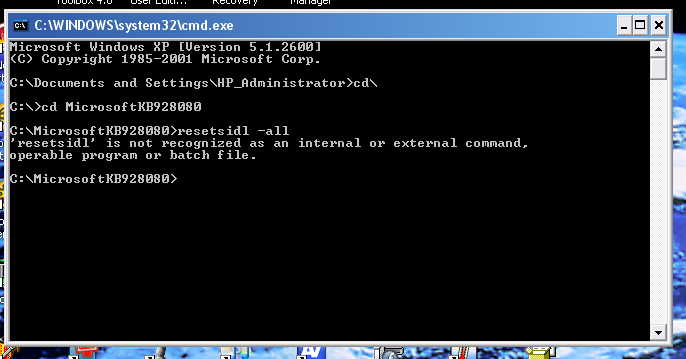
I'm beginning to think that the software thinks I'm trying to install it on a different computer. Since FSX was first installed I have upgraded the ram. cpu, graphic card and power supply. One thing that I haven't done is un-install the sdk software as that was a separate install by itself. Also I get a Error 1603 Windows Installer Package notice right when the install stops just before it rolls back. I udated the installer. Didn't help. I'm real hesitant to buy new software as that may not install. Are the FSX DVD disks themselves encrypted?
Re: Serious Erosion Problem
Posted:
Fri Mar 28, 2008 3:15 pmby NickN
Bob
Still misspelled!
you typed: resetsidl -all
Its not: i
Re: Serious Erosion Problem
Posted:
Fri Mar 28, 2008 4:19 pmby Bob70
[quote]Bob
Still misspelled!
you typed: resetsidl -all
Its not: i
Re: Serious Erosion Problem
Posted:
Fri Mar 28, 2008 10:42 pmby NickN
LOL!!
You an me both... I keep trying to not wear my glasses
soory about the reinstall.. it does happen although I have never been bit by it.
Sometimes a clean install is a good thing.. dont forget to defrag like crazy after it all goes back in.
Re: Serious Erosion Problem
Posted:
Sat Mar 29, 2008 7:32 amby haroldkip
You old men ....


I love you guys!

Re: Serious Erosion Problem
Posted:
Sat Mar 29, 2008 7:25 pmby Bob70
You old men ....
I love you guys!
You meant to say young old men.
Re: Serious Erosion Problem
Posted:
Sat Mar 29, 2008 10:28 pmby NickN
Dont forget Bob.. make sure GEXn installs its texture set AFTER everything else has been installed, like UTX and anything that may have textures associated with it.