Page 1 of 1

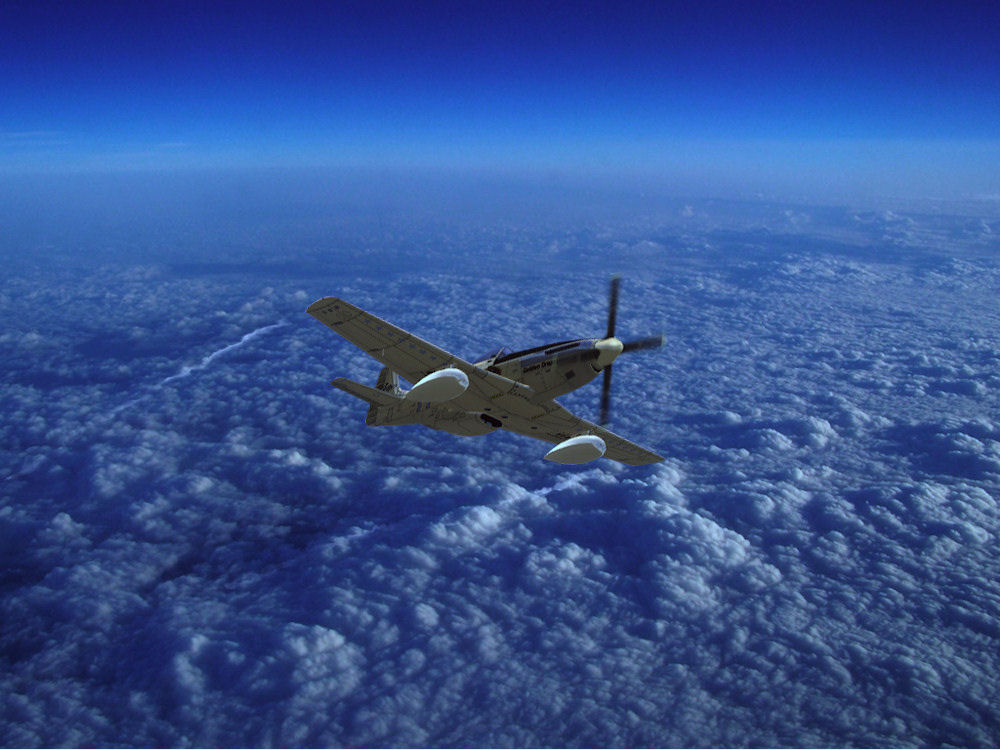
P-51 Mustang "Kinda High"...

PostPosted: Mon Jun 29, 2009 8:58 am
by lunitic_8
Clicky the picture for high quality

Re: P-15 Mustang "Kinda High"...

PostPosted: Mon Jun 29, 2009 9:04 am
by ShaneG_old
For the plane: Go to the 'Adjust' tab in the PSP menu bar and select :

'Automatic Color Adjustment' and move the slider more to the right (blue) side to better match the hue in the background photo. The plane is just a little too much on the red side and really pops out of the pic. ;)

Other than that, you have a very nice shot set up, and you did a fine job on the wing tip contrails. 8-)
Re: P-15 Mustang "Kinda High"...

PostPosted: Mon Jun 29, 2009 9:04 am
by jrom
Looks good!

Re: P-15 Mustang "Kinda High"...

PostPosted: Mon Jun 29, 2009 9:18 am
by lunitic_8
For the plane: Go to the 'Adjust' tab in the PSP menu bar and select :

'Automatic Color Adjustment' and move the slider more to the right (blue) side to better match the hue in the background photo. The plane is just a little too much on the red side and really pops out of the pic. ;)

Other than that, you have a very nice shot set up, and you did a fine job on the wing tip contrails. 8-)


How is this? (again sorry for the quality)
Image

Re: P-15 Mustang "Kinda High"...

PostPosted: Mon Jun 29, 2009 9:26 am
by ShaneG_old
Much better, looks like an original part of the pic now. ;)

Re: P-15 Mustang "Kinda High"...

PostPosted: Mon Jun 29, 2009 10:55 am
by skoker
One more thing your prop angle is a little off ;)

Re: P-15 Mustang "Kinda High"...

PostPosted: Mon Jun 29, 2009 10:57 am
by lunitic_8
One more thing your prop angle is a little off ;)


I tried my best this is my first official prop plane edit where i took the not moving prop and edited it to look like it is, if you have any tips on how to improve please share them!!

Re: P-15 Mustang "Kinda High"...

PostPosted: Mon Jun 29, 2009 3:57 pm
by ShaneG_old
Before you do the cutout, create a new layer, and trace the outline of the prop and mark the center point,

Re: P-15 Mustang "Kinda High"...

PostPosted: Mon Jun 29, 2009 6:01 pm
by lunitic_8
[quote]Before you do the cutout, create a new layer, and trace the outline of the prop and mark the center point,

Re: P-15 Mustang "Kinda High"...

PostPosted: Mon Jun 29, 2009 7:25 pm
by Brando14100
The shots look pretty good.

I believe it's a P-51, not P-15.

Re: P-15 Mustang "Kinda High"...

PostPosted: Tue Jun 30, 2009 8:17 am
by lunitic_8
[quote]The shots look pretty good.

I believe it's a P-51, not P-15.

Re: P-51 Mustang "Kinda High"...

PostPosted: Tue Jun 30, 2009 9:52 am
by jrom
Looks a lot better!