AA mess up on fsx problem? Help..
 Posted: Mon Dec 01, 2008 10:58 pm
Well I try to use AA (Anti-Alasing) on my shots now but ive noticed this is what happens..
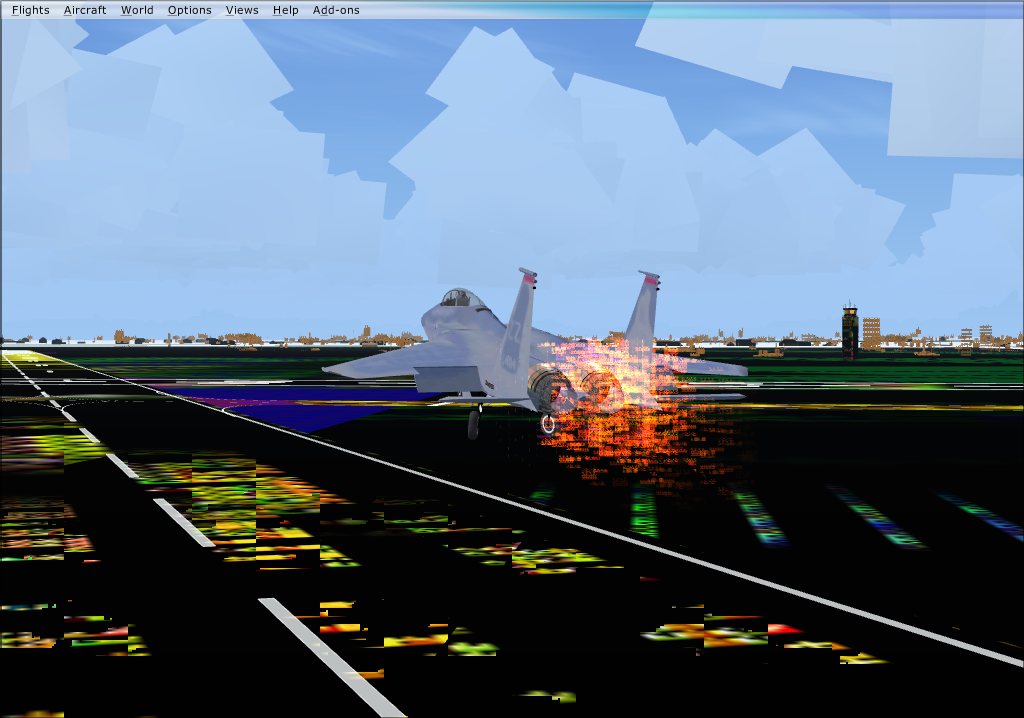
When I use AA I can only use the sun and clear sky to get the good shot because this is what the clouds and ground looks like. Although it works great on rounding the airplane ...
...
I think it has something to do with my computer not being able to handle it. Is there anyway I can fix this? :-? Beside upgrading my laptop. :-/
When I use AA I can only use the sun and clear sky to get the good shot because this is what the clouds and ground looks like. Although it works great on rounding the airplane
...I think it has something to do with my computer not being able to handle it. Is there anyway I can fix this? :-? Beside upgrading my laptop. :-/

