Page 1 of 1

flight map??

PostPosted: Wed Oct 08, 2003 12:38 pm
by wish_bear
Is there a way to display the flight map without pausing the simulation? can it be placed the way the GPS is- and show in real time where you are/ against the flight plane you set up?

Wish_bear

Re: flight map??

PostPosted: Thu Oct 09, 2003 5:17 am
by Heber98
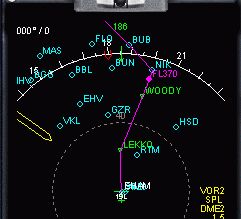
The first pic is the default GPS window that can be displayed on the panel anytime.

The second pic is the REALcrt gauge. Basically it overlays a database of the information you see in the default GPS window on top of the arc navigation display. These have to be purchased, but very cool and realistic.

Image

Image

Re: flight map??

PostPosted: Thu Oct 09, 2003 7:20 am
by Scottler
Wow, as anti-payware as I am, that's a beautiful gauge, and I may just have to make an exception.  Very realistic looking.

Re: flight map??

PostPosted: Thu Oct 09, 2003 7:28 am
by wish_bear
Thank you!!

wish_bear

Re: flight map??

PostPosted: Thu Oct 09, 2003 7:29 am
by wish_bear
forgot to ask...who sells that?

Re: flight map??

PostPosted: Thu Oct 09, 2003 11:29 am
by WebbPA
Go to the avsim file library (http://library.avsim.net/index.php) and search FS2002 for RealCRT.  There are several files that contain the gauge.

Re: flight map??

PostPosted: Thu Oct 09, 2003 2:42 pm
by Heber98
RealCRT Top Avionics gauges are developed by Tony D'AMBROSIO.
http://perso.wanadoo.fr/tony.dambrosio/index.htm

Go to www.flightsim.com file library and do a search for nd2k_13.zip. This is a required database/route program. Flight plans can be imported from FS. With the Real CRT gauges the flight plan is loaded though the FMC, not GPS. I'm not 100% how this works because I'm still learning, I think you load the plan into both the FMC and GPS, then you can get clearances and use the RealCRT gauges to fly the route.

Download a panel with the RealCRT gauges, then go to
http://www.reg.net/product.asp?ID=2524
to register. I think it's $17. Look at the nav data program registration window and write down the serial number, you need that to register. Fill out the registration then when you get your key code go back to the nav data register page and fill it out.

Re: flight map??

PostPosted: Fri Oct 10, 2003 5:46 am
by microlight
I used to have this type of moving map display with a Flight One package (747) that I had with FS98/2000, but the gauges don't work with FS2002 - all that happens is that the DX9 diagnostic screen comes up, and 2002 won't load.

It's a great gauge - does anybody know a way around this?
Thanks!
:)

Re: flight map??

PostPosted: Wed Oct 15, 2003 4:26 am
by microlight
The ERJ system (at www.project-erj.com) has a gauge similar to the above picture - it shows the VORs, intersections etc. in your flight plan on the multi function display, but not the other surrounding VORs.

:)