Page 1 of 2

P-47 VC has blacked out area in center and prop is 4 large black triangles

PostPosted: Fri Aug 12, 2011 10:09 pm
by BigT-65
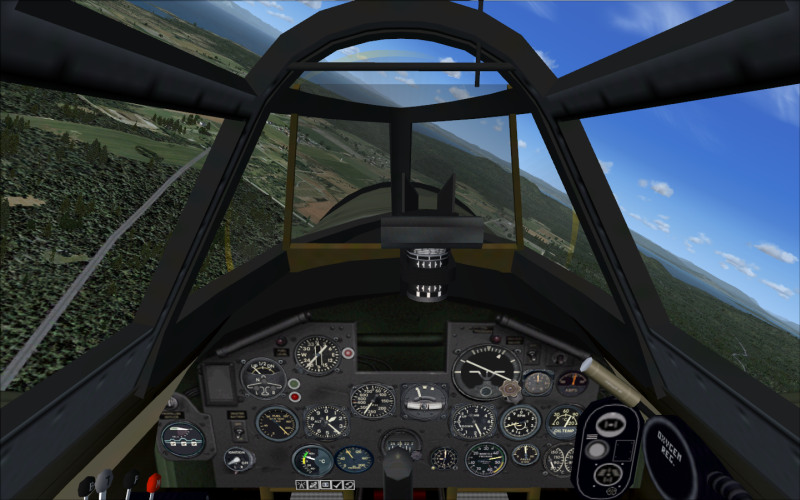
I downloaded a P-47 Thunderbolt for FSX. The plane looks and flys great but the VC has a large black square in the center of the screenblocking about half of the view and the prop is 4 slowly rotating large black triangles. I though at one time this plane was all good, but now it has these problems. Does anyone have any ideas? :(

Re: P-47 VC has blacked out area in center and prop is 4 large black triangles

PostPosted: Sat Aug 13, 2011 1:56 am
by Hagar
If you want help please be more specific. Give the file name or a link to the page the file is posted on so someone can check it out for you.

Re: P-47 VC has blacked out area in center and prop is 4 large black triangles

PostPosted: Sat Aug 13, 2011 4:53 pm
by BigT-65
Thanks for your response. I am away from my computer for a couple of days but I am pretty sure this link is to the plane in question. http://simviation.com/1/search?submit=1 ... &filename=

Re: P-47 VC has blacked out area in center and prop is 4 large black triangles

PostPosted: Sun Aug 14, 2011 3:44 am
by Hagar
That's the Alphasim ex-payware P-47D. It was originally intended for FS9 & has been updated for FSX by a third party. I've tried it & it works fine on my system apart from the usual "prop behind clouds" bug that is normal with FS9 aircraft in FSX. (See my shot #3 below)

Image

Image

Image

Image

Note that 5 variations of the P-47D are included in the package using 2 different models of the Razorback version. Some might display differently so try them all. They all appear to work fine for me including the very nice VC. (If I remember correctly the Bubbletop version of the original Alphasim package had some display problems when I tried it in FSX.)

I tried a new download and reinstall with same results each time. I have a good gaming machine and this is the only plane with this problem so I don't think it is my machine.

I don't think the problem is with the file itself so re-downloading it won't help. It might depend on which version of FSX you have. There are 3 basic versions - RTM (the original release version), FSX + SP1 & FSX + SP2/Acceleration. (I'm using FSX Gold which includes Acceleration as a separate install.) With so many possible variations it's difficult to give specific advice on FSX.

If you need them SP1 & SP2 can be downloaded here. http://www.microsoft.com/download/en/details.aspx?id=8986

PS. This is the VC of the Bubbletop model. I suspect this is the one you're having problems with & explains why it's not used in that FSX package.

Image

Re: P-47 VC has blacked out area in center and prop is 4 large black triangles

PostPosted: Sun Aug 14, 2011 9:08 am
by BigT-65
It does look good when it is working right. And it is a great flyer too. Mine use to look like yours. I don't know why it went bad. When I get home I will post some screen shots and check to see what service packs I have installed. I just recently changed my os from xp pro 64 bit to win 7 ultimate 64 bit and had to reinstall FSX. I have FSX deluxe Maybe I need to reinstall the service packs and acceleration. I will let you know more details when I get home Tuesday. Thanks for your help.

Re: P-47 VC has blacked out area in center and prop is 4 large black triangles

PostPosted: Sun Aug 14, 2011 5:07 pm
by BigT-65
On mine, Besides the prop being black triangles the other part that is black is the large HUD or sight that's in the center of the windshield. The rest of the VC looks OK.

Re: P-47 VC has blacked out area in center and prop is 4 large black triangles

PostPosted: Sun Aug 14, 2011 5:19 pm
by Hagar
Can you confirm that this is the correct file. http://simviation.com/1/search?submit=1&keywords=P-47D_Thunderbolt_FSX.zip&categoryId=&filename=Y

Also which version of FSX you have. If you have Acceleration installed you don't need SP1 or 2.

Re: P-47 VC has blacked out area in center and prop is 4 large black triangles

PostPosted: Mon Aug 15, 2011 8:54 am
by BigT-65
I have the Deluxe edition.

Re: P-47 VC has blacked out area in center and prop is 4 large black triangles

PostPosted: Mon Aug 15, 2011 1:07 pm
by Hagar
I have the Deluxe edition.

Sorry. Not what I meant by version. Do you have FSX SP1, SP2 (or Acceleration) installed?

I can't promise I can sort this out but to start with I need to know if we're both talking about the same file.

Re: P-47 VC has blacked out area in center and prop is 4 large black triangles

PostPosted: Mon Aug 15, 2011 9:36 pm
by BigT-65
I'm sorry, the P-47 file we are talking about is the correct one.
When I switched operating systems I had so much stuff to reload that I was not sure if I had reinstalled any of the service packs or acceleration so I went to install service pack 2 and got the choice of removing service pack 2 instead of installing it, so I am assuming it is already installed. How can I tell for sure if I have acceleration installed or the service packs?

Re: P-47 VC has blacked out area in center and prop is 4 large black triangles

PostPosted: Mon Aug 15, 2011 9:54 pm
by dave3cu
Start a flight. In the top menu click Help then About Microsoft Flight Simulator. Check the version number against this list.

RTM: 10.0.60905
SP1: 10.0.61355 (Russian: 10.0.61357)
SP2: 10.0.61472
XPack: 10.0.61637

Re: P-47 VC has blacked out area in center and prop is 4 large black triangles

PostPosted: Mon Aug 15, 2011 10:02 pm
by BigT-65
Thanks for your quick reply. I just checked and mine says Version 10

Re: P-47 VC has blacked out area in center and prop is 4 large black triangles

PostPosted: Mon Aug 15, 2011 10:31 pm
by dave3cu
XPack refers to the retail FSX Acceleration Expansion Pack.

Re: P-47 VC has blacked out area in center and prop is 4 large black triangles

PostPosted: Mon Aug 15, 2011 11:03 pm
by BigT-65
I didn't intend to change the subject. I have a screen shot of the blacked out problem but I don't know how to get it on here so you can see it.

Re: P-47 VC has blacked out area in center and prop is 4 large black triangles

PostPosted: Tue Aug 16, 2011 2:18 am
by Hagar
[quote]I just checked and mine says Version 10