Page 1 of 2

Unable to download...

PostPosted: Tue Jun 14, 2011 11:56 am
by Flying Trucker
Good afternoon all... :)

Griffith Island ON CNG4...is the location I want to work...

Well I have tried to install this airport for several hours:
It shows in FS Addons...
It shows in FSX Scenery Library...
But it does not show when I want to fly out of there in FSX
in the Ontario Canada Locations...
Do not have a problem with the other locations (5) I think and they are very nice scenery packages...
Used the Auto Installer and then tried to install it from a Temp Folder.

Here is the Link to it and it is in the FSX Section, this is a wonderful site if you like old airfields also.

The British Commonealth Air Training Fields are all here under the BCATP or British Commonwealth Air Training Program... ;D


http://flightontario.com/index.html

Any help would be much appreciated... ;)

Re: Unable to download...

PostPosted: Tue Jun 14, 2011 1:08 pm
by dave3cu
In the Scenery Library check the path for the CNG4 entry. Regardless of where you install the files, the installer adds the scenery to the library with the path ...\< your FSX>\Addon Scenery\Griffith Island ON CNG4\

Try deleting the entry and adding manually.

Re: Unable to download...

PostPosted: Tue Jun 14, 2011 1:57 pm
by Flying Trucker
Hi Dave... :)

The Scenery Path shows up in the FSX Library okay but the airport does not show up in the screen with all the airports listed by State, Province or Country.

When I typed in Billy Bishop Reg'l Airport, Ontario Canada and just north of that is the island with the airport and all the information.
That works in the Map Screen but unable to get it to work in the Flight setup screen...aircraft...location...weather...etc it just does not show.

Re: Unable to download...

PostPosted: Tue Jun 14, 2011 2:01 pm
by dave3cu
It shows in my 'Select Airport' as Airport ID=CNG4

Re: Unable to download...

PostPosted: Tue Jun 14, 2011 2:05 pm
by Flying Trucker
I can't get a CNG4 to show even though it is on the Map Screen and the Scenery Library... :)

Will try one more manual download as this has been ongoing since early this morning... ::)     :-X

Re: Unable to download...

PostPosted: Tue Jun 14, 2011 2:08 pm
by dave3cu
Does the physical scenery show up when you fly there?

Also make sure all filters are clear in the Select Airport screen and search for ID. If you're filtering, it lists the Province as ON rather than the usual Ontario.

Re: Unable to download...

PostPosted: Tue Jun 14, 2011 2:27 pm
by Flying Trucker
Well I just did a manual install and it still does not show "CNG4" for an airport ID.

I shall try a flight and see what happens...will let you know... :)

Thanks for all your help Dave...will keep plugging away... ;D

Re: Unable to download...

PostPosted: Tue Jun 14, 2011 2:32 pm
by Hagar
Doug. With this type of auto-installer it's best not to try a manual install. Make sure it's pointed at your FSX root directory & let it do its thing.

CNG4 works fine for me.

Re: Unable to download...

PostPosted: Tue Jun 14, 2011 2:34 pm
by Flying Trucker
Thanks Doug will delete what is there and let the installer do it again... :)

Re: Unable to download...

PostPosted: Tue Jun 14, 2011 3:22 pm
by Flying Trucker
Now unless the installer is not working I have no idea what is wrong...

It will download to a New Folder but that is as far as I get...

I need the exact path to send it too...

It is not going into the FSX Addon Folder but is showing up in the FSX Library...Position One (1)

I have never had so much aggrevation with one of their sceneries until now... :-X

Re: Unable to download...

PostPosted: Tue Jun 14, 2011 5:34 pm
by Hagar
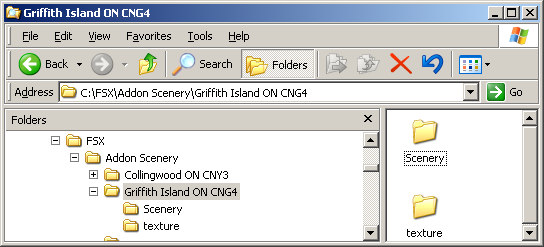
The install path is as in dave3cu's first reply. If you run the auto-installer & direct the extract path to your FSX root directory folder* (wherever that might be) it will go there automatically. The scenery will also be activated during the install process.

*My own FSX is installed to C:\FSX. The installer found this location without me redirecting it.

Image

PS. I seem to recall you had similar problems with the Collingwood scenery in my shot. This is by the same developers.

Re: Unable to download...

PostPosted: Wed Jun 15, 2011 7:07 am
by Flying Trucker
Good morning all... :)

Well I gave this electronic gizmo one more chance before I carried it over to the dock and threw it in the bay... :-X

These are the steps I took:
-downloaded file and directed it to a New Folder on my
desktop
-used Auto Installer

I got:
-Griffith Island ON CNG4 installed in:
-FSX Addons....Scenery

Re: Unable to download...

PostPosted: Wed Jun 15, 2011 7:40 am
by dave3cu
Doug, did you make sure that in the Select Airport screen you do not have any filters set?

In particular, if you have selected Canada and Ontario it won't show as the State/Province for the CNG4 scenery is ON, not the usual Ontario.

Re: Unable to download...

PostPosted: Wed Jun 15, 2011 8:46 am
by Flying Trucker
Gosh darn I just learned something NEW and it is not even ten o'clock yet... ;D

Thanks Dave...I clicked Clear Filters and there is a location for:
-Ontario
-ON...which only has this airport

HMMM...wonder why I did not have a problem with the others from the Home of Flight Ontario when I am sure they only say "ON" instead of "Ontario".

Me thinks something needs to be standardized in this Flight Simulator Game...thingy... ;D      ;)

Again thanks Dave and have a great day... ;)

Re: Unable to download...

PostPosted: Wed Jun 15, 2011 9:15 am
by dave3cu
Glad you got it working..