Page 1 of 1

EADS Socata TBM700 VC glass opaque

PostPosted: Sun Aug 30, 2009 9:51 pm
by chrisgin1
Hi everyone,

i am new to the forum and joined out of desperation to solve an issue.  I can't see out of the glass in the TBM700 VC. I know this issue has been answered in the past so my apologies for asking again, but i just can't find a solution that has helped me.  i am aware some of you have fixed this - can you walk me throguh what you did?

thanks so much

chrisgin1

Re: EADS Socata TBM700 VC glass opaque

PostPosted: Mon Aug 31, 2009 1:14 am
by Layne.
Hmm, it seems like a compatibility issue most commonly found when using FS9 aircraft in FSX Sp2 so it's most likely been done before.

Re: EADS Socata TBM700 VC glass opaque

PostPosted: Mon Aug 31, 2009 2:23 am
by pete
HUI and welcome to this forum.

Can you please tell us exactly which TBM 700 you are having trouble with?

Depending on the problem this might help but if not just let us know.

http://205.252.250.26/cgi-bin/yabb2/YaB ... 1193292780

Thanks

Re: EADS Socata TBM700 VC glass opaque

PostPosted: Mon Aug 31, 2009 2:47 am
by chrisgin1
Hi Pete and Lane,

thanks for taking the time to reply.  I downloaded the TBM 700 from simviation.  In the FSX readme file it identifies the file as Socata TBM700 A for FS2004 & tested OK in FSX, by Michel Migaud, Cyril Breton.

I have heard of others having this problem and even found a "solution?" which was as follows:

OK, here is the list, the modification are quite simple. You must edit the textures:
- glassdetail.bmp
- glassdetail2.bmp
- diver6.bmp

Each time, you will need to
- create an alpha channel(black)
- export alpha to editor
- fill the alpha with a dark grey
- save in the editor
- refresh alpha in DXTBMP
- save the picture as extended bitmap, DTX3


Sorry, but none of that makes sense to me.... are either of you / anyone else able to spell this out a little more.

thanks so much for all your help - i REALLY appreciate it.

cheers

chrisgin1 :)

Re: EADS Socata TBM700 VC glass opaque

PostPosted: Mon Aug 31, 2009 2:54 am
by Hagar
Hi chrisgin1. As Layne pointed out this is a common problem with FS2004 aircraft in FSX. Sometimes it can be fixed & sometimes it can't.

OK, here is the list, the modification are quite simple. You must edit the textures:
- glassdetail.bmp
- glassdetail2.bmp
- diver6.bmp

Each time, you will need to
- create an alpha channel(black)
- export alpha to editor
- fill the alpha with a dark grey
- save in the editor
- refresh alpha in DXTBMP
- save the picture as extended bitmap, DTX3

Sorry, but none of that makes sense to me.... are either of you / anyone else able to spell this out a little more.

This is straightforward enough once you get the hang of it. You will need a utility named DXTBmp to edit the textures. Get the latest version here. ---> http://www.btinternet.com/~mnwright/programs/dxtbmp.htm

Re: EADS Socata TBM700 VC glass opaque

PostPosted: Mon Aug 31, 2009 3:28 am
by chrisgin1
Hey thanks Hagar,

i will give it a go and let you know if i get stuck.

thanks to everyone for your help!

cheers

chrisgin1

Re: EADS Socata TBM700 VC glass opaque

PostPosted: Mon Aug 31, 2009 3:32 am
by pete
Hi Chris,

It often depends who has prepared the aircraft.

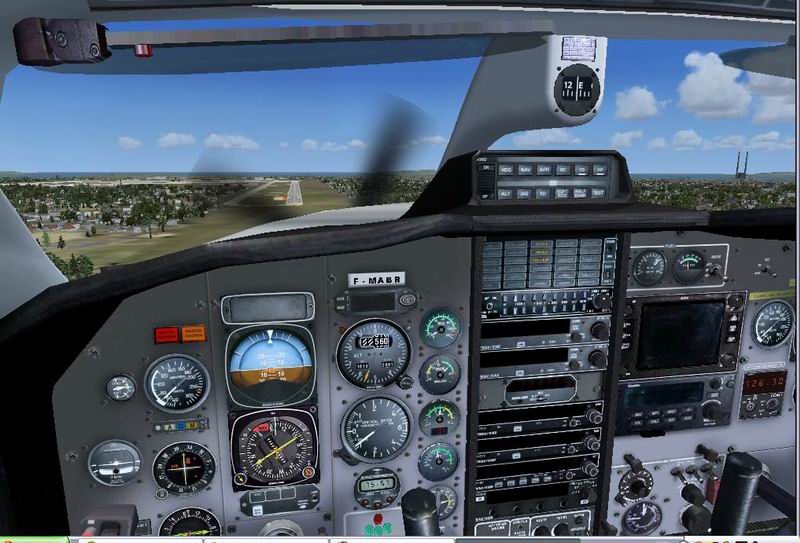
I downloaded the one on this page and it works fine for me

Image

Re: EADS Socata TBM700 VC glass opaque

PostPosted: Mon Aug 31, 2009 4:06 am
by Daube
[quote]Hi Pete and Lane,

thanks for taking the time to reply.

Re: EADS Socata TBM700 VC glass opaque

PostPosted: Mon Aug 31, 2009 4:15 am
by chrisgin1
Hi everyone,

Just to let you know the edit worked perfectly!!!

Thanks to you all for your help.  It turned out to be a very easy fix.  The steps were as follows:

1.  Download DXTBmp from the following link: http://www.btinternet.com/~mnwright/programs/dxtbmp.htm - THANKS HAGAR!!!!

2.  Now follow these instructions:

The textures you will need to edit are
- glassdetail.bmp
- glassdetail2.bmp
- diver6.bmp

They are located in the aircrafts texture folder.  Start with folder Texture1

Remember to back up the original files before you start editing, e.g. slip the word old in front of the filenames so as to retain an original copy.

Each time you edit the textures, you will need to:
- create an alpha channel(black) --> select Alpha from top menu and then click on Create Alpha Channel (Black)

- export alpha to editor --> click on Alpha from menu and then Send alpha to editor

- fill the alpha with a dark grey --> Click on the little paint can tipping (fill tool) and select the darkest grey there is (next to black) then click on the image to fill it.

- save in the editor --> Click on File, then Save, then exit out of the paint editor

- refresh alpha in DXTBMP --> you should now be back in DXTBmp.  Click once again on Alpha, then select Refresh Alpha

- save the picture as extended bitmap, DTX3 --> click on File, Save As then select Extended Bitmap

Remember to follow these steps for each of the files:
- glassdetail.bmp
- glassdetail2.bmp
- diver6.bmp

Once that is all complete, you can just drag and drop the newly edited files into your other texture folder - texture2, to correct the same VC opaque window problem.

Great effort team - we got there, no more mandatory IFR flight - we can see!!!!!

Happy flying.

Chrisgin

Re: EADS Socata TBM700 VC glass opaque

PostPosted: Mon Aug 31, 2009 4:21 am
by chrisgin1
Thanks Daube.  Sorry, I also meant to say a big thanks to you for the original instructions i quoted - i think they were yours.  They were a great help in guiding me through the process once i had DXTBmp installed.  Thanks also for the link!!! :)

cheers

chrisgin

Re: EADS Socata TBM700 VC glass opaque

PostPosted: Mon Aug 31, 2009 7:08 am
by Daube
You're welcome :)
I think a lot of people will find your extended instructions very usefull too.
If you check the textures that I included in my archive, you'll find that I kept a little bit of interior reflections on the glass. This looks much more realistic than a totally transparent glass, it adds a little bit of details.

Re: EADS Socata TBM700 VC glass opaque

PostPosted: Wed Jun 15, 2011 5:14 am
by pedritopiloto
Two years later, thought, I just register to thank you all for this solution. This is a good comunity. Let's take a look.