Page 1 of 3

Another way to improve fps in FS-X

PostPosted: Tue Oct 10, 2006 9:44 pm
by Felix/FFDS
from PC-12's blog:

Autogen tweak that might help
Many of you have been frustrated that you can't control the density of autogen trees verses buildings because we only have one slider to cover both of them. Some have also been frustrated that our lowest autogen setting is more dense than FS2004 at max density.

If you add these two lines to the [TERRAIN] section of your FSX.CFG, you can define the max number of objects in a terrain cell for trees and buildings independently. The slider will scale down from the numbers you set as the slider is moved to the left. The max tree value in FSX as released is coded to default to 4500 and the building default is 3000 (as shown below) and the absolute max FSX will recognize at all is 6000. Of course if you raise the values beyond the defaults, you will obviously be increasing density and lowering fps (so don't complain if you do this...). The point in sharing this information is that with these settings you can specify what the values are yourself. Set buildings or trees at 0 and you won't get any of those objects no matter where the slider is set.

TERRAIN_MAX_AUTOGEN_TREES_PER_CELL=4500

TERRAIN_MAX_AUTOGEN_BUILDINGS_PER_CELL=3000


I set mine at 1500, and 1000, respectively, and in the FSX.cfg files I set SHADERS-CACHE=0 and this now gets me double digit fps.

(using ATI Radeon 9000 Pro, 64Meg video memory, on an Intel P4 2.26GHz, 1024M RAM system)

Re: Another way to improve fps in FS-X

PostPosted: Tue Oct 10, 2006 9:53 pm
by Katahu
I'm surprised to see how flexible and more useful the FSX.cfg file has become. 8)

Re: Another way to improve fps in FS-X

PostPosted: Tue Oct 10, 2006 10:26 pm
by Daube
We were already surprised by the possibilities of FS9.cfg, I was expecting some more surprises from FSX.cfg as well  8)

Very nice tweak by the way, thanks to the developper :)

Re: Another way to improve fps in FS-X

PostPosted: Wed Oct 11, 2006 1:56 am
by Wing Nut
from PC-12's blog:


I set mine at 1500, and 1000, respectively, and in the FSX.cfg files I set SHADERS-CACHE=0 and this now gets me double digit fps.

(using ATI Radeon 9000 Pro, 64Meg video memory, on an Intel P4 2.26GHz, 1024M RAM system)


Were you talking about:

SHADER_CACHE_PRIMED=0

by any chance, Felix?

Re: Another way to improve fps in FS-X

PostPosted: Wed Oct 11, 2006 2:13 am
by Wing Nut
Works very well, thank you!  ;D

Re: Another way to improve fps in FS-X

PostPosted: Wed Oct 11, 2006 5:43 am
by Felix/FFDS

Were you talking about:

SHADER_CACHE_PRIMED=0

by any chance, Felix?


someething like that -  I wasn't reading it off the cfg file when I typed.

:)

Re: Another way to improve fps in FS-X

PostPosted: Wed Oct 11, 2006 6:11 am
by KDSM
umm cant seem to find my fsx.cfg wheres it located?

Re: Another way to improve fps in FS-X

PostPosted: Wed Oct 11, 2006 7:04 am
by rpjkw11
FSX config should be located in Documents and Settings; same place as the FS9 config.

Bob

Re: Another way to improve fps in FS-X

PostPosted: Wed Oct 11, 2006 1:29 pm
by SkyNoz
umm cant seem to find my fsx.cfg wheres it located?


C:\Documents and Settings\(??? your name)\Application Data\Microsoft\FSX ;D

Re: Another way to improve fps in FS-X

PostPosted: Wed Oct 11, 2006 5:25 pm
by Felix/FFDS
Another tweak that works for me (in addition to the above) .....  Increases my fps, in "medium low" but I get acceptable (to me) fps when I increase the settings to "medium high".

TEXTURE_BANDWIDTH_MULT=400

Re: Another way to improve fps in FS-X

PostPosted: Mon Oct 16, 2006 5:28 am
by Arnimon
Can somebody please tell me where i can find the "Terrain" section in the CFG file? I

Re: Another way to improve fps in FS-X

PostPosted: Mon Oct 16, 2006 5:51 am
by commoner
[quote]Can somebody please tell me where i can find the "Terrain" section in the CFG file? I

Re: Another way to improve fps in FS-X

PostPosted: Mon Oct 16, 2006 7:10 am
by sparetire
I have the standard edition and I can't seem to find the terrain section eather.

Re: Another way to improve fps in FS-X

PostPosted: Mon Oct 16, 2006 8:46 am
by Wing Nut
Open the file in Notepad, the go to Edit/Find and type in 'Terrain.'   :P

Re: Another way to improve fps in FS-X

PostPosted: Mon Oct 16, 2006 9:37 am
by commoner
Open the file in Notepad, the go to Edit/Find and type in 'Terrain.'   :P


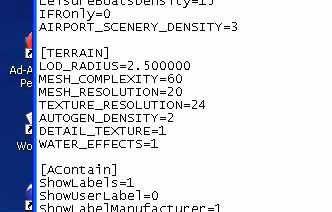
..mm...well the Demo at least just has this in the Terrain section.........

Image

..........no lines like this to be seen..........

TERRAIN_MAX_AUTOGEN_TREES_PER_CELL=4500

TERRAIN_MAX_AUTOGEN_BUILDINGS_PER_CELL=3000

...must be different from the "real thing"............commoner :D