Page 1 of 1

Texture install glich.

PostPosted: Wed Jan 19, 2011 5:19 pm
by tauruck
I have Tim Conrad's P6 Porter and 7 other variants (textures) installed and all work fine. Yesterday I downloaded 3 more depicting RNAF and they just won't show. I went through the same routine as always but no joy on these. A new texture for the default 747-400 is also not showing. Any advice would really be helpful. Thanks in advance.

Re: Texture install glich.

PostPosted: Wed Jan 19, 2011 5:35 pm
by Hagar
It's difficult to hazard a guess without specific information. File names. etc. My first suggestion is to check your new Aircraft.cfg entries carefully. Make sure you renumbered the [fltsim.x] headers correctly. Even a small typo can cause the new variations not to be listed on the menu.

Re: Texture install glich.

PostPosted: Wed Jan 19, 2011 5:58 pm
by tauruck
It's difficult to hazard a guess without specific information. File names. etc. My first suggestion is to check your new Aircraft.cfg entries carefully. Make sure you renumbered the [fltsim.x] headers correctly. Even a small typo can cause the new variations not to be listed on the menu.

I checked but I'll take your advice and go through them again. Thanks.

Re: Texture install glich.

PostPosted: Fri Jan 21, 2011 10:48 pm
by tauruck
It's difficult to hazard a guess without specific information. File names. etc. My first suggestion is to check your new Aircraft.cfg entries carefully. Make sure you renumbered the [fltsim.x] headers correctly. Even a small typo can cause the new variations not to be listed on the menu.

I checked but I'll take your advice and go through them again. Thanks.

PC6_KLU is the file name on all three and the author is Rene Spaan. One is Tigerrmeet, Camo and one other. I've given up. :D

Re: Texture install glich.

PostPosted: Sat Jan 22, 2011 4:09 am
by Hagar
It's difficult to hazard a guess without specific information. File names. etc. My first suggestion is to check your new Aircraft.cfg entries carefully. Make sure you renumbered the [fltsim.x] headers correctly. Even a small typo can cause the new variations not to be listed on the menu.

I checked but I'll take your advice and go through them again. Thanks.

PC6_KLU is the file name on all three and the author is Rene Spaan. One is Tigerrmeet, Camo and one other. I've given up. :D

A search for > pc-6c Rene Spaan < brings up these files. http://simviation.com/1/search?submit=1&keywords=pc-6c+Rene+Spaan&x=16&y=9

I've installed the Pilatus PC-6C H2 Package + the IFOR, Tigermeet & Camo textures. All work fine as you can see.
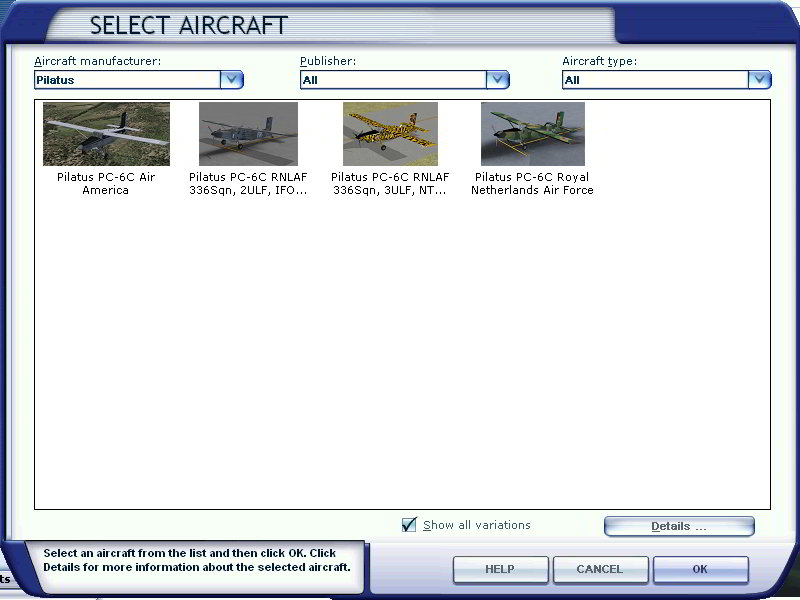
Image

Make sure you carefully check the [fltsim.x] numbers of previous variations you installed as a mistake in one of them will prevent following entries showing up. If all else fails copy the complete [fltsim] section from your Aircraft.cfg & paste it here. I might be able to spot any errors.

Re: Texture install glich.

PostPosted: Tue Jan 25, 2011 11:39 am
by tauruck
Thanks Hagar, I replaced the missing "bracket" on version 10 and they all show now.