Page 1 of 1

I need help, pretty please....=(

PostPosted: Tue Dec 28, 2010 2:23 am
by MrMichel
First of all I am new to the FS series. I am now an addict to FSX.I have tried to download freeware planes, and plan on using payware soon, but i am having a hell of a time getting my freeware to work. Any help will be greatly appreciated.

Re: I need help, pretty please....=(

PostPosted: Tue Dec 28, 2010 3:14 am
by skybolt66
:-/What is Your exactly problem? Download addons in a new created folder--
--name it "hengar," "depot" or so---unzip it there and copy plane-folder to FSX-SimObjects-Aircraft(heli's to Rotorcraft) Others----gauges, effects aso...only contents to samenamed FSX-folders.
For scenery-install. read "Readme"'s.
Good luck!

Re: I need help, pretty please....=(

PostPosted: Tue Dec 28, 2010 3:54 am
by Hagar
Try this tute first. http://www.simviation.com/fsxaircraftinstall.htm

If you still have problems ask again. An example of an aircraft you're having problems with would help us to help you.

Re: I need help, pretty please....=(

PostPosted: Tue Dec 28, 2010 2:42 pm
by MrMichel
I have tried numerous aircraft. After i posted last night I realized i didnt have sp1 or sp2 installed does that matter?. I do not have acceleration (does that matter)? I want a fast jet to travel overseas quick, any ideas?
Also I wanted to install the Star Wars X wing , and Millenium Falcon. I dont know if my computer is up to par for some of these things. I did manage to get two aircraft to work, but they installed themselves. Thanks for the replies

Re: I need help, pretty please....=(

PostPosted: Tue Dec 28, 2010 3:41 pm
by Hagar
I downloaded the FSX Millennium Falcon from here to check it out. http://simviation.com/1/search?submit=1&keywords=Millenium+Falcon&categoryId=

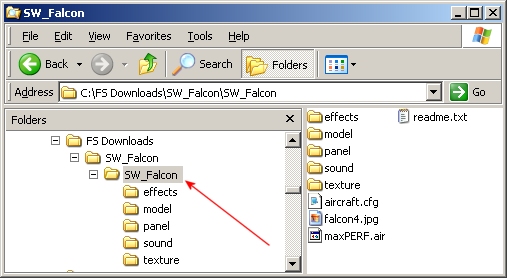
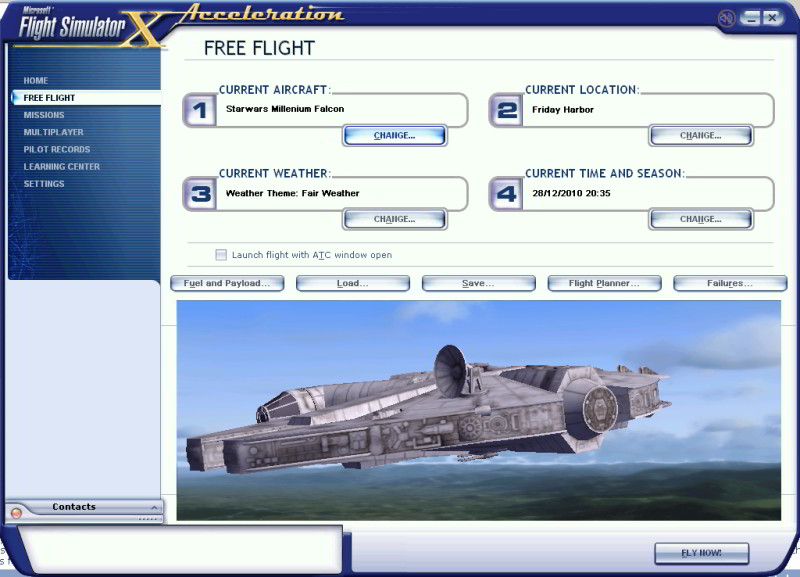
If you followed the tute from my link you should have a folder named SW_Falcon in your FSX\SimObjects\Airplanes folder. Please open it to check the contents. I think the most likely reason it's not displaying is that the "aircraft container" folder is hidden inside another one. The folder I've marked with a red arrow is the one you're looking for.
Image

Image

After i posted last night I realized i didnt have sp1 or sp2 installed does that matter?. I do not have acceleration (does that matter)?

Installing SP1 or 2 will not affect whether an aircraft displays on the FSX aircraft selection menu. However, there might be other problems depending on the aircraft. I suggest we fix one thing at a time.

Re: I need help, pretty please....=(

PostPosted: Tue Dec 28, 2010 4:22 pm
by MrMichel
Woohoo I got it to work. Is there any guages for the Millenium Falcon? I am still wondering if i need to do something different

Re: I need help, pretty please....=(

PostPosted: Tue Dec 28, 2010 4:47 pm
by Groundbound1
Hiya MrMichel. I'm glad to hear you're getting it. Never despair. Even if we are slow to answer, there are a WHOLE lot of people here at SimV that will me more than happy to assist you.

Ok. If you open the "SW_Falcon" folder you'll see several more folders. Open the one called "panel". Inside you'll see a file called panel.cfg, a few bitmap images, and a few ".cab" files. The panel.cfg file can be opened and edited with any text editor. (Windows Notepad for example.) You don't need to worry about that right now though.

The bitmaps are textures that are used in the cockpit of the model.

The .cab files in this case are the gauges. Most of the time, gauges will work whether they are in the aircraft's panel folder, of the sim's main gauges folder. The exception to this rule are .xml gauges, which usually have to be in thier own folder INSIDE the sim's gauges folder.

Also in the "SW_Falcon" folder, you should see another folder called "effects". Make sure you put the files that are inside the download's effects folder into the sim's effects folder (just the files, not the whole folder) otherwise they won't work.

Clear as mud right?! ;D

Anyway, if you have any more questions, feel free to ask. That's what these forums are for. (Remember, there is no such thing as a dumb question! We all started out just like you! ;) )

Re: I need help, pretty please....=(

PostPosted: Tue Dec 28, 2010 4:51 pm
by Boikat
Woohoo I got it to work. Is there any guages for the Millenium Falcon? I am still wondering if i need to do something different


It's got a generic "fighter jet" 2D panel, and a non functional VC.  That's all it came with, and I don't know of any add-ons for any custom Millenium Falcon 2D panel.  About the only thing to do to make it more to the original MF is to replace the sound folder with one from a P-51 Mustang (That is the sound they used in the movies.  Weird, but true.)

You can also add this to your "smokesystem" in the aircraft.cfg:

smoke.5= 2000, 0.0,  0.00, fx_firework10

It looks like you're going into hyperspace, but you dont't really go any faster, and is a freame-reate killer if you have an average system, but it looks pretty.  Just hit "I" :)

Oh, and *alsways* make a back-up of your aircraft.cfg before you edit!

Re: I need help, pretty please....=(

PostPosted: Wed Dec 29, 2010 1:47 am
by MrMichel
So i downloaded the Iris f-35 and now I am having hte same problems as before... i also downloaded a f 15.. neither of them appear in my game as usable aircraft??? thanks in advance for the help

Re: I need help, pretty please....=(

PostPosted: Wed Dec 29, 2010 5:07 am
by Hagar
So i downloaded the Iris f-35 and now I am having hte same problems as before... i also downloaded a f 15.. neither of them appear in my game as usable aircraft??? thanks in advance for the help

It would help if you can be more specific. The file description with a link to the page the files are posted on or even a file name will save us all a lot of frustration.

I assume the F-35 is this one. http://simviation.com/1/search?submit=1&keywords=iris+f-35+Joint+Strike+Fighter&x=20&y=9

Note that it was originally created for FS9 (FS2004) which means there could be display problems in FSX. This one appears to work very well on my own system - FSX Gold + Acceleration.

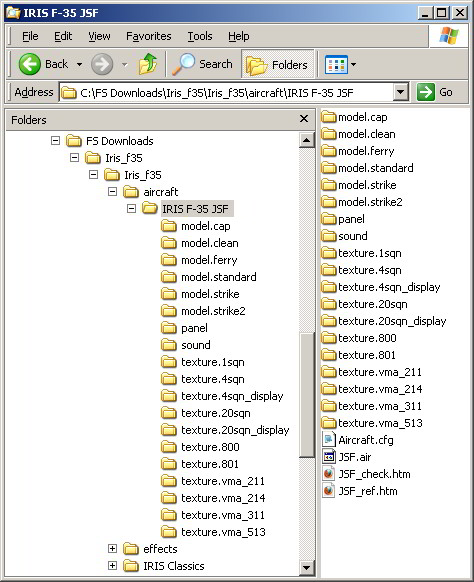
This is how the extracted file looks in Windows Explorer.
Image

Installation should be perfectly straightforward. Paste the contents of the aircraft folder (the folder named IRIS F-35 JSF) into your FSX\SimObjects\Airplanes directory. (This is the equivalent of the FS9\Aircraft directory.)

Paste the contents of the effects folder into FSX\Effects. Get the idea? (The manual is in the folder named IRIS Classics.) Note: The afterburner effect will need a little tweaking to display properly in FSX.

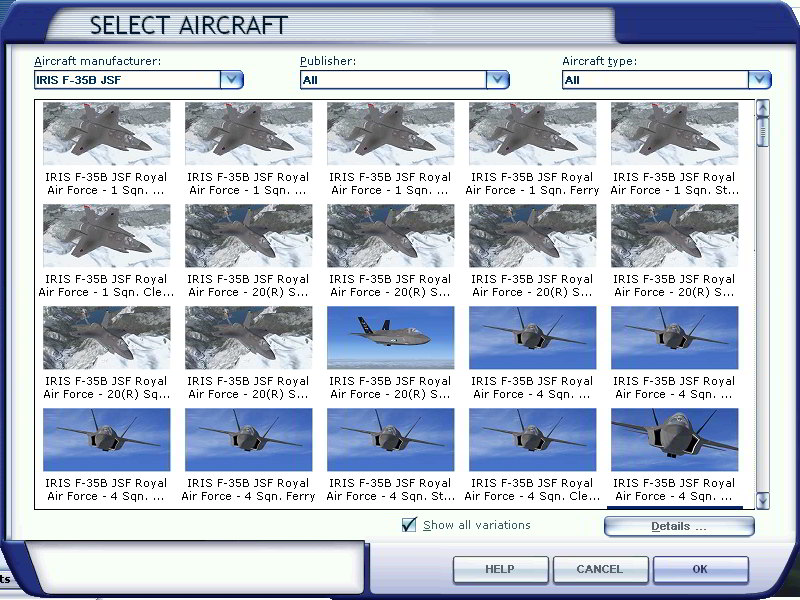
When you fire up FSX you should have 52 (yes fifty-two) different variations of the F-35 on the aircraft selection menu. Here's just a few of them.
Image

Please tell me if this helps.