Page 1 of 1
Lingering gauge problem

Posted:
Sat Aug 28, 2010 2:45 pmby FLLflyboy
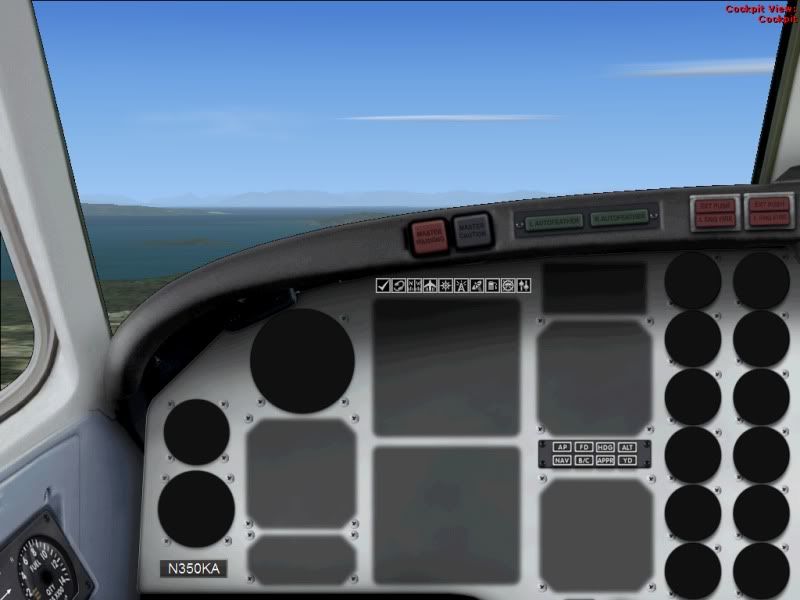
I have been having the same problem with my gauges for over a month now and MS Tech support is no help (surprise surprise). Maybe you guys can help me. I am very frustrated. I'm working with FSX Deluxe. Here is a screenshot:
Re: Lingering gauge problem
Posted:
Sat Aug 28, 2010 4:21 pmby Hagar
That looks like the FSX default King Air 2D panel. If so I suspect you're missing KingAir.dll from the FSX\Gauges folder.
Re: Lingering gauge problem
Posted:
Sat Aug 28, 2010 4:43 pmby FLLflyboy
Nope. I checked. It's there. I'm also missing the Multiplayer option in the start up screen. Everything is going wrong. It's not even letting me un-install it now. Argh
Re: Lingering gauge problem
Posted:
Tue Aug 31, 2010 8:21 pmby cx826
Did you activate the FSX? Mulitplayer should be there after you sucessfully activate the FSX.
The picture is definitly missing some gagues, (just like my 777 panel before), if it is not letting u uninstall, try repair or restarting the computer. What does the message say?
One risky, not complete uninstall, but might work way is to delete FSX folder itself from program files, and try installing it again, I cant grantee this will work, but its a way...
Re: Lingering gauge problem
Posted:
Tue Aug 31, 2010 8:50 pmby alrot
hold on there
This is a genuine FSX-SDK model it only need two things to work
Make sure panel.cfg hasn't been delete it or damage (open it with notebook)
make sure as Hagar said the KingAir.dll should be in the Main gauge folder
Im going to give you part of something that should be in panel.cfg ,this would allow to show you the altimeter
like this
Just see if there's a line like this one in you panel.cfg
[VCockpit01]
size_mm=512,512
pixel_size=512,512
texture=$Kingair_1
background_color=0,0,0
gauge12=KingAir!Altimeter_Selector, 2, 447, 123, 65
Re: Lingering gauge problem
Posted:
Wed Sep 01, 2010 4:13 amby Daube
I read "lingerie" in the title, and now I'm dissappointed somehow :-/
