Page 1 of 2

All textures blur (pic included)

PostPosted: Wed Jun 23, 2010 10:27 pm
by Mitch.
Hi gang,
This problem has been troubling me for a while now, decided its time to find a solution if possible. I did a search here and google but nothing. For starters this happens only around my highly detailed scenery. The problem is when I fly from one of these highly detailed all textures completely blur and this includes most text (atc, menu options), see pic below.

This only occurs when I have Global Texture Resolution on 'very high', there is no problem at all when I run Global Texture Resolution on 'high'. But I can have all my settings turned right down (getting 80-100fps) and yet the textures will still blur while on 'very high'? On my normal settings I usually get 15-25fps, in the picture it reads 21fps but the textures still want to blur. So it isn't a Frame rate issue. :-/
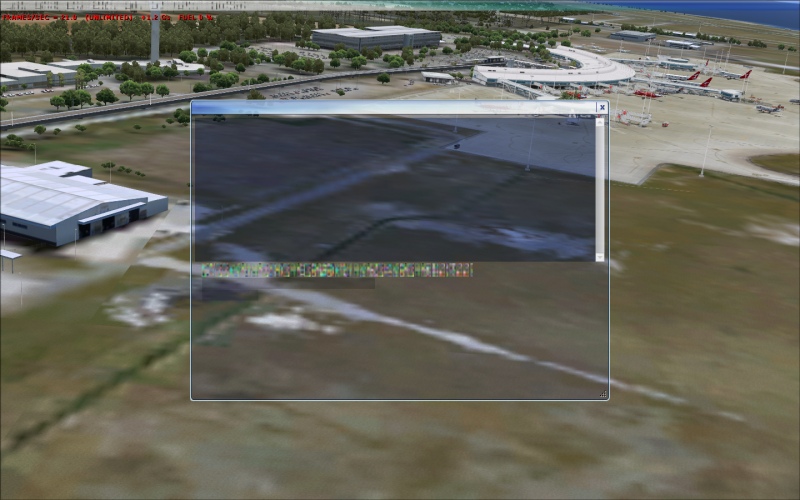
Image

The simple solution would be to continually run Global Texture Resolution on 'high' but I shouldn't have too. Hopefully there is a fix, perhaps in the fsx.cfg that I'm not sure about and any help would be highly appreciated. :-*

Intel Core 2 Duo E8400 3.00GHz
4GB Ram (3.25Gb)
500W PSU
512mb Nvidia Geforce 9800 GT
Windows XP SP3

Cheers
Mitch

Re: All textures blur (pic included)

PostPosted: Wed Jun 23, 2010 11:49 pm
by PilotGonzo
I occasionally get this too. I've seen fixes for it but i've been a bit lazy. Is that ORBX Brisbane? If so its pretty taxing on any pc, do you only get it around there?

Re: All textures blur (pic included)

PostPosted: Thu Jun 24, 2010 2:34 am
by Daube
Mitch, try playing a little bit with the NHAncer settings for your video card. This kind of problem occured to me in the past, when I've been a little bit too optimistic with the settings, mainly for the AA and texture filtering.
I believe there're also a couple of other settings involved, but I can't remember which one.

PS: Also, check if your video card is cooled correctly, if it wouldn't need a little cleaning because of accumulated dust, or stuff like that.

Re: All textures blur (pic included)

PostPosted: Thu Jun 24, 2010 3:13 am
by Fozzer
Do you find that if you wait a little while, the texture catches up with the complicated processes it is having to carry out in complex ground scenes.

I often get the effect for a second or two when changing Cockpit views, left and right, when in a new area. The computer has to display the new scene suddenly, so it starts off blurry, and then becomes clear.

The more detailed the scenery settings, the bigger the problem!

Traversing the ground at high speed, and at low level, in fast Military jets aggravates the problem!
(..or using; "Speed Acceleration" in the Menu).

Paul...G-BPLF...FS 2004...FS Nav...20FPS locked Frame Rate... :)...!

Re: All textures blur (pic included)

PostPosted: Thu Jun 24, 2010 11:59 am
by B-Valvs
I had this issue. I had to go to my graphics card and turn up the mipmap settings to solve it, but I have an ATI card and you have a Nvidia card so I don't know if it would help or not.

8-)

Re: All textures blur (pic included)

PostPosted: Thu Jun 24, 2010 9:19 pm
by Mitch.
Thank for the responses so far. I should've mentioned, but forgot, that this problem only occurs around my high detailed addon scenery, default airports are fine. The other thing I should've mentioned is that when I load the flight, all the textures start out absolutely fine, nice and crisp, its after a few seconds (30 odd) then all the textures go nuts and blur. If I go into a menu or hit Esc, but then return to the flight the textures start out crisp and then suddenly blur again.


I occasionally get this too. I've seen fixes for it but i've been a bit lazy. Is that ORBX Brisbane? If so its pretty taxing on any pc, do you only get it around there?


It is Orbx YBBN, I don't think the problem is its taxing because my FPS say otherwise? But then again, why does it only happen on high detailed scenery? :-/

Mitch, try playing a little bit with the NHAncer settings for your video card. This kind of problem occured to me in the past, when I've been a little bit too optimistic with the settings, mainly for the AA and texture filtering.
I believe there're also a couple of other settings involved, but I can't remember which one.

PS: Also, check if your video card is cooled correctly, if it wouldn't need a little cleaning because of accumulated dust, or stuff like that.


Thanks Daube, to be honest I wasn't running Nhancer. But I installed it and followed all the instructions found here:

http://www.simforums.com/forums/forum_posts.asp?TID=29041&PN=1

I did notice an improvement overall with FPS, so thanks. But the problem still exists at my High detailed sceneries, ableit it takes much longer before the textures will blur. Before it took around 30 sec, after nhancer its around 2-3min. However, as a pre-curse to the blurring I now get horrible jaggies?

Video card is fine. ;)

Do you find that if you wait a little while, the texture catches up with the complicated processes it is having to carry out in complex ground scenes.

I often get the effect for a second or two when changing Cockpit views, left and right, when in a new area. The computer has to display the new scene suddenly, so it starts off blurry, and then becomes clear.

The more detailed the scenery settings, the bigger the problem!

Traversing the ground at high speed, and at low level, in fast Military jets aggravates the problem!
(..or using; "Speed Acceleration" in the Menu).

Paul...G-BPLF...FS 2004...FS Nav...20FPS locked Frame Rate... :)...!


Thanks Paul, but this is a different type of blur, see even the text goes blurry. No amount of waiting will fix it. Its like the computer or video card is shitting itself and refuses to display clear textures. :(

I had this issue. I had to go to my graphics card and turn up the mipmap settings to solve it, but I have an ATI card and you have a Nvidia card so I don't know if it would help or not.

8-)


Thanks Brandon, are you sure its the exact same problem I am describing. Did you also get the slurred text, like in the pic? If so maybe you have some more valuable information. :)

Thanks again guys, I've never had any major FSX problem before this, so I'm new at this. :-[

Re: All textures blur (pic included)

PostPosted: Thu Jun 24, 2010 10:03 pm
by Steve M
I may have the same card as you except
1024 mb Nvidea 9800 GT. I had problems with blurring and stutters after a few minutes in flight. I read that these cards tend to run hot. So I keep one eye on that.
I back dated my video driver to 182.50. That did help.
I reset Nhancer according to Nicks guide. That helped a bit more.
I defragged 3 times in a row and since, what ever I did? It's a thing of beauty.. :)

Re: All textures blur (pic included)

PostPosted: Fri Jun 25, 2010 2:17 am
by Daube
Mitch, does it still happen if you limit your FPS to, say, 20 ?

Re: All textures blur (pic included)

PostPosted: Fri Jun 25, 2010 4:19 am
by Mitch.
Ok, quick update. After 2 defrags (Big thanks Steve M, forgot the old defrag trick :)) I have now rid of the blurry textures BUT it has been replaced with horrible jaggies. It has the exact same symptoms as the texture blur except its jaggies now. I must say its a step forward, we will get there eventually. I'm no expert but this should be a clue as to where the problem lay (video card, RAM, PSU?) perhaps?

If it helps I'm still running 182.50 drivers. Checked the Nvidia website and saw that drivers 257.21 were available. Wasn't sure if I should download and install them yet, without consulting here first. Any improvements with the new drivers, is it recommended? After reading here:

http://www.simforums.com/forums/forum_p ... ?TID=34873

It appears Nhancer 2.5.9 won't run with drivers 257.21, until Nhancer is updated. I might just wait for that update.

Mitch, does it still happen if you limit your FPS to, say, 20 ?


Didn't notice any difference besides a small FPS drop when I used a lock. :(

Re: All textures blur (pic included)

PostPosted: Fri Jun 25, 2010 9:11 am
by Daube
Jaggies ? What do you mean exactly ?
Could it be that the AA has been lowered too much ? Show me :)

Re: All textures blur (pic included)

PostPosted: Fri Jun 25, 2010 9:30 am
by B-Valvs

I had this issue. I had to go to my graphics card and turn up the mipmap settings to solve it, but I have an ATI card and you have a Nvidia card so I don't know if it would help or not.

8-)


Thanks Brandon, are you sure its the exact same problem I am describing. Did you also get the slurred text, like in the pic? If so maybe you have some more valuable information. :)

Thanks again guys, I've never had any major FSX problem before this, so I'm new at this. :-[


Yes, this was my problem:

Image

Sometimes it wouldbe this, sometimes it would be exactly what you show.

I've noticed that it also affects ground textures.

8-)

Re: All textures blur (pic included)

PostPosted: Fri Jun 25, 2010 11:49 am
by Boikat
I've seen something similar but it ended up being the aircraft add-on, believe it or not.  The recent King Air 300 has a lot of MIPed BMP's, and when I first installed it, as soon as the aircraft textures loaded, everything went blurry.  After I went through and re-saved *all* the  BMP's without MIPing, the scenery (and aircraft) blurries cleared up.

Obviously, this is not be the same problem you are having if you get the blurries on all flights, no matter what aircraft you are flying.

Re: All textures blur (pic included)

PostPosted: Sun Jun 27, 2010 6:09 am
by Mitch.
Jaggies ? What do you mean exactly ?
Could it be that the AA has been lowered too much ? Show me :)


Sorry for the slight reply delay. Appreciate the interest in trying to find a solution. :)

No Jaggies, Global Texture Resolution on 'high':
http://www.simviation.com/yabbuploads/2010-6-27_15-37-57-265.jpg

Jaggies (maybe a tad hard to see in pic, but severe in game), Global Texture Resolution on ' veryhigh':
http://www.simviation.com/yabbuploads/2010-6-27_15-38-17-484.jpg

I think I'll just have to live with having Global Texture Resolution on 'high' around my high-detail sceneries. Which is a shame having that extra detail going to waste. :-[ :(


I had this issue. I had to go to my graphics card and turn up the mipmap settings to solve it, but I have an ATI card and you have a Nvidia card so I don't know if it would help or not.

8-)


Thanks Brandon, are you sure its the exact same problem I am describing. Did you also get the slurred text, like in the pic? If so maybe you have some more valuable information. :)

Thanks again guys, I've never had any major FSX problem before this, so I'm new at this. :-[


Yes, this was my problem:

http://www.simviation.com/yabbuploads/BadATC141004.jpg

Sometimes it wouldbe this, sometimes it would be exactly what you show.

I've noticed that it also affects ground textures.

8-)


Thanks Brandon, looks exactly like the same problem I have. Did you get rid of it completely and if so, what is the equivalent fix from your Ati card to my Nvidia card? Anybody in the know?

Re: All textures blur (pic included)

PostPosted: Sun Jun 27, 2010 6:16 am
by ShaneG_old
I had this problem with my Ati 1650pro in both FSX and FS9,
at scenery that involved photoreal textures,
it would also affect Highly detailed aircraft.

My issues appeared to have been caused by having the settings on the card cranked up way too high,
almost as if the high detail addons were choking it to death with information overload.

After I turned the settings all down to the midway point, both FSX, and FS9s graphical glitches went away.
In fact, both sims look better now with the card settings turned down.

Re: All textures blur (pic included)

PostPosted: Sun Jun 27, 2010 6:22 am
by Mitch.
Thanks for the reply Shane, all valuable information. Did you have lowish frame rates when these glitches occured? I might have to crank down some Nhancer settings.

Need more POWER. ;D