Uninstalling FSX

Posted:
Fri Apr 02, 2010 9:54 pmby Thud
If I really mess up FSX on my computer (addons, settings, blah...) and I then Renstall FSX with the disks, will everything be back to stock? Even all the addons in all the sub folders?
Thanks gus. 8-)
Re: Uninstalling FSX
Posted:
Fri Apr 02, 2010 11:03 pmby Capt.Propwash
you will need to uninstall FSX from your C: / E: / F: (wherever it is located)
when you uninstall FSX it should ask you if you want to keep your addons and such, YES you want to keep them. ..... when it is done installing, rename the FSX folder that they are in to something like FSX BACKUP FILES.
go to START / RUN / REGEDIT and delete the registry key (search for FSX)
you will also need find C:/Documents and settings/(user name)/Application data/Micorsoft/FSX -- delete the ENTIRE folder "FSX" --------- this is for WINXP, if you have Vista or 7 the location may be different.
if all goes well, when you reinstall, FSX it will be straight out of the box with NO addons. NO addon planes, NO addon payware Programs (hope you kept the registry codes as they will need to be re-registered)....... It will be like you just installed it for the very first time, and you will have to go back with your FSX BACKUP FILES and replace everything that you did before the mess up.
If you told FSX to NOT save the additions and saved works, then everything will be wiped clean that pertains to FSX, addons, programs, sceneries, pretty much everything ...... except 3rd party programs like ADE, AFCAD221, RADAR SCREEN 5, FSHOST CLIENT, such like that that runs OUTSIDE of FSX. these will stay as they are stand alone programs.
Re: Uninstalling FSX
Posted:
Sat Apr 03, 2010 6:32 amby Capt.Propwash
Hkey_local_machine/software/microsoft/microsoft games/flight simualtor/10 ..... delete that folder and everything inside it.
when you run the UNINSTALLER from inside FSX main folder, it should delete that folder for you.
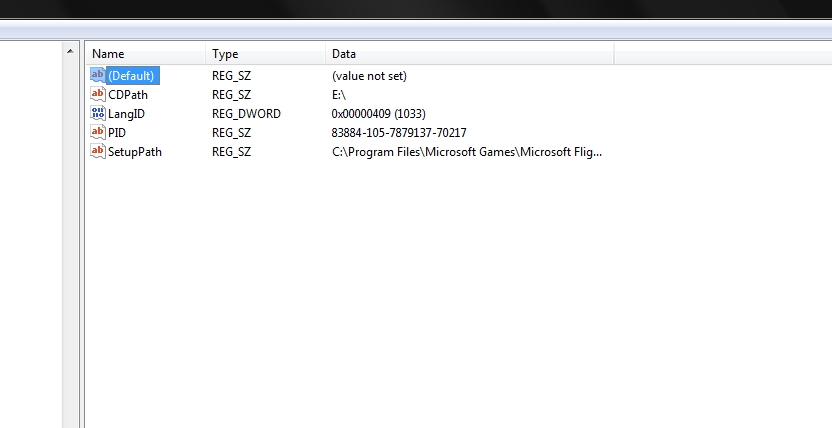 ?
?