Silly question.

FSX including FSX Steam version.

Silly question.

Postby eno » Thu Apr 01, 2010 4:54 pm

How do you install scenery into FSX?

I am assuming it is more or less the same as FS9 although when I click on add area in the scenery library and navigate to the scenery I want to add ...... I click OK and nothing happens. The dialog box with the scenery in refuses to disappear unless you shut the window ...... therefore not adding anything.

Any help will be most appreciated ..........

A rather frustrated
eno

[align=center][img]http://www.simviation.com/yabbuploads/imaginsigeno.jpg[/img][/align]
User avatar
eno
Lieutenant Colonel
Lieutenant Colonel
 
Posts: 6708
Joined: Sun Jan 18, 2004 12:30 pm
Location: Derbyshire UK

Re: Silly question.

Postby Tai-2 » Thu Apr 01, 2010 5:08 pm

How I install it is.
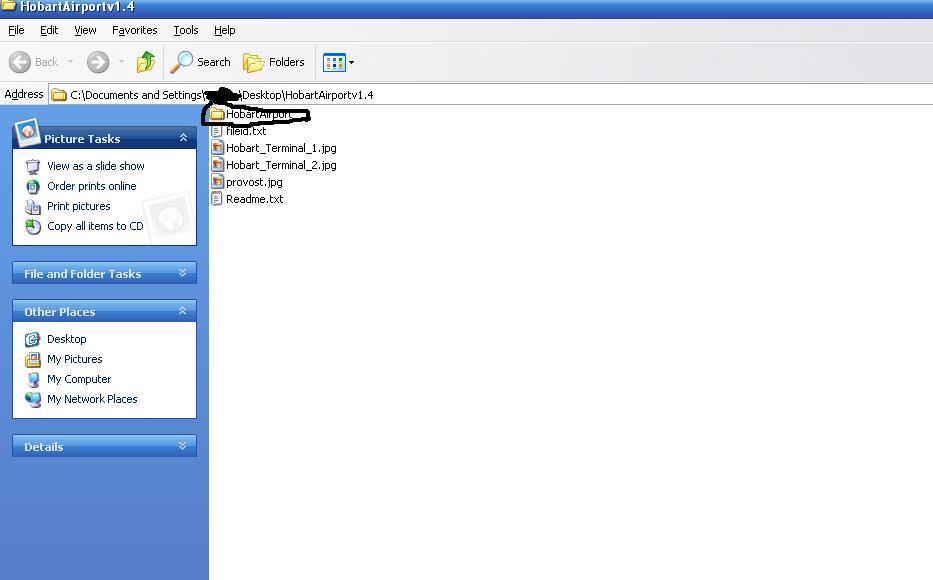
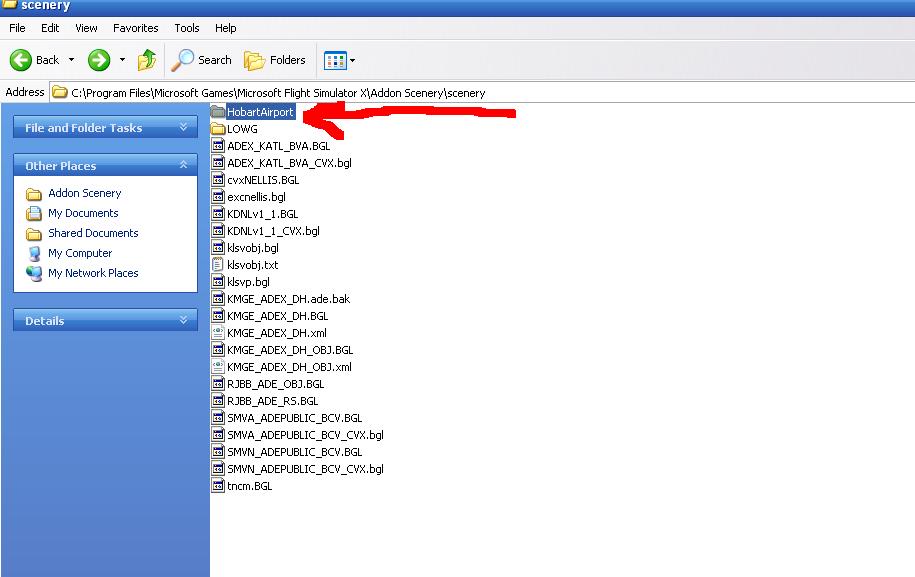
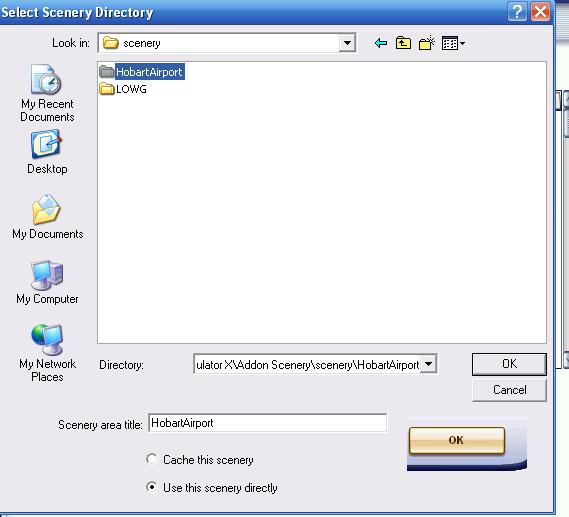
I put the scenery folder into C:\program files\Microsoft  Games\FSX\Addon Scenery\Scenery.
Load up FSX
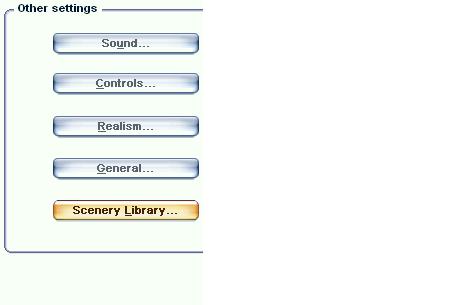
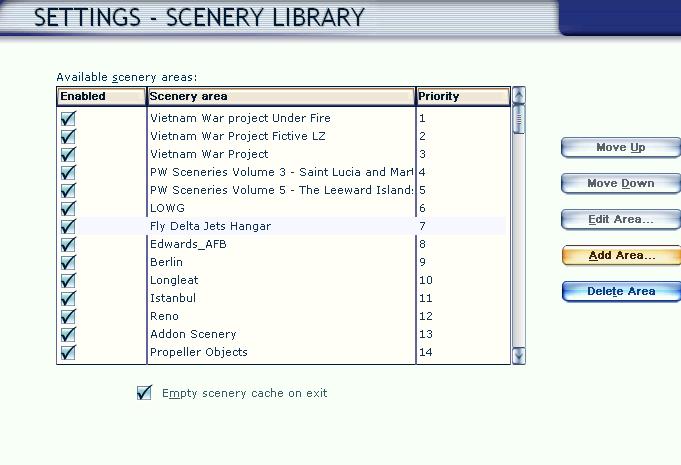
Go to options, then scenery library, the Add, go to where you installed it(that location above of course) And there ya go
Now some only require putting the .BGL files.
I would read the readmes first, they are pretty useful

edit: will try to get some SS up of it


Edit
here are the SS
I used Hobart as an example

Image


Image


Image


Image

of course be sure to use the c:\program files\Microsoftgames\Microsoft Flight Simulator X\Addon Scenery\Scenery
Then click ok, the click ok again and there ya go.
Image
Last edited by Tai-2 on Thu Apr 01, 2010 5:24 pm, edited 1 time in total.
User avatar
Tai-2
Captain
Captain
 
Posts: 699
Joined: Thu Apr 23, 2009 10:57 pm
Location: Georgia

Re: Silly question.

Postby eno » Fri Apr 02, 2010 2:25 am

That is as far as I'm getting ............. the final dialog box does not disappear when you click OK ......... and nothing shows in the scenery library afterwards.
[align=center][img]http://www.simviation.com/yabbuploads/imaginsigeno.jpg[/img][/align]
User avatar
eno
Lieutenant Colonel
Lieutenant Colonel
 
Posts: 6708
Joined: Sun Jan 18, 2004 12:30 pm
Location: Derbyshire UK

Re: Silly question.

Postby Hagar » Fri Apr 02, 2010 2:32 am

If you're using Windows 7 read this. http://aussiex.org/forum/index.php?showtopic=4426
Image

Founder & Sole Member - Grumpy's Over the Hill Club for Veteran Virtual Aviators
Member of the Fox Four Group
My Google Photos albums
My Flickr albums
User avatar
Hagar
Colonel
Colonel
 
Posts: 30868
Joined: Wed Jun 19, 2002 7:15 am
Location: Costa Geriatrica

Re: Silly question.

Postby eno » Fri Apr 02, 2010 3:30 am

If you're using Windows 7 read this. http://aussiex.org/forum/index.php?showtopic=4426

That didn't help either ....... and I am using windows 7
[align=center][img]http://www.simviation.com/yabbuploads/imaginsigeno.jpg[/img][/align]
User avatar
eno
Lieutenant Colonel
Lieutenant Colonel
 
Posts: 6708
Joined: Sun Jan 18, 2004 12:30 pm
Location: Derbyshire UK

Re: Silly question.

Postby Hagar » Fri Apr 02, 2010 3:35 am

If you're using Windows 7 read this. http://aussiex.org/forum/index.php?showtopic=4426

That didn't help either ....... and I am using windows 7

Adding scenery to FSX is basically the same as in FS9. Windows 7 would seem to be the cause of the problem. Which scenery are you trying to install? Has it got a Texture sub-folder? patchz is having similar problems in FS9. http://205.252.250.26/cgi-bin/yabb2/YaBB.pl?num=1270177645
Image

Founder & Sole Member - Grumpy's Over the Hill Club for Veteran Virtual Aviators
Member of the Fox Four Group
My Google Photos albums
My Flickr albums
User avatar
Hagar
Colonel
Colonel
 
Posts: 30868
Joined: Wed Jun 19, 2002 7:15 am
Location: Costa Geriatrica

Re: Silly question.

Postby eno » Fri Apr 02, 2010 3:38 am

Its actually some of the OZx stuff ....... and one or two other bits. I managed to get the Everest HD to work but that was by pure fluke.
[align=center][img]http://www.simviation.com/yabbuploads/imaginsigeno.jpg[/img][/align]
User avatar
eno
Lieutenant Colonel
Lieutenant Colonel
 
Posts: 6708
Joined: Sun Jan 18, 2004 12:30 pm
Location: Derbyshire UK

Re: Silly question.

Postby Hagar » Fri Apr 02, 2010 3:42 am

Some of that OZx scenery looks like mesh which won't have a Texture sub-folder. In that case you could try adding one.

Unfortunately I have even less knowledge of Windows 7 than I have of Vista so this is my best suggestion.
Last edited by Hagar on Fri Apr 02, 2010 3:43 am, edited 1 time in total.
Image

Founder & Sole Member - Grumpy's Over the Hill Club for Veteran Virtual Aviators
Member of the Fox Four Group
My Google Photos albums
My Flickr albums
User avatar
Hagar
Colonel
Colonel
 
Posts: 30868
Joined: Wed Jun 19, 2002 7:15 am
Location: Costa Geriatrica

Re: Silly question.

Postby eno » Fri Apr 02, 2010 3:43 am

Just put the BGLs straight into the Addon scenery/scenery folder ........ that worked almost ........ NO TEXTURES SHOWING so now going to add the textures to the textures folder and see what happenes.
[align=center][img]http://www.simviation.com/yabbuploads/imaginsigeno.jpg[/img][/align]
User avatar
eno
Lieutenant Colonel
Lieutenant Colonel
 
Posts: 6708
Joined: Sun Jan 18, 2004 12:30 pm
Location: Derbyshire UK

Re: Silly question.

Postby Hagar » Fri Apr 02, 2010 3:45 am

That should work Andy but it's not the ideal solution.
Image

Founder & Sole Member - Grumpy's Over the Hill Club for Veteran Virtual Aviators
Member of the Fox Four Group
My Google Photos albums
My Flickr albums
User avatar
Hagar
Colonel
Colonel
 
Posts: 30868
Joined: Wed Jun 19, 2002 7:15 am
Location: Costa Geriatrica

Re: Silly question.

Postby eno » Fri Apr 02, 2010 3:47 am

YAY........ that worked !!!!

Not ideal ...... but unless someone can come up with a better solution I'll advocate it for now  ;D ;D
[align=center][img]http://www.simviation.com/yabbuploads/imaginsigeno.jpg[/img][/align]
User avatar
eno
Lieutenant Colonel
Lieutenant Colonel
 
Posts: 6708
Joined: Sun Jan 18, 2004 12:30 pm
Location: Derbyshire UK

Re: Silly question.

Postby Hagar » Fri Apr 02, 2010 4:01 am

I'm not surprised that worked but I'd rather find a proper solution to this problem.
Image

Founder & Sole Member - Grumpy's Over the Hill Club for Veteran Virtual Aviators
Member of the Fox Four Group
My Google Photos albums
My Flickr albums
User avatar
Hagar
Colonel
Colonel
 
Posts: 30868
Joined: Wed Jun 19, 2002 7:15 am
Location: Costa Geriatrica

Re: Silly question.

Postby Bumkin » Fri Apr 02, 2010 12:11 pm

I had the same issue.  Follow the instructions in the link Hagar provided but in the next to the last step where it says click in the blank area - right click.  It has worked for me (Acceleration + Windows 7).
Don't ask an aviator if he flys fighters.
User avatar
Bumkin
2nd Lieutenant
2nd Lieutenant
 
Posts: 126
Joined: Wed Jun 11, 2008 4:39 pm
Location: Pensacola, FL

Re: Silly question.

Postby Hagar » Fri Apr 02, 2010 12:52 pm

[quote]I had the same issue.
Last edited by Hagar on Fri Apr 02, 2010 1:12 pm, edited 1 time in total.
Image

Founder & Sole Member - Grumpy's Over the Hill Club for Veteran Virtual Aviators
Member of the Fox Four Group
My Google Photos albums
My Flickr albums
User avatar
Hagar
Colonel
Colonel
 
Posts: 30868
Joined: Wed Jun 19, 2002 7:15 am
Location: Costa Geriatrica

Re: Silly question.

Postby Fr. Bill » Fri Apr 02, 2010 2:31 pm

[quote]I had the same issue.
BillImage Gauge Programming - 3d Modeling Eaglesoft Development Group Intel Core 2 Quad Q6600-4GB DDR2 Crucial PC6400-800 GB SATA-ATI Radeon HD2400 Pro 256MB DX10 [i
Fr. Bill
Captain
Captain
 
Posts: 961
Joined: Sun Apr 27, 2003 1:31 pm
Location: Hammond, IN

Next

Return to Flight Simulator X (FSX) and Steam

Who is online

Users browsing this forum: No registered users and 486 guests