Page 1 of 1

Scenery Download

PostPosted: Tue Mar 02, 2010 11:14 am
by Flying Trucker
Good morning all... :)

I have downloaded twice (2X) from the Simviation Downlads>FSX>Scenery>Hope Airport which is the last new scenery download today.

I installed it twice (2X) to Microsoft Games>FSX>Addon scenery/scenery and I do not see the representation of aircraft that is shown on the three (3) slides in the file.

The helicopter is missing and an aircraft or two are missing.
I tried different season settings and still they are not there.

I am wondering if this has to be installed when I start FSX and go to settings>library?  I do not think so as I do not see anything there.

Not sure if I am doing something wrong or perhaps these missing aircraft and helicopter will fly in at another time... ;D

Cheers...Happy Landings...Doug

Re: Scenery Download

PostPosted: Tue Mar 02, 2010 12:48 pm
by Hagar
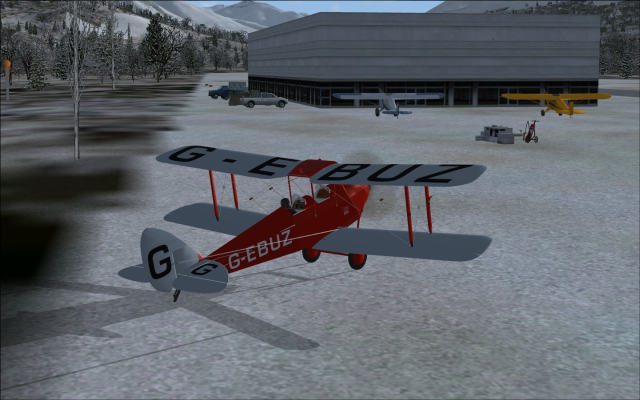
Just tried it Doug. All I get is the basic airstrip with a large building, 2 Piper Cubs & a few assorted vehicles. I can't read the instructions as the Readme is in WPS format & defies all my efforts to open it.

The Moth is mine.
Image

Re: Scenery Download

PostPosted: Tue Mar 02, 2010 1:21 pm
by dave3cu
I opened the .wps (MS Works/Word doc) with notepad. Reading between the 'garbage', it appears that the author failed to mention that an object library is required.

'kb_static_aircraft' available here: http://www.kb-sim.com/screens_static_aircraft.html

Once installed you should have 6 static ac, the 2 default Cubs, and 4 from the kb library.

Dave

Instant Scenery indicated there are 6 additional kb statics placed by the 5HO.bgl file. As they are not at Hope I disected the file and found them on the apron at PAMR-Merrill   ::) 

Re: Scenery Download

PostPosted: Tue Mar 02, 2010 2:01 pm
by Hagar
I opened the .wps (MS Works/Word doc) with notepad. Reading between the 'garbage', it appears that the author failed to mention that an object library is required.

'kb_static_aircraft' available here: http://www.kb-sim.com/screens_static_aircraft.html

Once installed you should have 6 static ac, the 2 default Cubs, and 4 from the kb library.

Dave

Thanks Dave. That fixed it. [smiley=thumbsup.gif]

Re: Scenery Download

PostPosted: Tue Mar 02, 2010 2:20 pm
by Capt.Propwash
I just moved the ReadMe for that scenery to my desktop, and then opened it with Microsoft Works / Word 2002.

This is exactly what the readme says;

Alaskan Airports volume 1

The first airport for this series is hope airport 5HO about twenty miles south of anchorage approx 12KM for all of you using the metric system.

Installation: Place the 5HO.BGL in your addon scenery/scenery folder.

Happy Bush flying!


although Hagar is a little more skilled at reading gibberish, I would also go with his reccomendation in downloading the extra file.

Re: Scenery Download

PostPosted: Tue Mar 02, 2010 2:29 pm
by dave3cu
Hagar,

IS also reports 3 objects 'not found in any library', indicating they're from a library(s) I don't have. As the only info IS can give is the GUID's, there's little chance of me finding them unless I would happen to download the missing library(s).

Dave

Re: Scenery Download

PostPosted: Tue Mar 02, 2010 2:31 pm
by Hagar
I just moved the ReadMe for that scenery to my desktop, and then opened it with Microsoft Works / Word 2002.

This is exactly what the readme says;

Alaskan Airports volume 1

The first airport for this series is hope airport 5HO about twenty miles south of anchorage approx 12KM for all of you using the metric system.

Installation: Place the 5HO.BGL in your addon scenery/scenery folder.

Happy Bush flying!

That's fine if you have MS Works. Lots of people don't. Thanks for posting the instructions. I actually installed in the usual way & activated it via the Scenery Library.

although Hagar is a little more skilled at reading gibberish, I would also go with his reccomendation in downloading the extra file.

Thank Dave, not me. He's the one who figured it out. That Instant Scenery looks like a handy piece of software.

Re: Scenery Download

PostPosted: Tue Mar 02, 2010 2:33 pm
by Hagar
Hagar,

IS also reports 3 objects 'not found in any library', indicating they're from a library(s) I don't have. As the only info IS can give is the GUID's, there's little chance of me finding them unless I would happen to download the missing library(s).

Dave

Thanks Dave. This looks a bit of a mess. It would be worth contacting the author but I don't see an e-mail address.

Re: Scenery Download

PostPosted: Tue Mar 02, 2010 7:08 pm
by Flying Trucker
Good evening all... :)

Thanks all for the information, I did download that link supplied with the static aircraft and with some luck managed to get the aircraft and helicopter showing.

All looks good now...there seems a lot more to this scenery downloading than what I expected.
The author states this is the first download for Alaska so I shall be looking forward to seeing the rest.

Again thanks to all for the help.   ;)

Cheers...Happy Landings...Doug

Re: Scenery Download

PostPosted: Wed Mar 03, 2010 3:42 am
by Hagar
All looks good now...there seems a lot more to this scenery downloading than what I expected.

Shouldn't be a problem Doug providing the author knows what he's doing. This one leaves a lot to be desired. For example; that Readme being in WPS format makes the installation instructions impossible to read for many users & even when you open it the extra libraries are not mentioned. Without Dave's investigation I doubt we would ever have figured it out.

Shame really as it's not a bad little update. If we had a contact address we could possibly do something about it.

Re: Scenery Download

PostPosted: Wed Mar 03, 2010 4:02 am
by pete
I'll remove this file -- looks more trouble than it is worth. Like Doug says if we had an email then it could be put right.

Only 1 or 2 users of this file would look at this so it's not worth having on the download pages