SCENERY INSTRUCTIONS DO NOT WORK
 Posted: Thu Jan 14, 2010 3:28 am
I saw this here:
[color=#ff0000]When installing Frank's scenery, you will need to set up the folder for it to go into your Addon Scenery directory (or where ever it is you keep your addon scenery files)
After unzipping the package:
- Create a new folder named after the scenery
- inside that folder create a folder named "Scenery"
- place all of the .bgl files from the zip file into that "scenery" folder
- now start FSX and go to Settings/ scenery Library/ add new/ and select the folder you just created.
Allow it to update the scenery files, and then you should be good to go[/color]
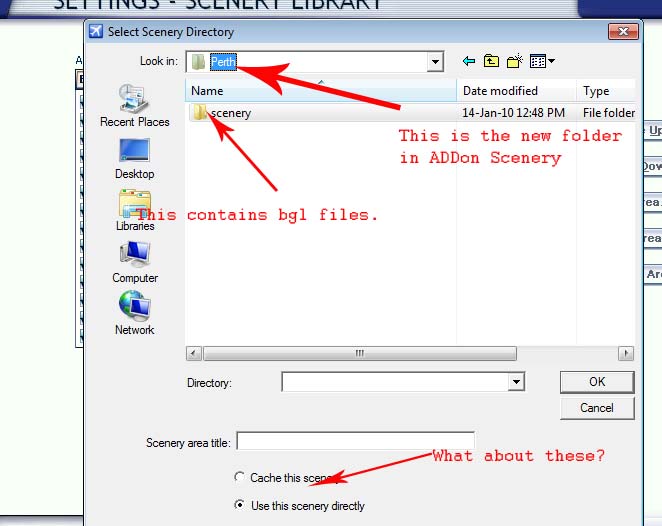
I followed this to the letter, but after selecting the folder, I got this box which leads no place:
[img]http://www.simviation.com/yabbuploads/SceneryFSX.jpg[img]
This scenery thing is driving me crazy.
Can someone help - PLEASE??
[color=#ff0000]When installing Frank's scenery, you will need to set up the folder for it to go into your Addon Scenery directory (or where ever it is you keep your addon scenery files)
After unzipping the package:
- Create a new folder named after the scenery
- inside that folder create a folder named "Scenery"
- place all of the .bgl files from the zip file into that "scenery" folder
- now start FSX and go to Settings/ scenery Library/ add new/ and select the folder you just created.
Allow it to update the scenery files, and then you should be good to go[/color]
I followed this to the letter, but after selecting the folder, I got this box which leads no place:
[img]http://www.simviation.com/yabbuploads/SceneryFSX.jpg[img]
This scenery thing is driving me crazy.
Can someone help - PLEASE??