Page 1 of 2
Stupid question...

Posted:
Mon Jan 11, 2010 6:17 pmby Thud
OK, I've looked at a bunch of places but I need a step by step guide on how to install a texture for a default airplane.
I tried it before with the AF1 textures for the B747 but I didn't save a copy thing and I had to re'install fsx.
So how do you do it?
:

Re: Stupid question...
Posted:
Mon Jan 11, 2010 7:03 pmby Tomcat5
I could sent you the (improved, hehe) default...
Re: Stupid question...
Posted:
Mon Jan 11, 2010 7:05 pmby Daube
1- you place the "texture.***" folder in the main folder of the plane.
2- you open the readme included with the repaint
3- you copy the whole section [flightsim.x] from the readme to the aircraft.cfg of the plane
4- you replace the "x" in [flightsim.x] by an appropriate number, according to the other [flightsim.*] sections that were already in the aircraft.cfg originally.
5- you're done, save the aircraft.cfg and go flying.
Re: Stupid question...
Posted:
Mon Jan 11, 2010 7:06 pmby Daube
I feel soooo slow tonight...

Re: Stupid question...
Posted:
Mon Jan 11, 2010 7:24 pmby Tomcat5
I feel soooo slow tonight...
I only beat you by 2 minutes... That's not much, lol

Re: Stupid question...
Posted:
Mon Jan 11, 2010 8:10 pmby Thud
[quote]I could sent you the (improved, hehe) default...
Re: Stupid question...
Posted:
Mon Jan 11, 2010 9:09 pmby Tomcat5
To do a backup, just copy the aircraft.cfg. Now paste it into the same folder. (What OS are you running? This works inn Vista and 7 that I know of.) it should just say "- Copy" after the filename. The aircraft -Copy.cfg is you backup. To restore, just rename to aircraft.cfg.
Re: Stupid question...
Posted:
Mon Jan 11, 2010 9:28 pmby Thud
By same folder do you mean the aircraft folder or the actual cfg file?
Also I'm running Vista Home Premium.
Re: Stupid question...
Posted:
Mon Jan 11, 2010 9:35 pmby Tomcat5
By same folder do you mean the aircraft folder or the actual cfg file?
Also I'm running Vista Home Premium.
Yep
Just copy it and paste it below everything else in the aircraft folder.
Re: Stupid question...
Posted:
Mon Jan 11, 2010 10:04 pmby Thud
When I go to save the aircraft cfg file (with the AF1 stuff in it) it says
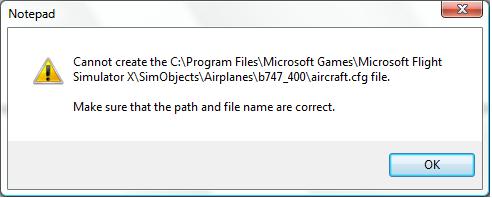
Re: Stupid question...
Posted:
Mon Jan 11, 2010 10:31 pmby Tomcat5
When I go to save the aircraft cfg file (with the AF1 stuff in it) it says
Go to C:\Program files\. Right-click Microsoft Games, and click properties. Click Security tab. Click edit, and give everyone full control. (You will think me in the long run. It may seem insecure now, but don't think about it.) Click Okay. It might take a while to set security permissions, and then it will be all set. It has to do with admin rights, and since you didn't run notepad in admin mode, it thinks that the b747 folder, as well as the whole program files, are restricted from users to edit. M$ thought that this would help security, but most people think it's a nuisance.
Re: Stupid question...
Posted:
Wed Jan 13, 2010 7:00 pmby Thud
I tried that, it won't let me give the users full control, I can't click on it.
EDIT: nevermind, I figured it out, I'm trying it now.
Re: Stupid question...
Posted:
Wed Jan 13, 2010 7:13 pmby Thud
OK, I did everything you said and I saved it, now when I go into FSX nothing is there (just not the AF1 texture)
Sorry for the double post.
Re: Stupid question...
Posted:
Wed Jan 13, 2010 7:19 pmby Tomcat5
OK, I did everything you said and I saved it, now when I go into FSX nothing is there (just not the AF1 texture)
Sorry for the double post.
Screenie please? I don't know what could be causing that...
Re: Stupid question...
Posted:
Wed Jan 13, 2010 7:26 pmby Thud
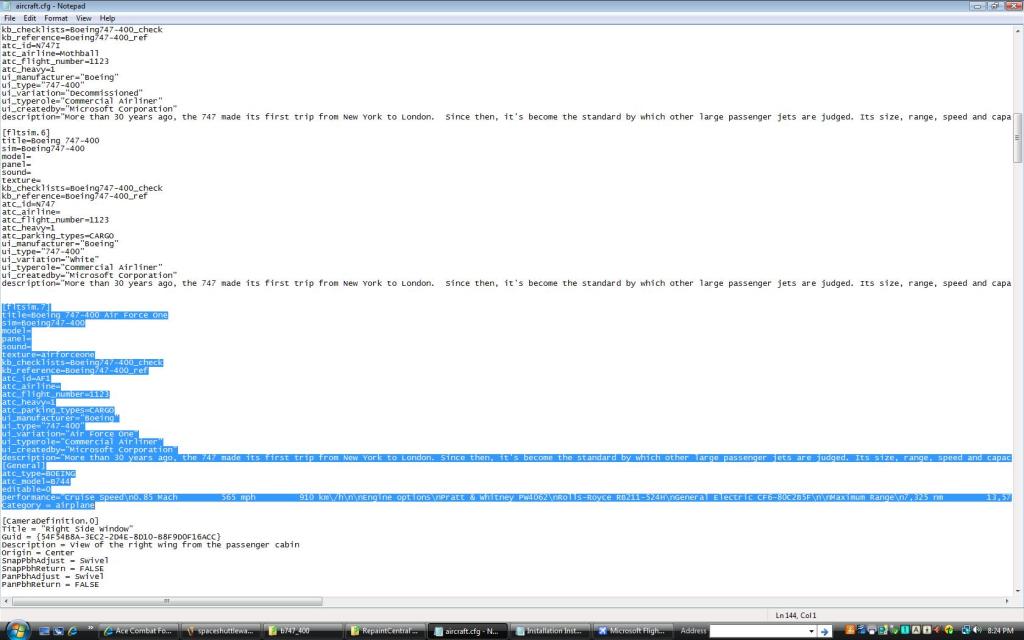
Don't know what you want them of...