Page 1 of 1

BSOD!!!

PostPosted: Mon Dec 14, 2009 7:29 pm
by vernongt
Greetings Members,
I have a problem to which I need a fix.
Often after downloading an aircraft to my Documents\Fltsim\FSX Downloads\aircraft, and then create a folder with that particular a/c's name; to where I "Extract Here" (instead of a Temp folder).
After reading the instructions and copying the folders to my FSX\SimObjects\Airplanes and doing any other instructions, I proceed to launch FSX and fly the aircraft.
Quite often, I end up with a screen that goes patchy or blotchy and then I get the very nerve wracking BSOD (Blue Screen of Death) and I have to power off and re-boot the computer.
What happened? I don't understand "Computerese" other than the average layman's knowledge.
Before I destroy my "Sim PC" can anyone please help me?
Thanks.
Vernon :-[

Re: BSOD!!!

PostPosted: Mon Dec 14, 2009 7:41 pm
by Steve M
Welcom to Simv, Vernongt. I am not techno savy, but posting some of your pc specs would help anyone who can advise you. This could be a myriad of things.    :)

Re: BSOD!!!

PostPosted: Mon Dec 14, 2009 7:44 pm
by Tai-2
Greetings Members,
I have a problem to which I need a fix.
Often after downloading an aircraft to my Documents\Fltsim\FSX Downloads\aircraft, and then create a folder with that particular a/c's name; to where I "Extract Here" (instead of a Temp folder).
After reading the instructions and copying the folders to my FSX\SimObjects\Airplanes and doing any other instructions, I proceed to launch FSX and fly the aircraft.
Quite often, I end up with a screen that goes patchy or blotchy and then I get the very nerve wracking BSOD (Blue Screen of Death) and I have to power off and re-boot the computer.
What happened? I don't understand "Computerese" other than the average layman's knowledge.
Before I destroy my "Sim PC" can anyone please help me?
Thanks.
Vernon :-[


do you know what the BSOD message was?
Might be hardware related.
Might be software

Re: BSOD!!!

PostPosted: Mon Dec 14, 2009 8:00 pm
by vernongt
My "Sim PC" is a Dell Dimension E521 - Windows XP Pro SP3-
AMD Athlon X2 Dual Core 5600 - 2.81 GHz - 4.00 GB of Ram

The BSOD is different every time and I don't understand what it means. At that point I am unable to capture the screen etc to attach it to an email so don't know where to proceed.
Vernon :-[

Re: BSOD!!!

PostPosted: Mon Dec 14, 2009 8:37 pm
by DeepSpace
Hi vernongt, I'll try to help.

Let's go through this a step at time. From the fact that you say that the BSOD changes every time it happens, I'm assuming that your PC is not auto-restarting itself (which is the default setting). Am I correct?

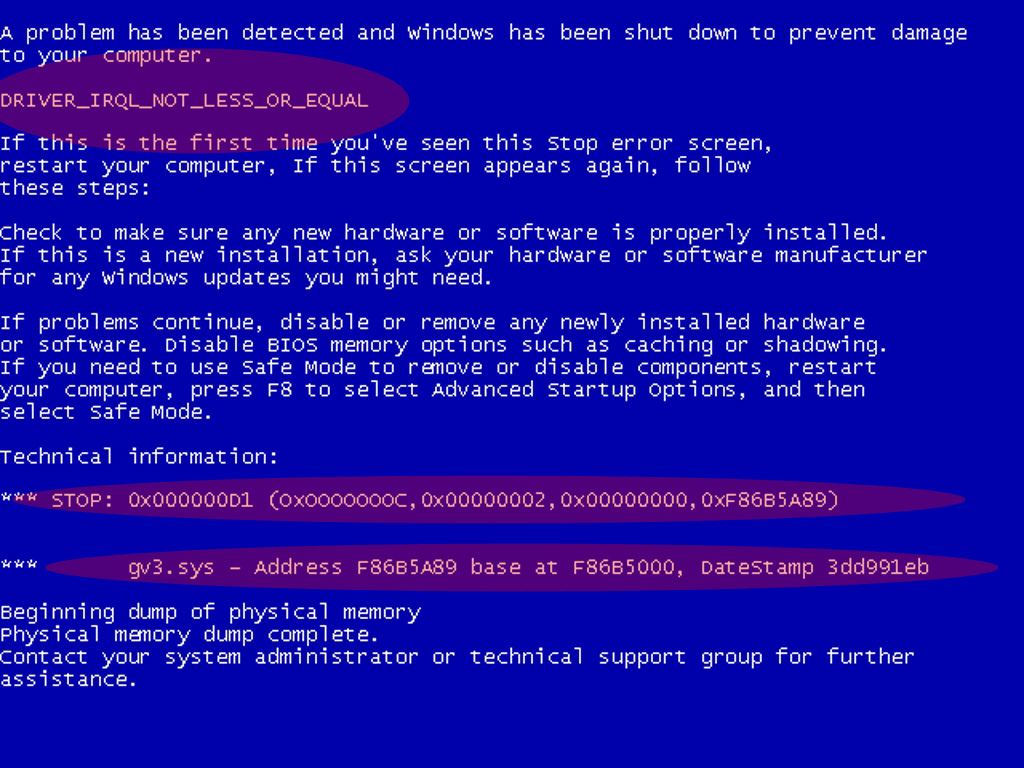
1) If I'm correct, please take the time and write on a piece of paper (as you obviously cannot capture a screenshot) of the BSOD. Of course you don't have to write down all of it, only 2 important, small sections. These 3 sections that are marked in this screenshot are those that matters. Of course they might be totally different in your case but the general format of any BSOD is mostly the same.

2) In case that I'm wrong and your computer does restart itself after the BSOD is showing up, please follow these steps:

1. Right-click My Computer, and then click Properties.

2. Click the Advanced tab.

3. Under Startup and Recovery, click Settings to open the Startup and Recovery dialog box.

4. Clear the Automatically restart check box, and click OK the necessary number of times.

Re: BSOD!!!

PostPosted: Mon Dec 14, 2009 9:18 pm
by Naja002

Re: BSOD!!!

PostPosted: Tue Dec 15, 2009 2:36 pm
by vernongt
Deep Space:
I replied with BSOD Stop Code info to you but I clicked on the personal reply (I think)  ::) :-/
I'm not too proficient in these forums.
I captured a couple of boxes (that came up after I rebooted) and they have "Stop Code" and also Files that are included in the error message.

I'd copy/paste in here but I don't know if that is possible.
I'm also going to find these Temp\WERf4e3.dir00\Mini121509-01.dmp file & also the ...\sysdata.xml files that are mentioned.

Perhaps an email to/from us (vernongt@hughes.net) would be easier???

Cheers.
Vernon  :-/

Re: BSOD!!!

PostPosted: Tue Dec 15, 2009 2:39 pm
by DeepSpace
Don't bother with these temp files. You can safely delete the whole TEMP folder from your PC.

Delete it see if the error comes again.

Re: BSOD!!!

PostPosted: Tue Dec 15, 2009 6:18 pm
by vernongt
OK, Deep Space,
I also read; or actually am reading, the BSoD Survival Guide, that was referred to me.
It notes the possible driver: ati3duag.dll and so I did a 'search' for it out of curiosity. It's in 4 places:
C\WINDOWS\system32
C\WINDOWS\SERVICE PACK FILES\i386
C\WINDOWS\system32\ReinstallBackups\0000\DriverFiles
C\WINDOWS\system32\ReinstallBackups\0001\DriverFiles

This doesn't help me yet, but I did want you to note this.

Cheers.
Vernon  ::)

Re: BSOD!!!

PostPosted: Tue Dec 15, 2009 6:24 pm
by DeepSpace
A possible cause is a faulty RAM stick. I suppose you have 2024 GB X 2, so try removing one at a time until the problem goes away, if at all.

Re: BSOD!!!

PostPosted: Wed Dec 16, 2009 12:20 pm
by vernongt
Actually, I have 4 sticks @ 1GB each.

System Properties tells me I only have 3GB of RAM, but in a conversation with DELL a week ago or so, I was told that XP fails to not 4GB of RAM on this "System Properties" box.

With guidance from DELL, I removed all the RAM chips and inserted them back into place - one at a time and booting between to see if all were OK.

We didn't see any  anomolies.  :-[

I just had another BSoD while trying to run a 'Simviation' downloaded aircraft.

This time:
IRQL_NOT_LESS_OR_EQUAL
and the STOP: 0X0000000A (0X00000034, 0X00000002, 0X00000001, 0X806E6A16)

Vernon  :-/

Re: BSOD!!!

PostPosted: Wed Dec 16, 2009 12:26 pm
by DeepSpace
IRQL_NOT_LESS_OR_EQUAL
and the STOP: 0X0000000A (0X00000034, 0X00000002, 0X00000001, 0X806E6A16)


Just like I suspected, these errors are typical for either corrupted drivers (sound, video, etc) or faulty RAM. These errors also show up with a file name (usually a *.sys or *.dll files). It's helpful to note these as well. You should try reinstalling the drivers and remove 1 RAM stick at a time and try using FSX.

BTW, it is usual for Win XP to show (and use) only 3.25GB of RAM.

Re: BSOD!!!

PostPosted: Wed Dec 16, 2009 4:01 pm
by vernongt
G'day Gentlemen,
Well, I think that with the help of Naja002 = who pointed me toward "the Blue Screen of Death Survival Guide" doc which I printed and read. Thanks Naja002.
Tai-2 who gave me a pointer or two as well; a heartfelt thanks.
And Deep Space... You most of all have not only calmed my apprehensive fears, but guided me through this problem.

I think I've solved a couple of problems:
1. I found that the "onboard" Sound card (built into the motherboard hadn't been 'removed' from the BIOS.
2. Two of the last 3 BSoD's pointed me to ati3duag.dll which after some investigating, found that the driver my ATI Radeon X1300 Pro 256MB Primary and Secondary were using ati2duag.dll (not 3) so I removed all instances (4) of that ati3duag.dll file to a folder on my desktop, and proceeded.

Well, i haven't had a BSoD since, but I'm still looking.  :-?

Funny how (like winning a lotto) one tends to try to 'proove that the numbers are wrong' instead of being satisfied.

Anyway guys, many, many thanks for your help and guidance. Much appreciated.

Re: Your BTW... about my 4GB of Ram...
Do you mean to tell me, Deep Space, that anything over the 3Gb (3.25GB of RAM) isn't used and therefore a waste??
:-[ :-/

Thanks so much.
Vernon.  :)

Re: BSOD!!!

PostPosted: Wed Dec 16, 2009 4:10 pm
by DeepSpace
First of all, I'm glad I could be of help...

As for your question regarding the RAM. It is kind off complicated. To fully access and use 4GB RAM properly your operating system should be the 64 bit version (doesn't matter if it's XP, Vista or 7). The 32 bit versions can access and fully use between 2.85GB and 3.5GB, depends on the exact hardware. Anyway it's not a waste, a lot of RAM is always good :)