Page 1 of 1

Hjg help

PostPosted: Tue Nov 03, 2009 7:08 am
by manesag
I finally got historic jet group planes on fsx. But I want to take the model fr the b 707-700 and combine it with the kc135r texture of the 22nd airbase in 2004. I tried to combine them but I don't know how! Someone plz help me

Re: Hjg help

PostPosted: Tue Nov 03, 2009 7:48 am
by Hagar
I'm not sure that's possible. The idea is that you first install the base pack of a specific aircraft like the KC-135R. Then add textures to it as different variations of that aircraft in the usual way. The textures must be for the model they were intended for or they won't display properly or not at all. The base packs are posted on the same page as the appropriate textures. http://simviation.com/hjg/aircraft/boeing/kc-135.htm

If you want help adding new variations to a specific aircraft I can walk you through it.

Re: Hjg help

PostPosted: Tue Nov 03, 2009 4:34 pm
by manesag
Ty all I need is wht to put in for the cfg Ty

Re: Hjg help

PostPosted: Tue Nov 03, 2009 4:44 pm
by Hagar
If you managed to get them working in FSX you must have already done this.

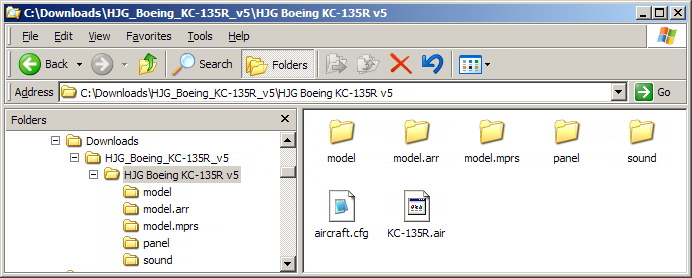
First of all, download the KC-135R base file (HJG_Boeing_KC-135R_v5.zip) from my previous link. Extract the file to a Temp folder & paste the HJG Boeing KC-135R v5 folder it contains into your FSX\SimObjects\airplanes folder.
Image

Now I need to you to tell me which texture to download so I can finish my walkthrough.

Re: Hjg help

PostPosted: Wed Nov 04, 2009 7:04 am
by manesag
It's the 22nd airbase for 2004 era also known as the third last one

Re: Hjg help

PostPosted: Wed Nov 04, 2009 7:13 am
by Hagar
It's the 22nd airbase for 2004 era also known as the third last one

The third file from the bottom is the USAF 452nd AMW (2006). I don't think that's the one you mean. What's the file name? I don't have the time to mess around downloading all the files.

PS. Never mind. I found it. I'll do the walkthrough later.

Re: Hjg help

PostPosted: Wed Nov 04, 2009 10:35 am
by Hagar
To continue: I'm assuming you have the KC-135R base file installed as per my earlier instructions. Also that you have downloaded the texture file named kc-135r_usaf_2004_61-0293.zip.

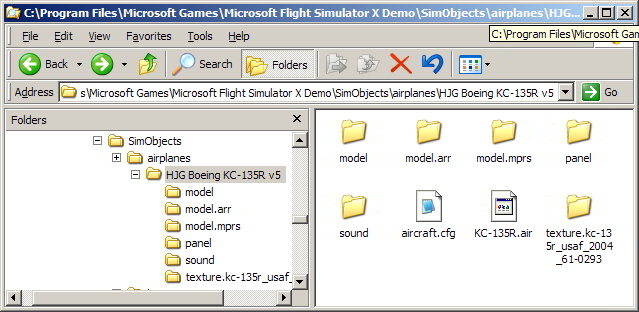
Extract kc-135r_usaf_2004_61-0293.zip & find a folder named texture.kc-135r_usaf_2004_61-0293. Paste this folder into the main folder of the KC-135R like so.
Image

Now you need to edit Aircraft.cfg to add the new variation to it.
Find the file named add to aircraft.txt in the texture download & open it in Notepad. Select all the text & copy it (Edit/Copy).
Open Aircraft.cfg in Notepad & paste (Edit/Paste) the text into it like this. (The copied text is in blue.)


[font=Courier][size=14]// Add your [fltsim.xx] sections here.
// Remember to start with 0 (zero).
// Copyright Historic Jetliners Group. No uploading of HJG materials to any website without prior

approval.

[fltsim.xx]                        // Change "xx" to next number in sequence starting from 0
title=HJG KC-135R USAF 22nd ARW 2004
sim=KC-135R
model=arr
panel=
sound=
texture=kc-135r_usaf_2004_61-0293
kb_checklists=
kb_reference=
visual_damage=1
description=HJG Boeing KC-135R
ui_manufacturer=Boeing
ui_type=KC-135R
ui_variation=USAF 22nd ARW (2004)
atc_id=61-0293
atc_airline=AIR FORCE
atc_flight_number=293
atc_heavy=0
atc_parking_codes=
atc_parking_types=MIL_CARGO,CARGO,RAMP


[General]
performance=Length: 136.1 ft\nWing span:

Re: Hjg help

PostPosted: Wed Nov 04, 2009 3:33 pm
by Hagar
I already installed the kc135r
2 months ago I asked If I can take that texture and use it on b707-700 cause with tail
boom max speed goes down

I answered your question in my first reply. I've obviously been wasting my time.

The quickest way to try it is to paste the MDL & model.cfg files from the Model folder of the Boeing 707-700 into the Model.arr folder of the KC-135R.

Re: Hjg help

PostPosted: Wed Nov 04, 2009 4:19 pm
by manesag
Ah Ty I copied the aircaft of it and copied it into te b707-700 cfg Ty

Re: Hjg help

PostPosted: Wed Nov 04, 2009 9:32 pm
by manesag
tired it but textures don't fully work need help

Re: Hjg help

PostPosted: Thu Nov 05, 2009 4:30 pm
by manesag
Hagar can u plz help me I need help with this plane

Re: Hjg help

PostPosted: Thu Nov 05, 2009 5:17 pm
by Hagar
I told you I didn't think it's possible in my first reply. Textures will usually only fit the aircraft they're intended for. The 22nd ARW textures go with the KC-135R model.