Page 1 of 1
Flying Tips Font is unreadable.

Posted:
Sat Oct 31, 2009 12:00 pmby Rockson 31
Hey All,
I did a search for flying tips font but, I found no help. I remember reading about the font but, can't find it again.
Just need to restore the right font.
Any help would be great.

TIA
Cliff
Re: Flying Tips Font is unreadable.
Posted:
Sat Oct 31, 2009 4:06 pmby B-Valvs
You're not giving much info. Does it look like this?
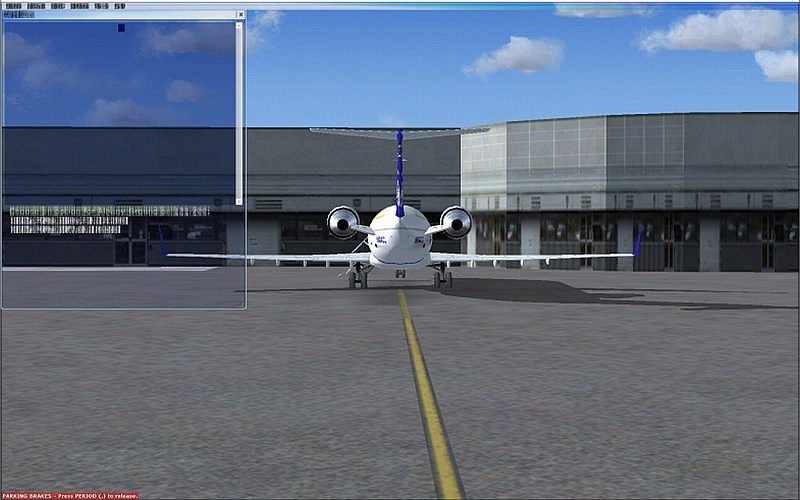
If so, go into your graphics card's settings and turn up the mip map detail.
8-)
Re: Flying Tips Font is unreadable.
Posted:
Sat Oct 31, 2009 4:23 pmby Rockson 31
Sorry,
It's the little boxes that appear when the cursor is over a gage or switch.
I'll try the MIPs, because I was playing around with the settings a bit.
Thanks
Re: Flying Tips Font is unreadable.
Posted:
Sat Oct 31, 2009 4:28 pmby B-Valvs
Okay. Don't touch the graphics card. It's in the settings.
8-)
Re: Flying Tips Font is unreadable.
Posted:
Sat Oct 31, 2009 4:51 pmby DeepSpace
Are you talking about the tool tips (that what it is called

) appearing as someone ran a black marker pen through them? As far as I know it's aircraft specific (i.e it depends on the aircraft/panel you are using at the moment). In some of the aircraft it's ok, in the others it's not.
Re: Flying Tips Font is unreadable.
Posted:
Sat Oct 31, 2009 5:20 pmby Dave W
I have the same problem with 'Tool Tips' from time to time. I have no solution but it does seem to go away after a bit.
Re: Flying Tips Font is unreadable.
Posted:
Sun Nov 01, 2009 11:05 pmby Cee74E
Don't know if this helps, but I have noticed that the problem goes away when i run FSX in a window rather than full screen on my machine.
To clarify, the problem is that the tool tips txt looks overly bold like someone wrote it with a sign marker instead of a fine point pen.
Re: Flying Tips Font is unreadable.
Posted:
Mon Nov 02, 2009 1:47 pmby Tech Diver
I don't know if this applies to you, but I have an ATI Radeon 4870 and can reproduce it at will. Using the Catalyst Control Center if I disable "Catalyst A.I." I get it. Enable it and it's back to normal.
Peter
Re: Flying Tips Font is unreadable.
Posted:
Mon Nov 02, 2009 4:54 pmby basys
Hi Folks
Blurry fonts are actually dithering of the viewport,
and due to your sliders being set too high
for your PC's capabilities in the current situation.
Click the FSX config settings' "reset to default" button.
For any slider you subsequently increase
back off one of your less preferred options.
HTH
ATB
Paul