Page 1 of 2
Heading Indicator Help

Posted:
Sat Aug 29, 2009 6:24 amby Sky_Rookie
Hi there, Im new to FSX and im struggling to graps how the Heading Indicator works.
I have 3 lines within it, Blue, Green and Pink.
Can someone explain exactly what they do because i cant see anything in FSX that explaines this clearly.
I have a fair idea the Pink line is the course i should be taking, but what are the other?
Even when i follow the pink line, my distance from the destination actually increases rather than decreases.
Im really confused here, because on the edge of the compass on the tol left of the screen has a green arrow and when i line up with this my course is fixed, but as i rwach 5nm, it moves and goes yellow im going further away from the destination.
The compass and the Heading Indicator dont seem to correspond at all.
Sky_Rookie
Re: Heading Indicator Help
Posted:
Sat Aug 29, 2009 6:37 amby Fozzer
The Heading indicator contains up to three needles, two of which respond depending upon the Radio Beacon Frequency you have selected, VOR Beacon and NDB Beacon.
The course (heading, with the orange arrow) is selected by rotating the Heading Bug to track the selected Radio Beacon.
As you pass the Beacon(s) the needle(s) will swing round...from "TO" to "FROM".
Have a peek at Brett Henderson's Course on Radio Navigation...

...!
Paul...G-BPLF...FS 2004.... 8-)...!
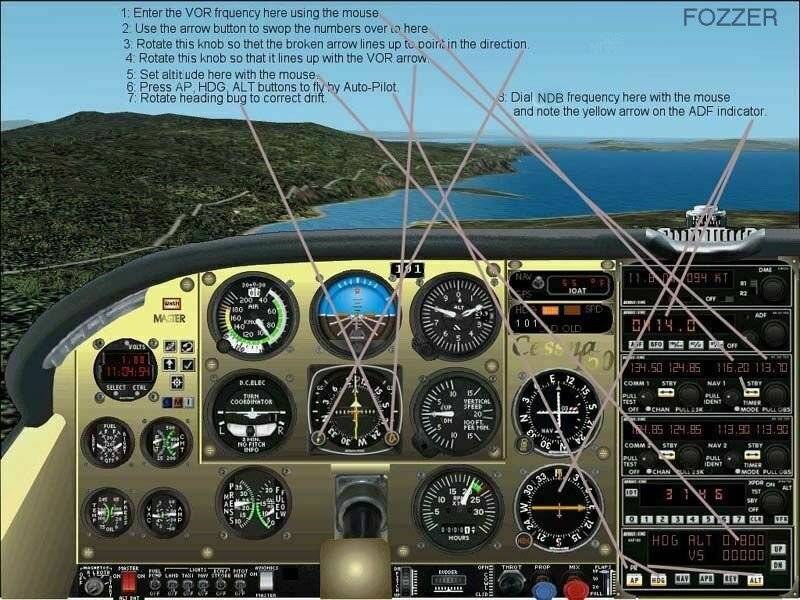
Re: Heading Indicator Help
Posted:
Sat Aug 29, 2009 7:38 amby Sky_Rookie
Cheers for that, these are term im not even familiar with, so i have plenty of learning to do.
Are there any diagrams that explain this at all?
Re: Heading Indicator Help
Posted:
Sat Aug 29, 2009 7:47 amby Sky_Rookie
Sorry I just realised you have attached a picture for me!!
Mine is in the MFD and looks very different?
I have tried to attach an image but ive had no joy for some reason.....
Re: Heading Indicator Help
Posted:
Sat Aug 29, 2009 8:49 amby Fozzer
Sorry I just realised you have attached a picture for me!!
Mine is in the MFD and looks very different?
I have tried to attach an image but ive had no joy for some reason.....
In FS 2004 we have what is called "The Learning Centre" which is where we find all this sort of all information...
..!
Radio Navigation...
Paul...G-BPLF..FS 2004....FS Navigator.... 8-)...!
Re: Heading Indicator Help
Posted:
Sat Aug 29, 2009 9:10 amby Brett_Henderson
Ok.. slow down. ..
A, multi function display (MFD) is a complex piece of equipment. You aren't gonna make heads-nor-tails out of it, until you understand all the functions, individually
Re: Heading Indicator Help
Posted:
Sat Aug 29, 2009 11:38 amby Sky_Rookie
Brett, thanks for that and your right, its too complicated for me at this point!!
Ill go through all the instruments individually and when i grasp how they work, then hopefuly things will make more sense to me.
Do you have any suggestions on a good started plane i could use to get me going?
Re: Heading Indicator Help
Posted:
Sat Aug 29, 2009 11:48 amby Brett_Henderson
The default Cessna 172, has two VORs, an ADF, and is ILS capable.. More than adequate for learning

(leave that pesky GPS off)
Re: Heading Indicator Help
Posted:
Sat Aug 29, 2009 12:35 pmby Sky_Rookie
Brett, cheers for that!!
I have found it in one of the tutorials under Introduction to Mountain Flying, heres hoping thigs become a little clearer!! Im not sure how to turn the GPS off, but ill try and figure it out
Thanks again Brett
Re: Heading Indicator Help
Posted:
Sat Aug 29, 2009 12:39 pmby Brett_Henderson
You're welcome
You don't have to turn the GPS off.. just don't use it at all.
Re: Heading Indicator Help
Posted:
Sat Aug 29, 2009 12:49 pmby Sky_Rookie
Ill play about with it and see how i do, im sure this will make things a lot easier for me
Re: Heading Indicator Help
Posted:
Sat Aug 29, 2009 12:54 pmby jwenham
[quote]Ok.. slow down. ..
A, multi function display (MFD) is a complex piece of equipment. You aren't gonna make heads-nor-tails out of it, until you understand all the functions, individually
Re: Heading Indicator Help
Posted:
Sat Aug 29, 2009 1:01 pmby Fozzer
Now that you have hired your brand-new Cessna 172 tricycle Trainer, stay with it, and use it to practice for many weeks until you learn everything you need to know about controlling and operating it safely and successfully, and studying the Aircraft Owners Handbook....
...before you move on to anything else!...
...!
Boeing 747's, etc, are in the far distant future!...
...!
Paul..G-BPLF...FS 2004...(...and a cute little Cessna 150 Trainer)...
...!
Re: Heading Indicator Help
Posted:
Sat Aug 29, 2009 1:16 pmby Capt.Propwash
here is the correct link that Bretts Signature should be pointing to instead of the forums home page.
just follow the outlined tutorials, and you should be up and flying in no time.
http://205.252.250.26/cgi-bin/yabb2/YaB ... 113107/6#6
Re: Heading Indicator Help
Posted:
Sat Aug 29, 2009 1:24 pmby Brett_Henderson
Thanks Capt. .. I fixed the link