Page 1 of 1

Cleaning Up System Processes

PostPosted: Thu Aug 20, 2009 7:58 am
by DazzleStar
First of all, I wasn't sure where to put this, so I put it in FSX as that is the game I am trying to run well. Just to clarify.

Re: Cleaning Up System Processes

PostPosted: Thu Aug 20, 2009 4:43 pm
by mjrhealth
A service is really ony an issue when its doing something , and as you can see, except for sytem idle doing what its supposed to do , nothing else seems to be using any time. You can probaly stop the lexmark services, abd remove them, but i cant figure out why they would be there un less at some stage someone had a lexmark printer insatlled, check you softare uninstall list see if its in there.

Re: Cleaning Up System Processes

PostPosted: Fri Aug 21, 2009 5:06 am
by basys
Hi Folks

Darrell -
Does that screenie show your processes
after you'd "optimized" XP ?        :o

At least ensure you stop the following - antivirus, defrag, ICS, JavaQS, user-switching.
Uninstall that Lexmark printer.


Suggest downloading Ken Salter's AlacrityPC


CPU % processes useage is really only useful as a static load indicator.
Unrequired services may - hog resources, fragment your memory footprint, intermitently impact FPS.

For further info, see BlackViper.com


HTH
ATB
Paul

Re: Cleaning Up System Processes

PostPosted: Fri Aug 21, 2009 10:41 am
by DazzleStar
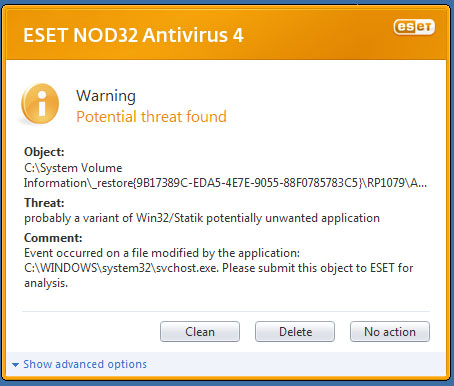
Talking about all of those 'svchost.exe' in my first post, by coincidence this came up the night when I took the screen of my processes:

Image

No idea where that came from, I have never seen it before.

And basys yes I had optimized my PC. Thanks for the help.

Re: Cleaning Up System Processes

PostPosted: Fri Aug 21, 2009 11:33 am
by NickN
25 running processes as long as they are not resource hogs is excellent .. looking at that list I see nothing wrong. You could even get rid of the java app by setting that in the Control Panel- Java "Java Quick Starter" under the advanced Misc list, uncheck. You can also disable automatic Java updates too if so desired from the same interface


You DO NOT NEED AlacrityPC or BLACK VIPER for anything

Now.. with the new NOD32 they have made some changes. One is that NOD32 checks Windows Update too frequently and they are aware of the issue.. they released the method to change the way NOD32 scans here:

http://kb.eset.com/esetkb/index?page=co ... d=SOLN2196

Next, I DISABLE the 'Potentially Unwanted Applications" feature in NOD32 simply because its NOT SMART and can point to false positives from time to time. You can leave it enabled if you wish. What it is showing above is at some point it would appear system restore may have backed up something nasty.. I cant say that is true or not.  

Svchost.exe is a NORMAL FUNCTION of Windows. It is used to launch several services/apps bundled together at the same time.

System Restore is another feature I completely disable which in turn DELETES all the restore points and cleans the disk of that space. I highly suggest people learn how to use backup and image software and get rid of system restore which as far as I am concerned is nothing but a resource hog.

Re: Cleaning Up System Processes

PostPosted: Fri Aug 21, 2009 11:44 am
by SubZer0
You DO NOT NEED AlacrityPC or BLACK VIPER for anything

+1... ;)

Especially BLACK VIPER... That's a HUGE no-no... :o

Re: Cleaning Up System Processes

PostPosted: Fri Aug 21, 2009 1:23 pm
by DazzleStar
System Restore is another feature I completely disable which in turn DELETES all the restore points and cleans the disk of that space. I highly suggest people learn how to use backup and image software and get rid of system restore which as far as I am concerned is nothing but a resource hog.


I probaby will turn it off for that extra disk space when I have finished tweaking and installing extra programs. But for now I'll leave it on, just to be safe...

Re: Cleaning Up System Processes

PostPosted: Fri Aug 21, 2009 2:14 pm
by DazzleStar
Also removed the two Lexmark services by removing 'print spoolers' dependency on them. Happy with processes now!  ;D

Re: Cleaning Up System Processes

PostPosted: Fri Aug 21, 2009 5:08 pm
by basys
Hi Folks

DazzleStar -
You have - antivirus, defrag, ICS, JavaQS, & user-switching, all still running,
(there are 8 unnescessary processes visibly listed in your screenie).
Your PC is not optimized for running FSX.

Nick -
I suggested Alacrity as a numpty-proof option,
given the o/p's belief that his configuration was optimized.

As the o/p has his machine setup for multiple-users
and that the screenie specifically identifies 'Darrell' as owning specific processes,
(inferring other user's may also be logged-on),
it'd be interesting to see what, (if any),
other user's processes are also running.

Black Viper was suggested for info,
to aid identify the process origins/purposes.

Particularly interested why some of you believe
info at Black Viper is a 'a HUGE no-no... '

PS
If you've got the network connections icon
active in your system tray
recommend you disable it from displaying in the system tray,
as it continually disk-reads the registry,
and can cause FSX stutters.

HTH
ATB
Paul

Re: Cleaning Up System Processes

PostPosted: Fri Aug 21, 2009 9:11 pm
by NickN
His machine is fine Paul

Re: Cleaning Up System Processes

PostPosted: Sat Aug 22, 2009 4:20 am
by DazzleStar
Hi Folks

DazzleStar -
You have - antivirus, defrag, ICS, JavaQS, & user-switching, all still running,
(there are 8 unnescessary processes visibly listed in your screenie).
Your PC is not optimized for running FSX.

Nick -
I suggested Alacrity as a numpty-proof option,
given the o/p's belief that his configuration was optimized.

As the o/p has his machine setup for multiple-users
and that the screenie specifically identifies 'Darrell' as owning specific processes,
(inferring other user's may also be logged-on),
it'd be interesting to see what, (if any),
other user's processes are also running.

Black Viper was suggested for info,
to aid identify the process origins/purposes.

Particularly interested why some of you believe
info at Black Viper is a 'a HUGE no-no... '

PS
If you've got the network connections icon
active in your system tray
recommend you disable it from displaying in the system tray,
as it continually disk-reads the registry,
and can cause FSX stutters.

HTH
ATB
Paul


They are the only processes on the whole PC. I also know that my PC will never be great for FSX, but from Nick's guide I have managed to get dense autogen and scenery complexity, with most other sliders to the right, on a 2.66GHz Pentium 4, 256mb Nvidia GeForce 6200 and 1Gb of memory! To be honest, I'm happy with it running on that setup, and would definetely class it as optmized!.  ;D

And if I get rid of network connnections icon, how am I supposed to use the internet?

Thank you very much,
DazzleStar.  ;)

Re: Cleaning Up System Processes

PostPosted: Sun Aug 23, 2009 9:58 am
by Skittles
I use "Process Explorer" It's powerful and free. It shows you what processes are running through those scvhost.exe. Check it out, I love and will never use TaskManager or Windows Services again.

Re: Cleaning Up System Processes

PostPosted: Sun Aug 23, 2009 11:19 pm
by Capt.Propwash
PS
If you've got the network connections icon
active in your system tray
recommend you disable it from displaying in the system tray,
as it continually disk-reads the registry,
and can cause FSX stutters.

HTH
ATB
Paul


And if I get rid of network connnections icon, how am I supposed to use the internet?

Thank you very much,
DazzleStar.