Page 1 of 1

installing aircraft

PostPosted: Sun Aug 16, 2009 8:59 pm
by jp100184
Hello

I am trying to install this file simobjects\airplanes\emb1905x\. I have followed all the instructions as indicated in the read me file for vista users including disabling user acc control. I am able to extract the files but they do not appear in fsx, I am having similar results with similar files.

thanks
JP

Re: installing aircraft

PostPosted: Sun Aug 16, 2009 9:34 pm
by Staiduk
JP - Readme files can sometimes be a bit...confusing. On this forum, look up to the FSX FAQ page - all the answers you need are there. :)

Re: installing aircraft

PostPosted: Sun Aug 16, 2009 11:30 pm
by Capt.Propwash
dumb question, but could you copy/paste the read me to a post on here?? there might be something so small that you might have missed.

or better yet, what craft is it, and where did you find it ? link please.

Re: installing aircraft

PostPosted: Mon Aug 17, 2009 12:09 am
by jp100184
dumb question, but could you copy/paste the read me to a post on here?? there might be something so small that you might have missed.

or better yet, what craft is it, and where did you find it ? link please.


Hi

Not sure how to link it cuz its doesn't have a url but here are the instructions copy pasted.


We recommend Winzip to extract these files, other zip tools may not do the job.

Windows Vista users may need to temporarily turn OFF User Account Control ( in the Security Center) in order to enable creation of new folders.

................................................................................

1. Navigate to where you downloaded the EMB190_X.zip file

2. Double click with your mouse on the EMB190_X.zip file.

3. WINZIP should open and show all the files inside the zip.

4. Press CTRL A and this will select all the files.

5. Click on 'Extract' in the Main Tool Bar above.
( Make sure the "Use folder names" box is checked)

6. Type in, or select, your path in the pop-up dialogue box....
The default path in English version is C:\program files\microsoft games\microsoft flight simulator X

If you have amended your FSX location, or if you use a non English version of Windows, ...then ...

.... browse to your own FSX Location

Re: installing aircraft

PostPosted: Mon Aug 17, 2009 9:07 am
by Hagar
The file is set up to extract to the FSX root directory folder (Microsoft Flight Simulator X) not FSX\SimObjects\airplanes.

Everyone has their own pet methods for installing addons but I would never recommend extracting zipfiles direct to any version of FS. I can almost guarantee that this is the cause of your problems.

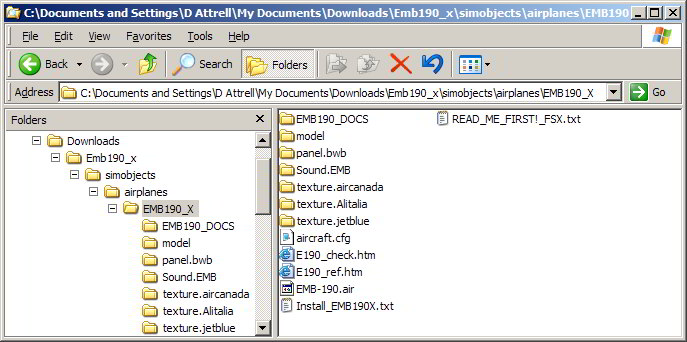
Installation of a complete aircraft should be no different in WinXP or Vista. Extract the downloaded file to a Temp folder first so you can see what you've got. Then paste the contents to their appropriate locations in FS. In this case you should have a folder named EMB190_X in your FSX\SimObjects\airplanes directory. This folder should directly contain the following subfolders

Image

Re: installing aircraft

PostPosted: Mon Aug 17, 2009 9:56 am
by jp100184
Thanks Hagar, I will give this a try and post the results.

cheers
JP

Re: installing aircraft

PostPosted: Mon Aug 17, 2009 2:44 pm
by jp100184
Hmm no luck, I don't seem to have the EMB190_docs file??? Is that the temp that you created?? Anyway maybe I need to get rid of winzip and cleanup my airplanes folder. You mentioned that winzip by default extratcs it to another folder, I made sure to change it to mic games/fsx/simobjects/airplanes before extracting so that is not the problem. It seems as though winzip throws the files all over the place though instead of keeping them in the folder.

Anyway I figured this stuff would be much easier, can't believe I am having so much trouble.

what can you do??

thanks
JP

Re: installing aircraft

PostPosted: Mon Aug 17, 2009 3:02 pm
by Hagar
Hmm no luck, I don't seem to have the EMB190_docs file??? Is that the temp that you created??

The Docs folder is not important. I've added nothing. Perhaps you have a different file. Mine is named EMB190_X.zip. I downloaded it to my My Documents\Downloads folder & extracted it to the same location.

You mentioned that winzip by default extratcs it to another folder, I made sure to change it to mic games/fsx/simobjects/airplanes before extracting so that is not the problem.

I mentioned nothing about WinZip. Different versions vary. I've had WinZip 7.0 for many years & always use the right-click "Extract to Folder" option to extract files to the same directory I download them to. (The "Extract All" option will do the same thing using the Windows default compressed folders utility.)

It sounds like you extracted the file to the wrong location as I tried to explain before. You should have directed it to the main FSX folder itself NOT FSX\SimObjects\airplanes. I suspect the extracted folder you're looking for is buried inside a folder named simobjects in your FSX\Simobjects\airplanes folder. This is one reason I would never recommend extracting files direct to FS.

It seems as though winzip throws the files all over the place though instead of keeping them in the folder.

Make sure you have the "Use Folder Names" option enabled.

Re: installing aircraft

PostPosted: Mon Aug 17, 2009 5:17 pm
by Capt.Propwash
which beech 1900D are you trying to install?? i see 6...


my opinion, for the all of .0000001 cent that it is worth, Delete/Uninstall Winzip all together.

Re: installing aircraft

PostPosted: Tue Aug 18, 2009 6:56 am
by Fuad31
Hmm no luck, I don't seem to have the EMB190_docs file??? Is that the temp that you created?? Anyway maybe I need to get rid of winzip and cleanup my airplanes folder. You mentioned that winzip by default extratcs it to another folder, I made sure to change it to mic games/fsx/simobjects/airplanes before extracting so that is not the problem. It seems as though winzip throws the files all over the place though instead of keeping them in the folder.

Anyway I figured this stuff would be much easier, can't believe I am having so much trouble.

what can you do??

thanks
JP


U r complicating things. As Hagar suggested, DO NOT unzip direct into FSX. Folder structure preserved in the zip can be different from your FSX folder structure to run the plane.

Follow exactly what Hagar said. Should work. Unzip externally and then see what should go where. Zips contain extra infos that are not needed to be in FSX.

Good luck!

Re: installing aircraft

PostPosted: Tue Aug 18, 2009 7:00 am
by Fuad31
[quote]

To fix THAT problem, create a new folder called EMBRARER 190 and just stuff everything in that folder that belongs to the E190 and try running FSX again.

Re: installing aircraft

PostPosted: Tue Aug 18, 2009 9:54 am
by jp100184
hey guys,

So I decided to give winzip the boot, considering I was having a lot more success with this stuff before installing it. I then proceeded to cleanup my files and got rid of the useless ones. I then simply copy pasted emb1905x into my simobjects/airplanes folder and that was all there was to it. Seems as though it wasn't the process itself that was complicated but rather myself who complicated it lol.

Anyway thanks to all who replied, I am very happy with the help on this forum and I am sure I will need it again in the near future.  ;D ;D

cheers
JP

Re: installing aircraft

PostPosted: Tue Aug 18, 2009 5:53 pm
by Hagar
Glad you figured it out JP. ;)