Page 1 of 1

Historic jetliners help

PostPosted: Thu Jul 02, 2009 11:56 am
by manesag
i want a e8 a recon version of the b707 i looked at historic jet liners group and i downloaded it and unzipped it. i looked at the read me and then the installation i read it didnt get it so i tried to install it it didnt pop up how to i get it to work in FSX

Re: Historic jetliners help

PostPosted: Thu Jul 02, 2009 2:14 pm
by Alejandro Rhodes
This will sound weird specially coming from me

You can try this true FSX model(made using the real FSX-SDK Tools) if you don't like it then delete it

Re: Historic jetliners help

PostPosted: Mon Jul 06, 2009 6:20 am
by Flying Mouse
[quote]This will sound weird specially coming from me

You can try this true FSX model(made using the real FSX-SDK Tools) if you don't like it then delete it

Re: Historic jetliners help

PostPosted: Mon Jul 06, 2009 10:07 am
by manesag
I am just saying but doesnt anyone know what I want or need! I have that lovely B707. I want the Boeing E-8, it is a Boeing 707-300 with a small canoe shaped recon equipment under the cockpit.

Re: Historic jetliners help

PostPosted: Mon Jul 06, 2009 10:43 am
by Hagar
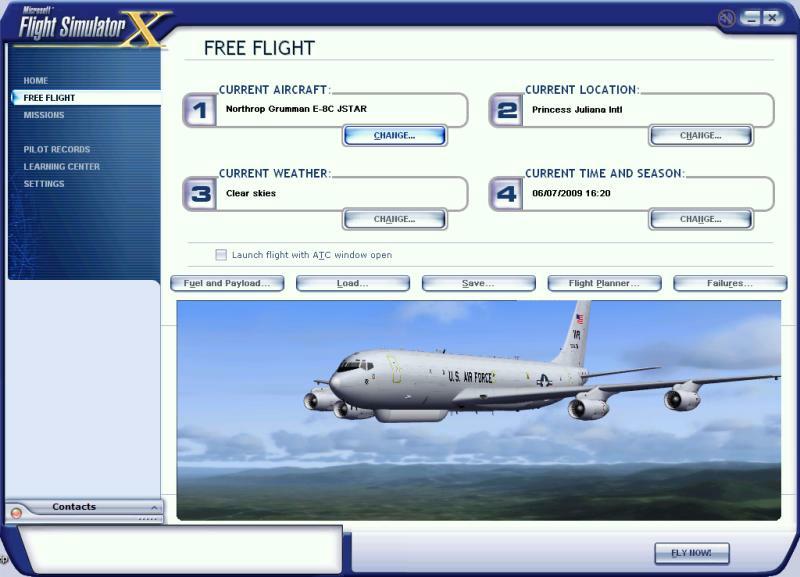
You mean this one?
Image

Note it's intended for FS9 but it should work in FSX. It has no VC.

Go here & download the Base Pack. http://www.simviation.com/hjg/aircraft/boeing/e-8.htm

Install it to FSX in the usual way. Open Sound.cfg in Notepad & change this;

[fltsim]
alias=B737_400\sound

to this;

[fltsim]
alias=B737_800\sound

Exit Notepad saving changes when prompted.

Now you need a texture. Download one of the repaints & read the instructions carefully. The above shot is the first one on the above link. The file is named e-8c_usaf_1997_92-3290.zip. Extract it & paste the folder named Texture.usaf_1997_e8c_92-3290 into your HJG Boeing E-8C v6 folder.

Finally, open Aircraft.cfg in Notepad & add the new [fltsim.xx] entry to it. As this is your first repaint it should look like this. (The added text is in Bold type)

[font=Arial][size=14]// Add your [fltsim.xx] sections here.
// Remember to start with 0 (zero).
// Copyright Historic Jetliners Group. No uploading of HJG materials to any website without prior approval.

[fltsim.0]                        // Change "xx" to next number in sequence starting from 0
title=Northrop Grumman/USAF E-8C-JSTAR 3290 circa 1997
sim=E-8C-JSTAR
model=
panel=
sound=
texture=usaf_1997_e8c_92-3290
kb_checklists=
description=Northrop Grumman/ USAF E-8C Joint Surveillance Target Attack Radar System (JSTARs). This aircraft is a highly modified Boing 707-320C used by the US AirForce and US Army in support of US ground forces, providing detailed ground target and tracking information deep within enemy lines. The fleet of E-8C's is solely based at Robins AFB, GA. The JSTARs platorm is operated by the 116th Air Control Wing. The Airframes were bought from different operators around the globe, and modified to E-8C standards.\nAircraft 3290 was the 2nd production aircraft. She was delivered to Qantas in 1967 as B707-338 VH-EBV (cn 19295).She was operated by Zambia Airways (9J-AEL), Trans Arabian Air Transport (ST-ALP) and also as N4115J before becomming part of the JStar fleet.
ui_manufacturer=Northrop Grumman
ui_type=E-8C JSTAR
ui_variation=92-3290 circa 1997
atc_id=923290
atc_heavy=1
atc_airline=Air Force
atc_flight_number=3290

[General]
performance=Length:

Re: Historic jetliners help

PostPosted: Mon Jul 06, 2009 11:16 am
by manesag
Thats just what i needed. but do i copy everything you said and you can download a sound and panel. And it says in the readme if you are using fsx delete the aircraft.cfg and rename fsxaircraft.cfg to aircraft.cfg is that true?

Re: Historic jetliners help

PostPosted: Mon Jul 06, 2009 12:56 pm
by Hagar
Thats just what i needed. but do i copy everything you said and you can download a sound and panel.

Copy the text from the text file in with the repaint & paste it into Aircraft.cfg. You can try the panel & sound but the gauges might not be compatible.

And it says in the readme if you are using fsx delete the aircraft.cfg and rename fsxaircraft.cfg to aircraft.cfg is that true?

Yes. I missed that. Sorry. Change it before adding the new entry.

Re: Historic jetliners help

PostPosted: Fri Jul 10, 2009 1:59 pm
by manesag
I also want to install the B727-100F Fed ex and the E6B how do i install that??????

Re: Historic jetliners help

PostPosted: Fri Jul 10, 2009 2:12 pm
by Hagar
The HJG aircraft are all configured in the same way. Once you've done one it should be easy enough to figure out.