Page 1 of 1

Strange Sky Glitch

PostPosted: Sat Jun 20, 2009 4:25 pm
by EJW
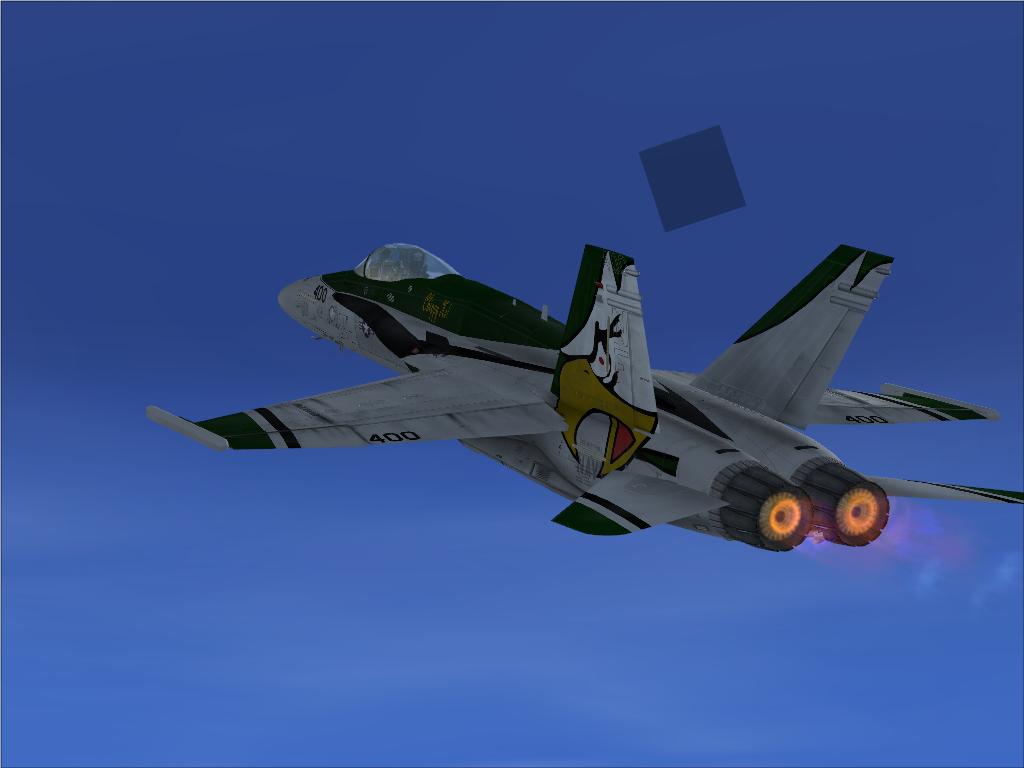
Does anybody know how to fix this?

Image

Thanks!

Re: Strange Sky Glitch

PostPosted: Sat Jun 20, 2009 5:18 pm
by Boikat
Does anybody know how to fix this?

Thanks!


Is it "fixed" in place, or is it "attached" to the aircraft?  If it's "fixed", and you have a Sun, the my guess is that it's the moon, since the sun and moon are the only two textures that are that small and would appear in the sky.

If it's the moon, check your FSX/scenery/textures if you can, and make sure you have 15 moons (moon1-> moon15)  The image in the sim is produced by a white .bmp with a "moon" alpha mask for that particular moons phase.   You can probably also check to see if it's it's the moon by doing a google search for "Moon rise and set times" and finding the appropriated moon rise and set time , add about 20 minutes to "moon rise" ow subtract about twenty munits from "moon set" time, set your sim to that time, and see if the moon shows up.

Re: Strange Sky Glitch

PostPosted: Sun Jun 21, 2009 3:20 am
by EJW
Thanks. Looks like I'm missing moon 15.

Re: Strange Sky Glitch

PostPosted: Sun Jun 21, 2009 6:37 am
by Boikat
Might I suggest:

http://www.simviation.com/simviation/?t ... 63&page=41

High Rez Moon.   :)

It replaces all the moons with higher resolution moons *except* for moon15.  Moon15 in the download is the original image.

Re: Strange Sky Glitch

PostPosted: Tue Jun 23, 2009 7:59 am
by Brando14100
[quote]Might I suggest:

http://www.simviation.com/simviation/?t ... 63&page=41

High Rez Moon.

Re: Strange Sky Glitch

PostPosted: Tue Jun 23, 2009 10:18 am
by NickN
Just a heads up on those moon textures

Although I do agree they are very well done the designer did not mip-map them

That was a mistake as the sim expects mips for those and that can cause strange perf issues although since the textures are not being renedered over a model that impact is no where near as much as un-mipped aircraft textures

Textures that were originally mip-mapped should always remain mipped

Also, I noticed the file moon15 was still 64x64 in that package and had not been changed from default. I reversed moon1 and resaved it as moon 15 to fix that

512x512 @ 1MB per tile means a user lis loading up 14MB to display the moon and not mipped that means from a distance the sim is going to deal with full scale. Being the moon size @ 512x512 is far larger than the image the sim will ever display a better scale would be 256x256 and also mip-mapped therefore the sim will only be loading in physical memory about 5MB, 2/3rds less memory use, and since they are properly mip-mapped the distance views will not render any load on the system.

@ 256x256 that would be a 4x increase in resolution scale from default and the user would not know the differnece between that and 512 since the sim will not display that moon much larger than 128x128

A better way of making this addon would have been to use 256x256, special sharpen passes in photoshop and then mip map them correctly so their final size would be about 340KB per tile (as opposed to 1MB) which is what I did with this package and it looks awesome.

This is not to downplay the authors excellent work... its just a note about addons and what to look for and how to correct them when they may not be quite made to sim spec

Re: Strange Sky Glitch

PostPosted: Tue Jun 23, 2009 10:47 am
by NickN
And one last item


Users can add to their FSX.cfg file the following line:

[SCENERY]
ShowMissingTextureAlert=1


Which I keep enabled at all times.. it tells me when a texture is missing the sim is trying to render and lets me know what the file name is.

Re: Strange Sky Glitch

PostPosted: Tue Jun 23, 2009 11:00 am
by Boikat
I didn't have a good thin "moon" for moon 15 :-[

This "mip mapping" would get rid of the "sparklies"?

Re: Strange Sky Glitch

PostPosted: Tue Jun 23, 2009 12:17 pm
by NickN
I didn't have a good thin "moon" for moon 15 :-[

This "mip mapping" would get rid of the "sparklies"?


Would you like to try the set I made from them?

I can post a link here

The image work you did was great!   :)

Re: Strange Sky Glitch

PostPosted: Tue Jun 23, 2009 10:06 pm
by Boikat
I just got home from work, and I'll give it a try.

Re: Strange Sky Glitch

PostPosted: Wed Jun 24, 2009 2:28 am
by NickN
Its your package.. I fixed.. you re-upload as yours

enjoy


:)

Re: Strange Sky Glitch

PostPosted: Wed Jun 24, 2009 7:33 am
by Boikat

Its your package.. I fixed.. you re-upload as yours

enjoy


:)


Crdit will go where credit is dues.  Thanks again!   :)

Re: Strange Sky Glitch

PostPosted: Thu Jul 02, 2009 6:08 am
by carcher126


[SCENERY]
ShowMissingTextureAlert=1


Which I keep enabled at all times.. it tells me when a texture is missing the sim is trying to render and lets me know what the file name is.


Thanks Nick for the info but please excuse my ignorance but what can we do when a missing texture is 'found' ? Is it a modellers mistake or can 'we' rectify it some way? I have a number of sceneries that produce the 'can not load xxx.bmp' window come up and its annoying. None of the missing textures are in the scenery's folder so I would love to be able to correct it but fear I cant.  :(

Any help would be appreciated by the scenery guys here.

Thanks

carcher126