Page 1 of 1

Help to install grand teton

PostPosted: Thu Jun 04, 2009 12:41 pm
by ovahare
Hi does anyone know how to install grand teton it just comes with the scenery files and no textures....

thank you

Re: Help to install grand teton

PostPosted: Thu Jun 04, 2009 12:48 pm
by ShaneG_old
Create a folder called "Grand Teton" and inside that folder make another folder called 'scenery' and then place the .bgl files from the download in that folder.

You can now add the new 'Grand Teton' folder to your Addon Scenery as normal.  :)

Re: Help to install grand teton

PostPosted: Fri Jun 05, 2009 9:13 pm
by jimm57
I have the same problem with the Tetons. I made the dir, made a scenery dir, added bgls 1 - 7. When I go to add scenery, I nav to Addon scenery, tetons, scenery, but the bgls dont show up. What gives?

Thanks
Jim

Re: Help to install grand teton

PostPosted: Fri Jun 05, 2009 9:26 pm
by ShaneG_old
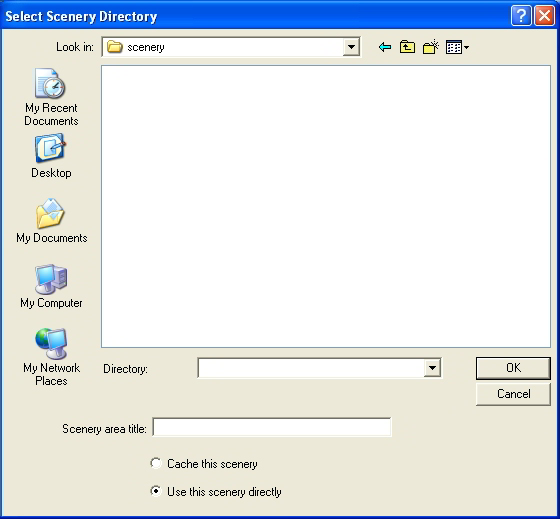
You won't see the .bgl files themselves from the add new area screen.

Image


Is it not letting you add it?

the path should be :/FSX/Addon Scenery/Grand Teton/scenery

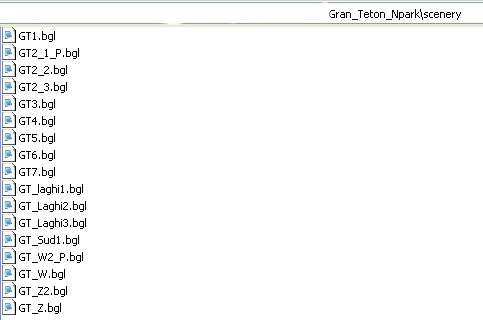
and these are all of the bgl files that should be in the 'scenery' folder:

Image


If you were able to add the area, start at Jackson Hole Wyoming, and you will be at the foot of the scenery. ;)

Re: Help to install grand teton

PostPosted: Sat Jun 06, 2009 1:39 am
by Hagar
I have the same problem with the Tetons. I made the dir, made a scenery dir, added bgls 1 - 7. When I go to add scenery, I nav to Addon scenery, tetons, scenery, but the bgls dont show up. What gives?

Thanks
Jim

You've gone a step too far. Select the folder named tetons.

Re: Help to install grand teton

PostPosted: Mon Jun 08, 2009 9:43 am
by grizzard
I too had the same dilemma until I figured out (from ShaneG's jpg) that you NEED to go into the SCENERY LIBRARY in SETTINGS after you have created the proper directories under the Addon Scenery folder, and then click on ADD AREA, and then navigate to the Grand Teton folder you just added. You can then move it to the priority you wish, if you want ....  

This may be common knowledge to some, but I had no idea this was one of the steps needed, and much of the Addon Scenery files available online fail to mention this step.   I went through all kinds of hoops before I finally stumbled onto this.  ;D ;D  Of course I'm sure there are instructions for this ...........  somewhere!!   :-[