How to make the jetways work with the Posky 777
 Posted: Thu Dec 04, 2008 10:40 pm
Ever wanted the jetways in FSX to work with your Posky 777?
All you need to do is edit your aircraft.cfg. Look for the section titled "exits". It should be towards the bottom of the cfg. You will see something like this;
[exits]
number_of_exits = 4
[glow=yellow,2,300]exit_rate.0 = 0.10 ;Percent per second
exit_rate.1 = 0.08 ;Percent per second
exit_rate.2 = 0.10 ;Percent per second[/glow]
exit_rate.3 = 0.08 ;Percent per second
What you do is simply remove the first 3 entries highlighted above. And in place of them, add this;
exit.0 = 0.4, 72.1, -7.0, 8.00,0 //openclose rate percent per second, longitudinal, lateral, vertical positions from datum (feet), type (0=Main 1=Cargo 2=Emergency)
exit.1 = 0.4, 40.5, -7.0, 8.00, 1 //openclose rate percent per second, longitudinal, lateral, vertical positions from datum (feet), type (0=Main 1=Cargo 2=Emergency)
exit.2 = 0.4, -42.30, 9.0, -7, 2 //openclose rate percent per second, longitudinal, lateral, vertical positions from datum (feet), type (0=Main 1=Cargo 2=Emergency)
So now the "exit" section should look like this;
[exits]
number_of_exits = 4
exit.0 = 0.4, 72.1, -7.0, 8.00,0 //openclose rate percent per second, longitudinal, lateral, vertical positions from datum (feet), type (0=Main 1=Cargo 2=Emergency)
exit.1 = 0.4, 40.5, -7.0, 8.00, 1 //openclose rate percent per second, longitudinal, lateral, vertical positions from datum (feet), type (0=Main 1=Cargo 2=Emergency)
exit.2 = 0.4, -42.30, 9.0, -7, 2 //openclose rate percent per second, longitudinal, lateral, vertical positions from datum (feet), type (0=Main 1=Cargo 2=Emergency)
exit_rate.3 = 0.08 ;Percent per second
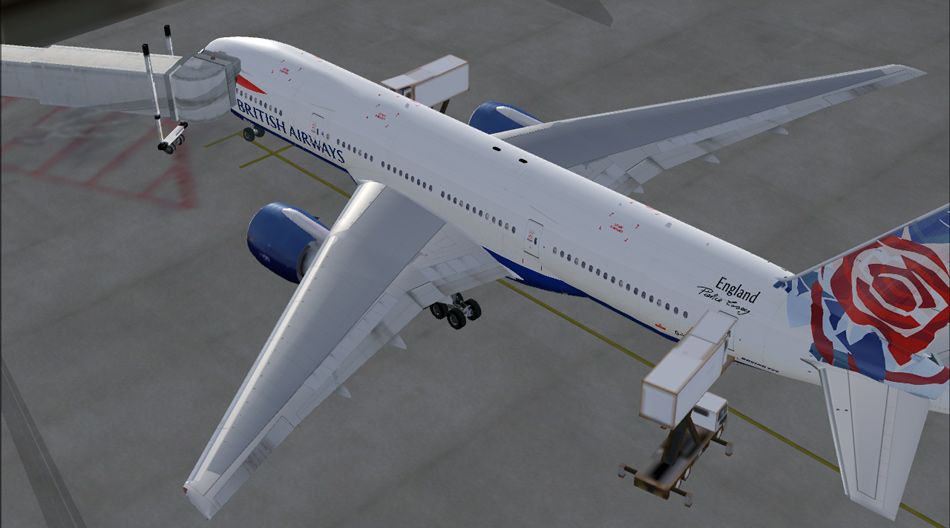
Save the cfg and thats it. The default jetway should now attach to the 1st door on the aircraft. I've only tried this on the 777-200ER, but the others shouldnt be very different, if at all.
It will look like this.
All you need to do is edit your aircraft.cfg. Look for the section titled "exits". It should be towards the bottom of the cfg. You will see something like this;
[exits]
number_of_exits = 4
[glow=yellow,2,300]exit_rate.0 = 0.10 ;Percent per second
exit_rate.1 = 0.08 ;Percent per second
exit_rate.2 = 0.10 ;Percent per second[/glow]
exit_rate.3 = 0.08 ;Percent per second
What you do is simply remove the first 3 entries highlighted above. And in place of them, add this;
exit.0 = 0.4, 72.1, -7.0, 8.00,0 //openclose rate percent per second, longitudinal, lateral, vertical positions from datum (feet), type (0=Main 1=Cargo 2=Emergency)
exit.1 = 0.4, 40.5, -7.0, 8.00, 1 //openclose rate percent per second, longitudinal, lateral, vertical positions from datum (feet), type (0=Main 1=Cargo 2=Emergency)
exit.2 = 0.4, -42.30, 9.0, -7, 2 //openclose rate percent per second, longitudinal, lateral, vertical positions from datum (feet), type (0=Main 1=Cargo 2=Emergency)
So now the "exit" section should look like this;
[exits]
number_of_exits = 4
exit.0 = 0.4, 72.1, -7.0, 8.00,0 //openclose rate percent per second, longitudinal, lateral, vertical positions from datum (feet), type (0=Main 1=Cargo 2=Emergency)
exit.1 = 0.4, 40.5, -7.0, 8.00, 1 //openclose rate percent per second, longitudinal, lateral, vertical positions from datum (feet), type (0=Main 1=Cargo 2=Emergency)
exit.2 = 0.4, -42.30, 9.0, -7, 2 //openclose rate percent per second, longitudinal, lateral, vertical positions from datum (feet), type (0=Main 1=Cargo 2=Emergency)
exit_rate.3 = 0.08 ;Percent per second
Save the cfg and thats it. The default jetway should now attach to the 1st door on the aircraft. I've only tried this on the 777-200ER, but the others shouldnt be very different, if at all.
It will look like this.
