How to make the jetways work with the Posky 777

FSX including FSX Steam version.

How to make the jetways work with the Posky 777

Postby gtirob01 » Thu Dec 04, 2008 10:40 pm

Ever wanted the jetways in FSX to work with your Posky 777?

All you need to do is edit your aircraft.cfg. Look for the section titled "exits". It should be towards the bottom of the cfg. You will see something like this;

[exits]
number_of_exits = 4
[glow=yellow,2,300]exit_rate.0 = 0.10 ;Percent per second
exit_rate.1 = 0.08 ;Percent per second
exit_rate.2 = 0.10 ;Percent per second[/glow]
exit_rate.3 = 0.08 ;Percent per second

What you do is simply remove the first 3 entries highlighted above. And in place of them, add this;

exit.0 = 0.4, 72.1, -7.0, 8.00,0 //openclose rate percent per second, longitudinal, lateral, vertical positions from datum (feet), type (0=Main 1=Cargo 2=Emergency)
exit.1 = 0.4, 40.5, -7.0, 8.00, 1 //openclose rate percent per second, longitudinal, lateral, vertical positions from datum (feet), type (0=Main 1=Cargo 2=Emergency)
exit.2 = 0.4, -42.30, 9.0, -7, 2 //openclose rate percent per second, longitudinal, lateral, vertical positions from datum (feet), type (0=Main 1=Cargo 2=Emergency)

So now the "exit" section should look like this;

[exits]
number_of_exits = 4
exit.0 = 0.4, 72.1, -7.0, 8.00,0 //openclose rate percent per second, longitudinal, lateral, vertical positions from datum (feet), type (0=Main 1=Cargo 2=Emergency)
exit.1 = 0.4, 40.5, -7.0, 8.00, 1 //openclose rate percent per second, longitudinal, lateral, vertical positions from datum (feet), type (0=Main 1=Cargo 2=Emergency)
exit.2 = 0.4, -42.30, 9.0, -7, 2 //openclose rate percent per second, longitudinal, lateral, vertical positions from datum (feet), type (0=Main 1=Cargo 2=Emergency)
exit_rate.3 = 0.08 ;Percent per second

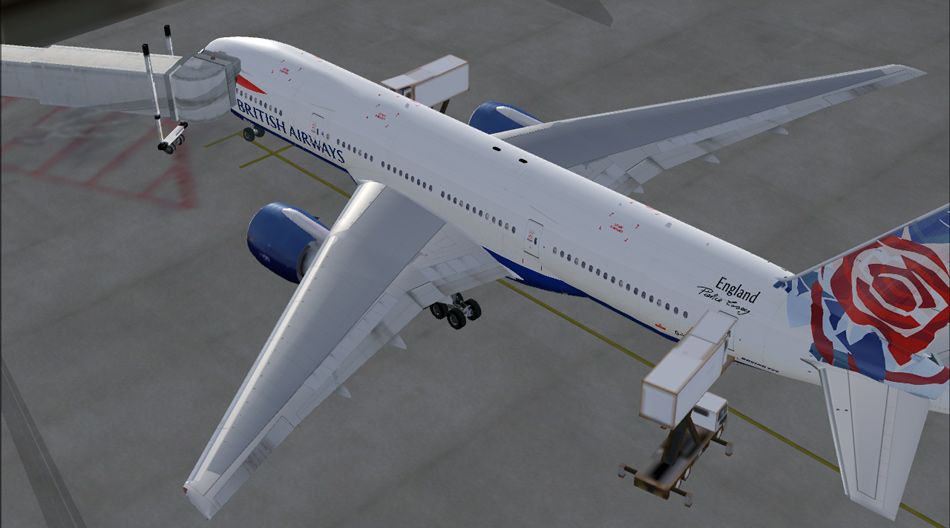
Save the cfg and thats it. The default jetway should now attach to the 1st door on the aircraft. I've only tried this on the 777-200ER, but the others shouldnt be very different, if at all.

It will look like this.
Image
My specs... A hard drive, motherboard, graphics card, some memory, a keyboard, mouse, and monitor - in other words, nothing special.

Image

My Posky
User avatar
gtirob01
Major
Major
 
Posts: 3605
Joined: Fri Jul 20, 2007 11:10 pm
Location: Ft. Walton Beach, FL

Re: How to make the jetways work with the Posky 777

Postby anikun07 » Fri Dec 05, 2008 3:37 pm

Thanks!

What is the setting needed to have jetways?  Is it ground detail that needs to be all the way up?  Also, is there a guide on jetways?  I still haven't really figured out small, med, and heavy yet.  Again, Thanks!
anikun07
2nd Lieutenant
2nd Lieutenant
 
Posts: 91
Joined: Tue Nov 04, 2008 11:51 pm

Re: How to make the jetways work with the Posky 777

Postby Rich H » Fri Dec 05, 2008 4:47 pm

[quote]Thanks!

What is the setting needed to have jetways?
Image

"Politics" is made up of two words, "Poli", which is Greek for "many", and "tics", which are blood sucking insects. - Gore Vidal
User avatar
Rich H
Major
Major
 
Posts: 2017
Joined: Mon Jun 02, 2008 11:40 am
Location: Solihull, U.K.

Re: How to make the jetways work with the Posky 777

Postby Anxyous » Sat Dec 06, 2008 9:26 am

Here's a guide on getting jetways on lower settings.

http://www.simviation.com/cgi-bin/yabb2 ... 799168/7#7

:)
Image
User avatar
Anxyous
Major
Major
 
Posts: 2593
Joined: Mon Dec 25, 2006 4:04 pm

Re: How to make the jetways work with the Posky 777

Postby artifact » Mon Jun 01, 2009 5:11 pm

Hi, I followed the instructions to make the jetways work on the UNITED 777-200 but it does not work. Any ideas? Thanks. by the way, the majority of my planes can't use jetways, which s*cks big time! I would like for all them to work. thanks!!
User avatar
artifact
Ground hog
Ground hog
 
Posts: 5
Joined: Sat Mar 07, 2009 8:36 pm
Location: CANADA

Re: How to make the jetways work with the Posky 777

Postby gtirob01 » Mon Jun 01, 2009 6:33 pm

As long as you did exactly as it shows in the original post, there is no reason for them not to work. That is unless your basic sim settings are too low to even get the jetways. Make sure the scenery complexity is set to "very dense". Or follow the link posted by Anxyous to get them at lower settings.
My specs... A hard drive, motherboard, graphics card, some memory, a keyboard, mouse, and monitor - in other words, nothing special.

Image

My Posky
User avatar
gtirob01
Major
Major
 
Posts: 3605
Joined: Fri Jul 20, 2007 11:10 pm
Location: Ft. Walton Beach, FL

Re: How to make the jetways work with the Posky 777

Postby artifact » Tue Jun 02, 2009 9:01 pm

It worked! :) Only on the 777-ER though. Why do you think it does not work for the other 777's? or any other planes? Thanks.
User avatar
artifact
Ground hog
Ground hog
 
Posts: 5
Joined: Sat Mar 07, 2009 8:36 pm
Location: CANADA


Return to Flight Simulator X (FSX) and Steam

Who is online

Users browsing this forum: No registered users and 291 guests