Page 1 of 1
Hovering Runway/Taxiway Lights

Posted:
Tue May 05, 2009 8:13 amby Brett Hill 2
I Have recently noticed at night The Runway/Taxiway lights at any default airport seem to be hovering off the ground (this is mainly noticeable when using the AirCreation Ultralight Due to its size. It is not a major problem but I was just wondering if anyone else had noticed this or if anyone know if it is possible to fix this.
Thanks
Re: Hovering Runway/Taxiway Lights
Posted:
Tue May 05, 2009 11:01 amby Anxyous
That's just the way it is...

Re: Hovering Runway/Taxiway Lights
Posted:
Tue May 05, 2009 9:51 pmby brantmacga
runway and taxiway lights aren't on the ground.
they do make in-ground lighting for areas where they might be a hazard, but typically the actual bulb is maybe 8"-10" off the ground. that's just a guess. i've never actually measured one.
if i can remember to, i'll take you a picture of a runway light.
or actually, just do a search on airport lighting fixtures and you'll see what i'm talking about.
Re: Hovering Runway/Taxiway Lights
Posted:
Tue May 05, 2009 11:39 pmby HarvesteR
You mean one of these?
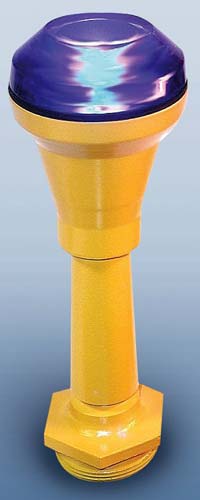
In FSX you just have to "imagine" the fixtures ;)
Cheers
Re: Hovering Runway/Taxiway Lights
Posted:
Thu May 07, 2009 6:48 amby DaveSims
The lights can vary from 8 inches to 36 inches off the ground. Helps keep the grass and sometimes snow from blocking the light.
Re: Hovering Runway/Taxiway Lights
Posted:
Thu May 07, 2009 1:04 pmby Brett Hill 2
oh right.... well isn't that a shame they dont model them in default fsx scenary... guess im gonna have to get a few addon scenary packages
Thanks anyway

Re: Hovering Runway/Taxiway Lights
Posted:
Sat May 09, 2009 7:06 pmby brantmacga
I've seen FSX screenshots that showed the fixtures modeled in the sim. I thought these were in the freeware screenshots section of SimV. I assumed they just had the graphics sliders set high; but are you saying this is not a feature that comes with FSX?