Page 1 of 2
windows shutting down during flight

Posted:
Sat Apr 25, 2009 2:27 pmby eurowing
hello,
i have spent all week to set up my new hardware (and tuning the system per Nicks instructions) and i must say i am VERY happy with it. my expectations were exceeded by far! it is an i7 920 @ stock speed, asus P6T, 6gb ram, GTX 280oc, win xp pro x64. it is dedicated for FSX, with the o/s on one hdd and FSX on another one.
however, there is one big problem. i am experiencing serious stability problems with FSX and xp.
when flying the pmdg 744 i don't seem to have any problems. with the LD767 i get a cream colored screen (could be after 1 minute or any time thereafter) but the sim is still responsive (i can exit with ESC but i have to restart the sim to cure the problem, exiting the flight and starting a new one won't help). and then it could happen again at any time. only with the level D 767.
the biggest problems i have with the pmdg MD11. windows shuts down within an hour or so into a flight. i get the blue screen and i always see different messages. at first it said:
- PAGE_FAULT_IN_NONPAGED_AREA
Re: windows shutting down during flight
Posted:
Sat Apr 25, 2009 3:28 pmby NickN
sounds like a memory error
You say you have 6GB installed.. what memory are you using (I need an exact link to the product) and did you set it up correctly in the BIOS?
Re: windows shutting down during flight
Posted:
Sat Apr 25, 2009 3:49 pmby eurowing
hi Nick,
i have this ram
http://www.newegg.com/Product/Product.a ... 6820227381i have (literally) spent all week installing and tuning o/s and FSX and did not get a chance to look at the BIOS much, yet. it's all still on auto.
Re: windows shutting down during flight
Posted:
Sat Apr 25, 2009 4:24 pmby NickN
well that would probably explain your problem.. baring a defective stick of memory
If you are not clocking at all I suggest you enter your BIOS and at the very least set the following
DRAM VOLTAGE 1.65-1.67v Anywhere in that range
Try again and see if you crash. If you do post back and I will make further suggestions
Re: windows shutting down during flight
Posted:
Sat Apr 25, 2009 4:25 pmby eurowing
wilco!
i assume that is the DRAM BUS VOLTAGE SETTING.
there are DRAM DATA and CTRL voltage (CHA/CHB) settings, do i need to set those, too?
Re: windows shutting down during flight
Posted:
Sat Apr 25, 2009 4:50 pmby eurowing
i changed it to 1.64V.
when i load the MD11 i now get the cream color screen (so it's not only the 767) when switching to full screen... :(
i know you said >1.65 but can i do that safely? i will give it a shot now with 1.66...
Re: windows shutting down during flight
Posted:
Sat Apr 25, 2009 5:13 pmby NickN
DRAM BUS VOLTAGE
and do you think I would post something dangerous to somone who tells me they are not clocking
1.65 to 1.67 is fine
Listen to me.. you bought 1600 memeory for a proc which by design wants to see 1333. If you did not intend to clock you should have bought LOWER timing 1333 memory instead because the only way you are really getting to use that 1600 memory is if the CPU is being pushed in speed.
regardless
OK so you may need to also change QPI/DRAM Voltage
set it to 1.35v
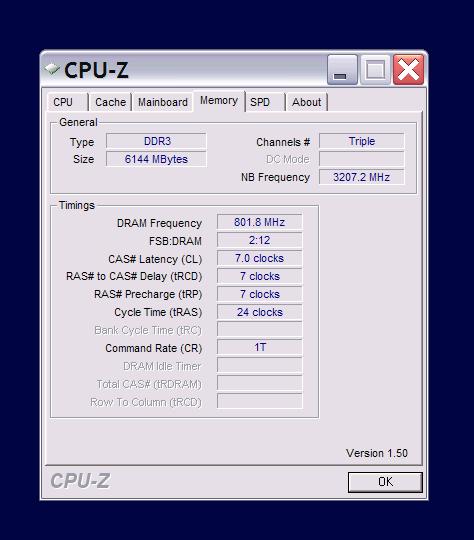
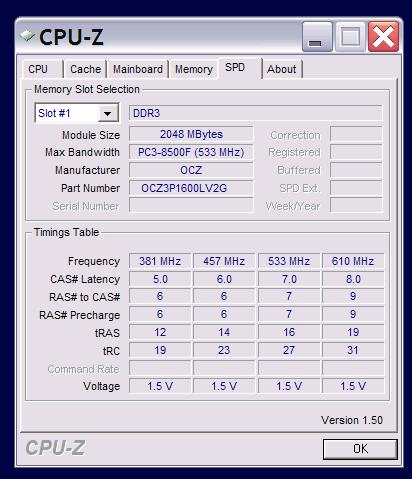
verify the memory speed and timing is correct using CPUz
http://www.cpuid.com/download/cpuz_150.zipIf those are in order and you are not clocking then there is a possibility there is something wrong with the memory.. run MEMTEST. Make a boot disk and run 5 full passes (will probably take an hour or more)
http://www.memtest.org/#downisoare you using a 64bit OS?
If not:
http://www.simviation.com/cgi-bin/yabb2 ... 959973/3#3the addons you are trying to run are killers and memory hogs. If there is anything out of order in the memory subsystem they will force it to the surface.
If the memory tests pass and after making the changes I suggest it still happens then perhaps this is a video driver issue of some type
I have given you everything I can now.. if that timing and speed is correct, those voltage are where they should be.. the memory tests pass and this still shows up it could be related to the addon and drivers and make sure there are no patches you missed for the addon too...
Re: windows shutting down during flight
Posted:
Sat Apr 25, 2009 5:22 pmby eurowing
of course i would not think you tell me anything dangerous, Nick. i am just somewhat paranoid

Re: windows shutting down during flight
Posted:
Sat Apr 25, 2009 5:52 pmby eurowing
is that what should be showing?
Re: windows shutting down during flight
Posted:
Sat Apr 25, 2009 6:19 pmby NickN
that is correct
Re: windows shutting down during flight
Posted:
Sat Apr 25, 2009 8:11 pmby eurowing
the MD11 has been in the air for more than two straight hours. not looking bad so far, will leave her airborne until the tanks run dry.
will report back!
thanks!!
Re: windows shutting down during flight
Posted:
Sun Apr 26, 2009 12:03 amby eurowing
Nick, thank you so much for your help! the sim seems stable now, the MD11 has been flying for 6 hours without a problem! it is time to land back at KPHX.
thank you thank you thank you!!!
regards,
Denis
EDIT: just when i was going back to the sim and switching to full screen i got the 'cream screen' again. i guess i got excited a little too soon... but i am sure that the blue screen is fixed, which is great...
Re: windows shutting down during flight
Posted:
Sun Apr 26, 2009 10:59 amby NickN
that has nothing to do with memory or stability
That is a known issue with FSX
If hitting ALT-ENTER a few times does not clear it your SOL
Dont switch screens.. remain in full screen mode and that wont happen
CRASHES you had were from memory setttings.. what you see there has nothing to do with hardware
Re: windows shutting down during flight
Posted:
Sun Apr 26, 2009 6:27 pmby eurowing
fair enough. tanks alot Nick!
probably a stupid question but what does SOL stand for?
EDIT: never mind, i found the definition on the urban dictionary.com. makes sense
Re: windows shutting down during flight
Posted:
Sun Apr 26, 2009 6:48 pmby NickN
I have a theory about that issue I never tested.. I do not see it that often and have not in some time
However
When you see it..