FSX SDK Traffic Explorer Tutorial

FSX including FSX Steam version.

FSX SDK Traffic Explorer Tutorial

Postby Anxyous » Wed Sep 03, 2008 10:43 am

Hi there!

I recently discovered the Traffic Explorer, which is a part of the SDK. Not many people seem to know about this,
so I thought I would make a tutorial for how to use it.

First, let's get nailed down what Traffic Explorer is:

Traffic Explorer is a part of the SDK. It allows you to manipulate traffic in FSX, like placing aircraft,
AI aicraft with flight plans and the like.

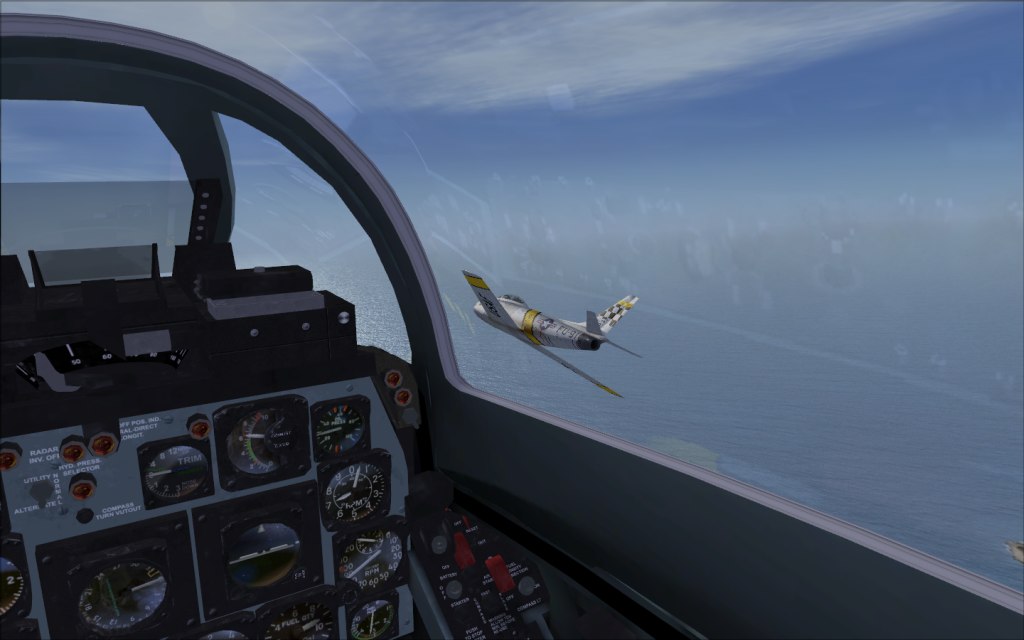
For an example, it can be used to take shots like these (shameless self-advertisement :P):

Image

In the pic, Traffic Explorer was used to place 2 F-86F Sabres, so the shot could be taken.

Pretty much all you will need for Traffic Explorer, is the SDK (Software Development Kit), which is included
with Flight Simulator X: Deluxe.

To install the SDK, pop install disc 1 of FSX, into your drive. Instead of running the installer however,
open it up in Windows Explorer.

Scroll down, locate the SDK setup file, and run that.

You might wanna download some service packs from www.fsinsider.com, and if you got Acceleration, install the SDK
on that as well. It's a kinda complicated process though, but the installer should run you through it more or less.

Ready? Let's get started!!!

The first step (following that you have the SDK installed), is to open up explorer.

On for Vista users, find C:/Users/*Your user*/AppData('show hidden files' must be on)/Roaming/Microsoft/FSX.

For XP users the path is C:\Documents and Settings\Administrator\Application Data\Microsoft\FSX

(Thanks to ShaneG for the XP path)

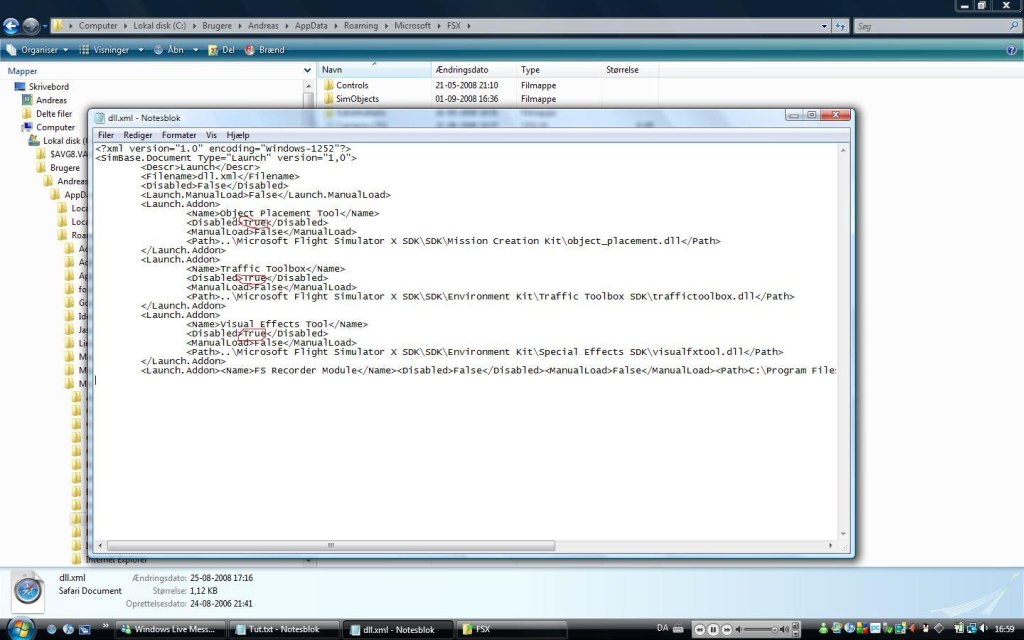
Find the dll.xml file, and open it up in notepad. It should look like this:
Image

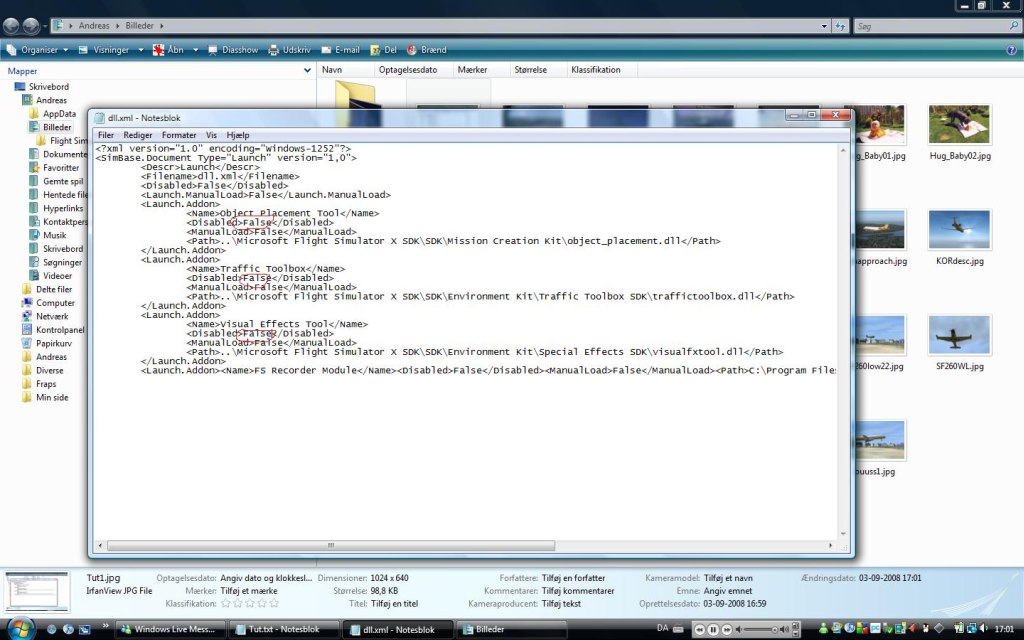
See the three 'True' tags I've drawn red circles around? You must change these to 'False' (no '). It should now look like this:
Image

Now, open up FSX, and go to Realism Settings. You need to uncheck the 'Detect crashes with other aircraft' box. Now, boot up a flight of your choice.

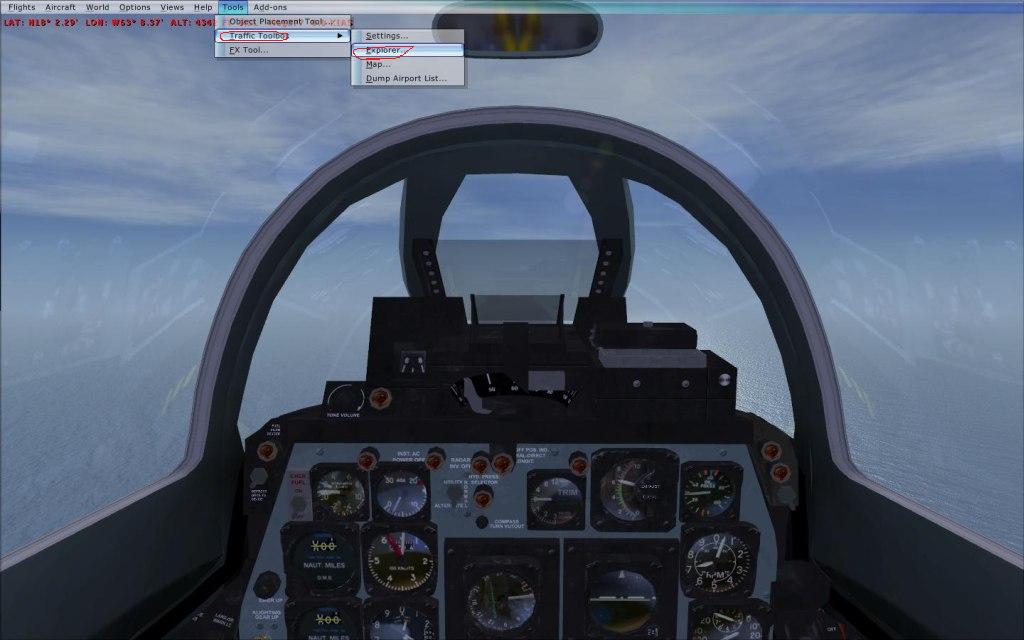
When you're where you wanna be, press the Y key to enter slew mode, and pause the simulator. Now press the 'Alt' key, for the top menu to drop down. Because you changed the tags above,
you will now have a section called 'Tools'. Click it, choose 'Traffic Toolbox' and 'Explorer':
Image

FSX will now go to windowed mode, and the Traffic Explorer will appear. You will see a list of all the loaded AI planes,
and you can change, or delete them for that matter:
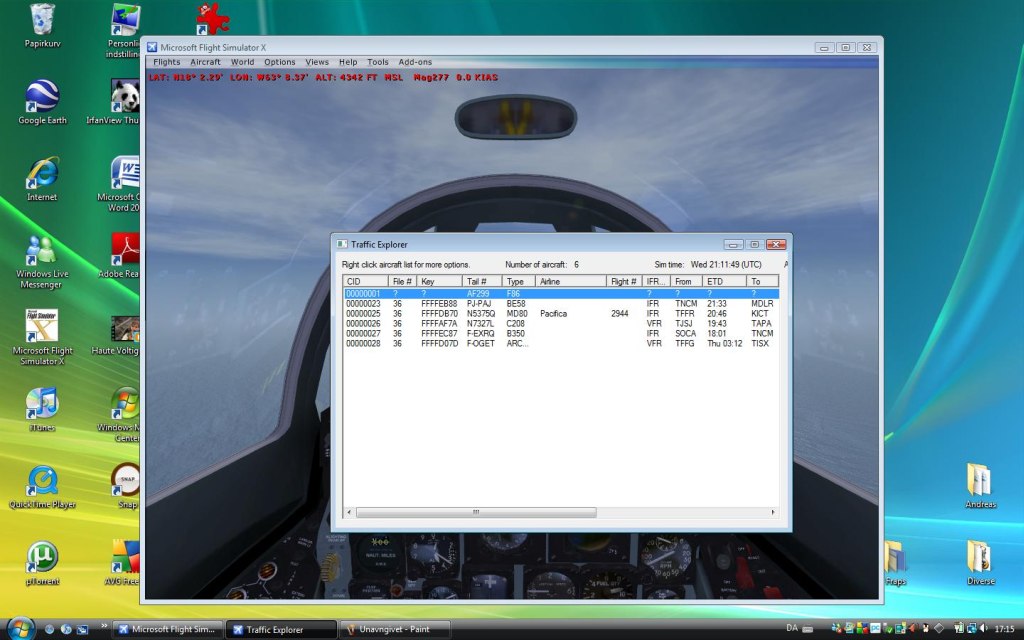
Image

But what we wanna do, is right-click, and choose 'Create'

A new box will pop up:
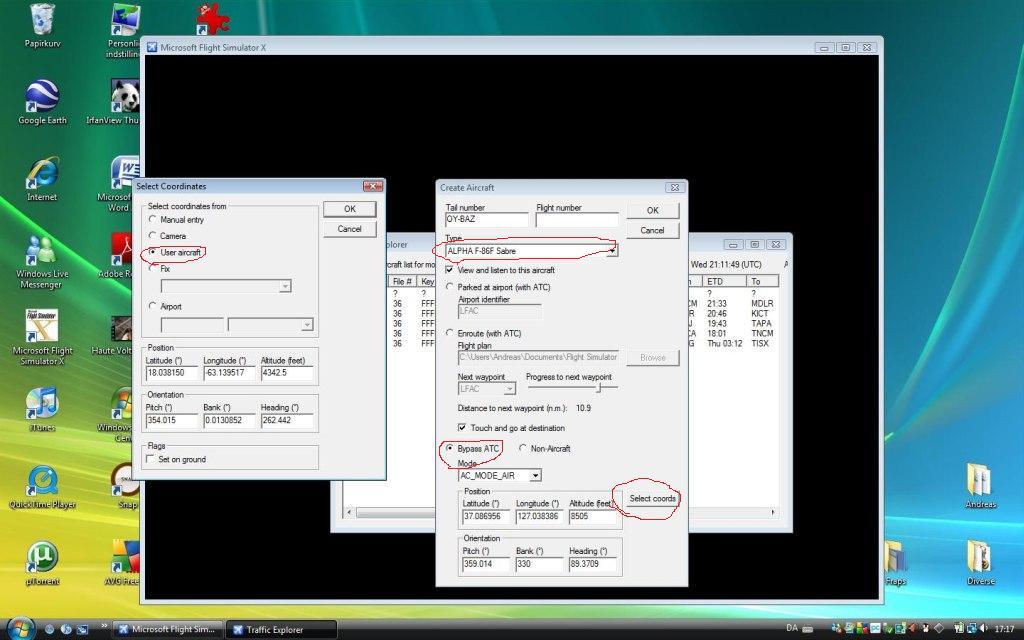
Image

Follow the red circles (set 'Bypass ATC', and choose 'Select Coords'. Then check the 'User aircraft' box. Remember to choose the aircraft you want)

Click 'Ok' through it, and though you won't see it, you just spawned an aircraft inside yourself.

Now, you may be tempted to unpause, but don't do that yet, or the plane will shoot away.

Instead, find it in the traffic list, right click and check 'Enable Slew':
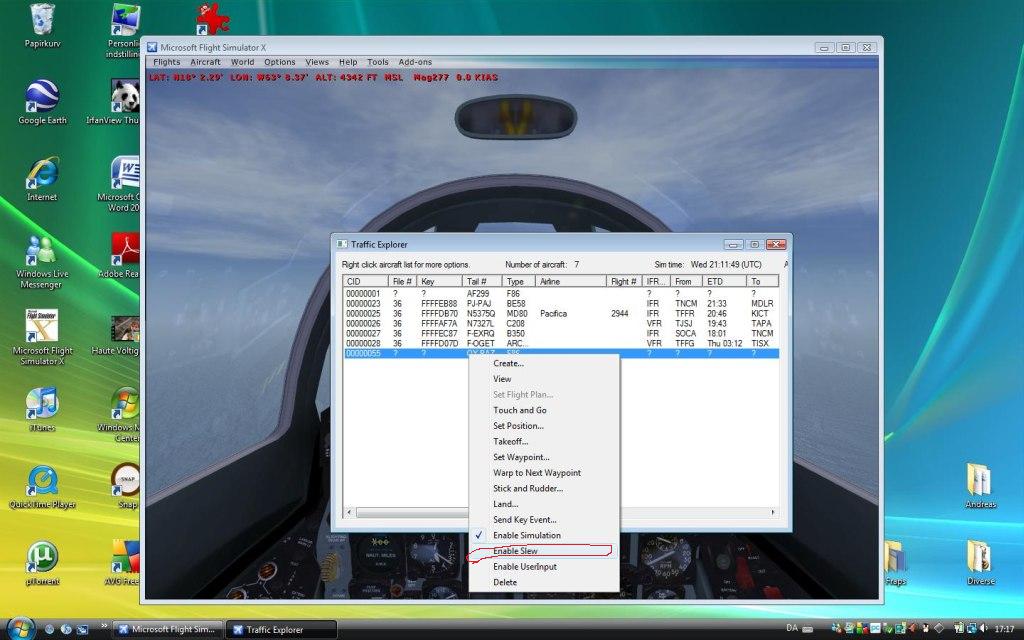
Image

Now you can unpause the game, and slew yourself into position:
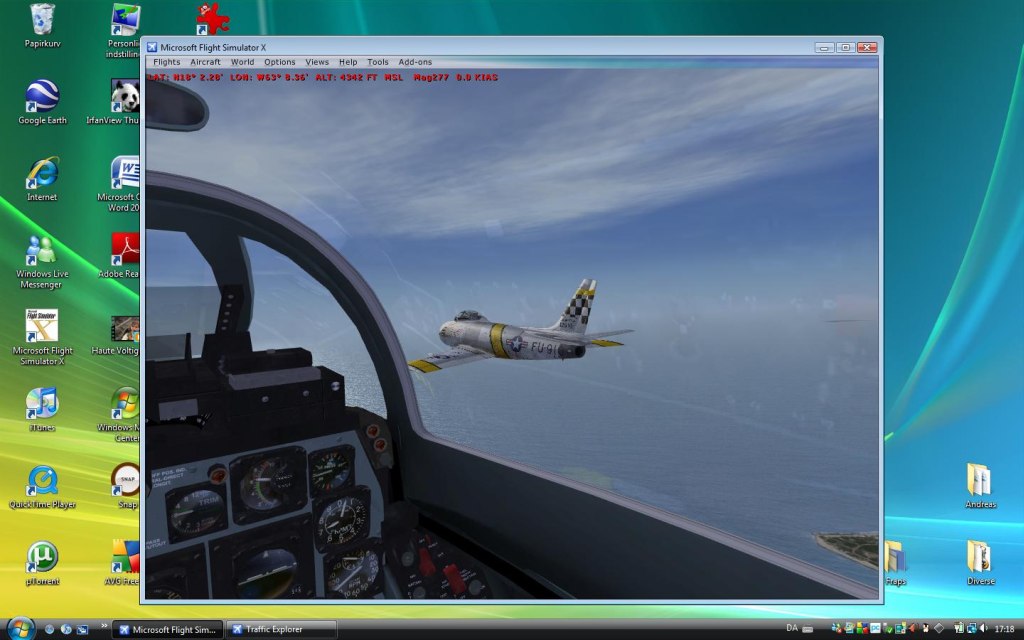
Image

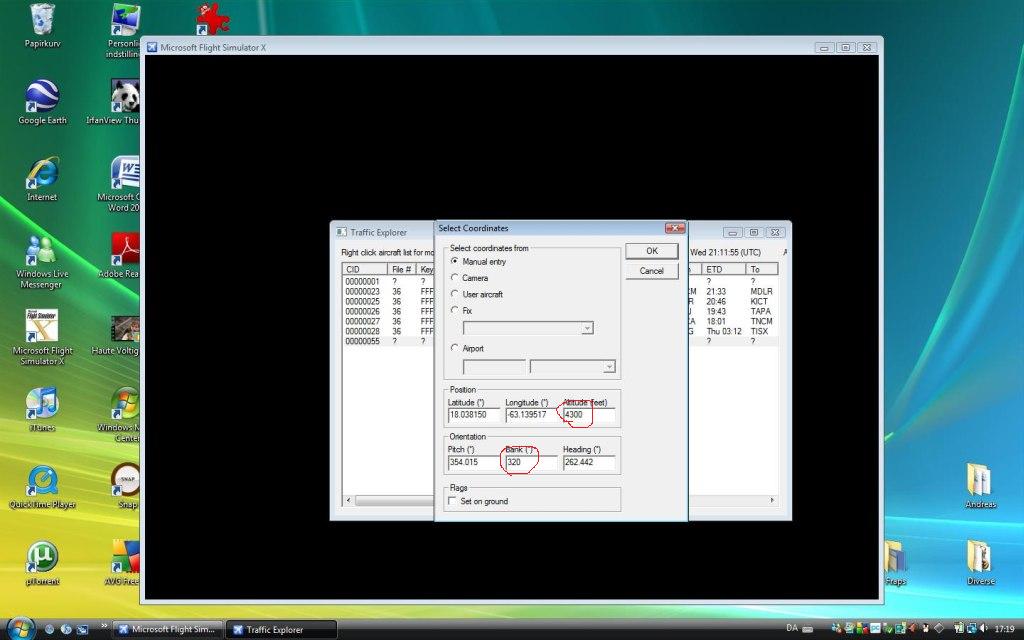
But we want a little more action, so we're gonna change the bank and altitude.

Again, find it in the AI list, right click and choose 'Set Position':
Image

You must change the circled things here. The altitude is a little lower, because a plane will naturally lose altitude,
when banking in the manner we want it to.

For the bank:

The bank goes from 0 - 359,99999. You must think of the number of degrees you set as a left roll. Ie. with 90 degrees set,
the plane will be banking 90 degrees to the left, so you need to set 270 for a 90 degree bank to the right.

I've set it to 320 degrees.

And that's it, there's your shot! :)

Image

Any questions, I'll be happy to answer to the best of my ability :)

101 tutorial (I've only now discovered, that the term was used in the wrong context... this is actually more advanced) http://www.simviation.com/cgi-bin/yabb2 ... 648246/2#2


:)
Last edited by Anxyous on Wed Mar 25, 2009 1:18 pm, edited 1 time in total.
Image
User avatar
Anxyous
Major
Major
 
Posts: 2593
Joined: Mon Dec 25, 2006 4:04 pm

Re: FSX SDK Traffic Explorer Tutorial

Postby ShaneG_old » Wed Sep 03, 2008 11:51 am

On for Vista users, find C:/Users/*Your user*/AppData('show hidden files' must be on)/Roaming/Microsoft/FSX.

I'm not sure for XP users, but I believe all you need to do, is disregard the 'Roaming' section.


for XP users:C:\Documents and Settings\Administrator\Application Data\Microsoft\FSX

Thank you for this tutorial! excellent work! ;) 8-)
ShaneG_old
Lieutenant Colonel
Lieutenant Colonel
 
Posts: 9700
Joined: Tue Mar 11, 2008 11:52 am

Re: FSX SDK Traffic Explorer Tutorial

Postby Anxyous » Wed Sep 03, 2008 12:28 pm

Thanks! No problem :)

I included the path now, thanks for that! :)
Image
User avatar
Anxyous
Major
Major
 
Posts: 2593
Joined: Mon Dec 25, 2006 4:04 pm

Re: FSX SDK Traffic Explorer Tutorial

Postby NickN » Wed Sep 03, 2008 1:26 pm

Nice tutorial

thanks for sharing!

noted for future posts..
User avatar
NickN
Lieutenant Colonel
Lieutenant Colonel
 
Posts: 6317
Joined: Mon Sep 05, 2005 12:57 pm

Re: FSX SDK Traffic Explorer Tutorial

Postby Anxyous » Wed Sep 03, 2008 3:21 pm

Thanks man, means a lot coming from you :)

Are you ready to Fly Free?

(Unrelated, but well worth a view).
Image
User avatar
Anxyous
Major
Major
 
Posts: 2593
Joined: Mon Dec 25, 2006 4:04 pm

Re: FSX SDK Traffic Explorer Tutorial

Postby ShaneG_old » Thu Sep 04, 2008 9:21 am

Ok, I've installed the SDK from deluxe and instlled SDKsp1a, gone to the dll.xml and changed all true to false. (also had to do this with fsrecorder) when I start FSX I get no tools option in the menu bar wether I'm in slew or not. Does the fact that I have my FSX in a different drive than the SDK make a difference. And if so is it fixed simply by reinstalling SDK into the same HD as FSX or can I just respecify the path?
ShaneG_old
Lieutenant Colonel
Lieutenant Colonel
 
Posts: 9700
Joined: Tue Mar 11, 2008 11:52 am

Re: FSX SDK Traffic Explorer Tutorial

Postby Anxyous » Thu Sep 04, 2008 10:25 am

Installing SDK on the same drive should do it for you :)
Image
User avatar
Anxyous
Major
Major
 
Posts: 2593
Joined: Mon Dec 25, 2006 4:04 pm

Re: FSX SDK Traffic Explorer Tutorial

Postby Fr. Bill » Thu Sep 04, 2008 10:34 am

Ok, I've installed the SDK from deluxe and instlled SDKsp1a, gone to the dll.xml and changed all true to false. (also had to do this with fsrecorder) when I start FSX I get no tools option in the menu bar wether I'm in slew or not. Does the fact that I have my FSX in a different drive than the SDK make a difference. And if so is it fixed simply by reinstalling SDK into the same HD as FSX or can I just respecify the path?


No. What DOES MATTER is the version of the SDK you've installed...

...it MUST match the version of FSX you have installed!

FSX RTM..........use SDK SP1a

FSX SP1..........use SDK SP1a

FSX SP2..........use SDK 2

FSX Acceleration.......use SDK Acceleration
BillImage Gauge Programming - 3d Modeling Eaglesoft Development Group Intel Core 2 Quad Q6600-4GB DDR2 Crucial PC6400-800 GB SATA-ATI Radeon HD2400 Pro 256MB DX10 [i
Fr. Bill
Captain
Captain
 
Posts: 961
Joined: Sun Apr 27, 2003 1:31 pm
Location: Hammond, IN

Re: FSX SDK Traffic Explorer Tutorial

Postby ShaneG_old » Thu Sep 04, 2008 11:41 am

Gotcha, I have the wrong SDK then, Thanks! :)
ShaneG_old
Lieutenant Colonel
Lieutenant Colonel
 
Posts: 9700
Joined: Tue Mar 11, 2008 11:52 am

Re: FSX SDK Traffic Explorer Tutorial

Postby Anxyous » Thu Sep 04, 2008 1:25 pm

http://www.simviation.com/cgi-bin/yabb2 ... 20552605/0

Suggest you check this out, to see what else Traffic Explorer can do :D

I'll be making a more advanced tutorial soon on how to do like what's done on the pics there, plus some more.

:)


EDIT: 666!!!!!!!!!!!!!!!!!!!!!!

Image

:P
Last edited by Anxyous on Thu Sep 04, 2008 1:27 pm, edited 1 time in total.
Image
User avatar
Anxyous
Major
Major
 
Posts: 2593
Joined: Mon Dec 25, 2006 4:04 pm

Re: FSX SDK Traffic Explorer Tutorial

Postby Longers » Sun Sep 14, 2008 8:28 am

sorry to exhume an old thread, but when I installed original SDK (from FSX DVD) then updated using the SDK from Acceleration it is version SDK SP1a and not SP2 - as described in the fsdeveloper wiki the help files are in htm format.

Greg
Last edited by Longers on Sun Sep 14, 2008 8:33 am, edited 1 time in total.
Longers
Ground hog
Ground hog
 
Posts: 4
Joined: Wed Jun 18, 2008 3:06 am
Location: Australia

Re: FSX SDK Traffic Explorer Tutorial

Postby firemonte007 » Tue Dec 23, 2008 10:33 pm

good evening tonight i just added the SDK to my system. I have my FSX on my J:Drive and the installer put the SDK onto my C:drive...I went to FSinsider.com and download the SP1 and SP2 for the SDK...i opened the DLL file and edited it like you shown but when i load up FSX I dont notice any difference...there is no tool option in the menu bar...any ideas?
Image
User avatar
firemonte007
Major
Major
 
Posts: 2288
Joined: Mon Aug 20, 2007 8:24 pm
Location: northern IL, USA

Re: FSX SDK Traffic Explorer Tutorial

Postby Anxyous » Wed Dec 24, 2008 5:43 am

What version of FSX do you have?

And Longers, I'm not sure the Acceleration SDK contains all service packs. Have you downloaded the ones from fsinsider.com?

Merry Christmas :)
Image
User avatar
Anxyous
Major
Major
 
Posts: 2593
Joined: Mon Dec 25, 2006 4:04 pm

Re: FSX SDK Traffic Explorer Tutorial

Postby firemonte007 » Wed Dec 24, 2008 7:43 am

What version of FSX do you have?

And Longers, I'm not sure the Acceleration SDK contains all service packs. Have you downloaded the ones from fsinsider.com?

Merry Christmas :)


i have FSX deluxe with the SP2 and i downloaded the SP1 for SDK first then SP2 after that because it would not install the SP2 for the SDK with out the SP1 first

merry christmas
Image
User avatar
firemonte007
Major
Major
 
Posts: 2288
Joined: Mon Aug 20, 2007 8:24 pm
Location: northern IL, USA

Re: FSX SDK Traffic Explorer Tutorial

Postby ShaneG_old » Wed Dec 24, 2008 7:59 am

I believe Fr. Bill gave me this link, http://www.fsdeveloper.com/wiki/index.p ... ation_(FSX)#Installation

It helped me solve this very problem, and explains everything. ;)

Merry Christmas! :)
ShaneG_old
Lieutenant Colonel
Lieutenant Colonel
 
Posts: 9700
Joined: Tue Mar 11, 2008 11:52 am

Next

Return to Flight Simulator X (FSX) and Steam

Who is online

Users browsing this forum: No registered users and 495 guests