Page 1 of 1
FSX problems

Posted:
Sun Mar 08, 2009 12:57 pmby Rich H
Recently, FSX is becoming slow, and sometimes doing this:
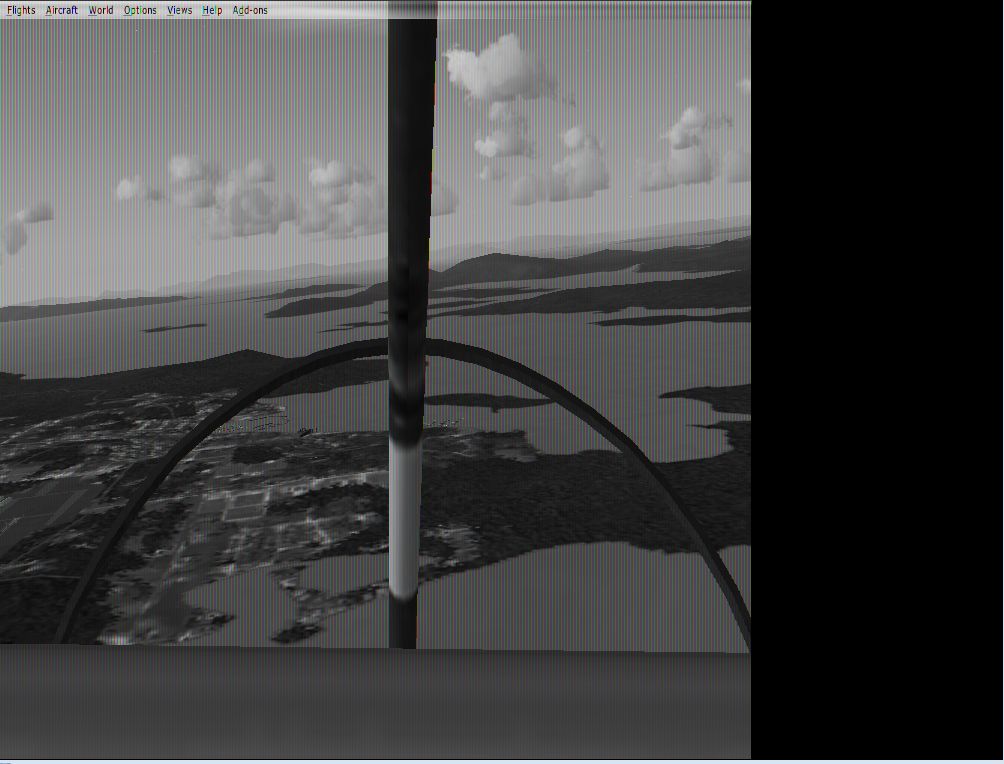
Anyone know why?
Re: FSX problems
Posted:
Sun Mar 08, 2009 4:40 pmby SubZer0
Uninstall your drivers and download and install the newest ones available for your video card.
If that doesn't work, your video card could be heating up too much or it could just be getting too old and this could be a sign of it dying.
Re: FSX problems
Posted:
Mon Mar 09, 2009 5:05 amby Daube
It seems to me that your video card is dying.
It could be because of the heat. First thing to do would be to open your computer and make a general cleaning of all the fans, from the CPU to the video card and the power supply.
Re: FSX problems
Posted:
Mon Mar 09, 2009 8:23 amby Meck
Back to the roots: looks like the beginning of FS!
The financial crisis now affects PCs - they just downgrade to an earlier version of FS... So: no more color for you!
Re: FSX problems
Posted:
Mon Mar 09, 2009 11:13 amby Rich H
Installed the latest drivers; I'll see how they work. My pc is only a few months old though, got it in late august.
Seems a bit better, though I always seem to get it with default planes.
Re: FSX problems
Posted:
Mon Mar 09, 2009 1:45 pmby logjam
Its' hard to get a serious reply I know. The usual explanations are at best generic and don't work. I have a pronlem with some installed 'planes that using outside view display mostly a jumble of aircraft parts. The best response I got was "maybe you are sitting in the middle of a junk heap. Actually, I seem to remember problems such as yours and mine appearing in FS9, but I can't find the solution any more. I don't know why I dumped a perfectly good simulator (FS2002) for FS9 and naively thought that buying FSX would fix everything. I use a dual core laptop with a NVidea go 7300 . It is smooth and works well with some aircraft. With others, like I said a jumble of parts in outside view. I'd sure like to get Alrot's planes to work, they are very well modelled.
Re: FSX problems
Posted:
Mon Mar 09, 2009 3:44 pmby Rich H
I'll try cleaning the video card, but my computer seems very well screwed and bolted up.
Re: FSX problems
Posted:
Tue Mar 10, 2009 6:27 pmby basys
Hi Folks
RichardH -
As it's
sometimes doing this:
Font text has not been dithered to illegibility,
so it's on the monitor side, (rather than CPU or GPU).
If your monitor is a CRT
it's probably failing, (HozHold).
HTH
ATB
Paul
Re: FSX problems
Posted:
Tue Mar 10, 2009 9:59 pmby BAW0343
Hi Folks
RichardH -
As it's
sometimes doing this:
Font text has not been dithered to illegibility,
so it's on the monitor side, (rather than CPU or GPU).
If your monitor is a CRT
it's probably failing, (HozHold).
HTH
ATB
Paul
Can you take a screenshot of the monitor failing?
Re: FSX problems
Posted:
Wed Mar 11, 2009 4:57 amby Daube
Hi Folks
RichardH -
As it's
sometimes doing this:
Font text has not been dithered to illegibility,
so it's on the monitor side, (rather than CPU or GPU).
If your monitor is a CRT
it's probably failing, (HozHold).
HTH
ATB
Paul
Can you take a screenshot of the monitor failing?
Re: FSX problems
Posted:
Wed Mar 11, 2009 8:16 amby basys
Hi Folks
Can you take a screenshot of the monitor failing?
You're entirely correct.
Overconsumption of pickling juice on my part. :grin
I'd deleted the other possiblities from my OP.
Overheating - Can you control your fan speed ?
Intermittent seating connection failure - Check the card is socketed correctly.
As it only sometimes happens
it's not going to be a driver issue.
HTH
ATB
Paul
Re: FSX problems
Posted:
Wed Mar 11, 2009 1:07 pmby Rich H
Hi Folks
Can you take a screenshot of the monitor failing?
You're entirely correct.
Overconsumption of pickling juice on my part.
Re: FSX problems
Posted:
Wed Mar 11, 2009 2:55 pmby BAW0343
It's a very new LCD Hannspree Xm-S. However, the lead from the screen to the computer is not new. Could that be the problem?
Nope, there's a problem with the card itself.
What card is it and what kind of power supply do you have? Maybe there is a lack of power?
Re: FSX problems
Posted:
Wed Mar 11, 2009 5:09 pmby Rich H
It's a very new LCD Hannspree Xm-S. However, the lead from the screen to the computer is not new. Could that be the problem?
Nope, there's a problem with the card itself.
What card is it and what kind of power supply do you have?