Page 1 of 1
Now I can cry

Posted:
Thu Feb 07, 2008 3:51 amby RAF_Loke
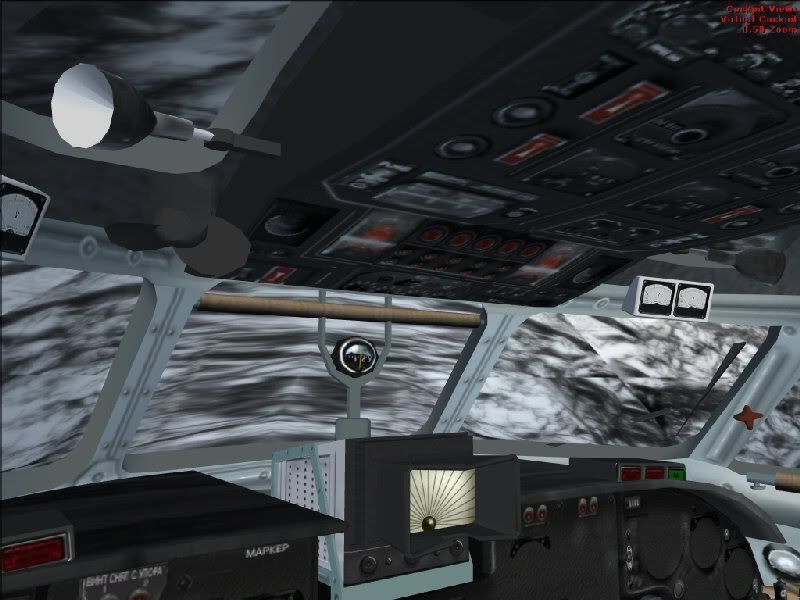
It has happened again :-(, another VC with blinded windscreens.
This time it happens with the new Antonov An-26 which is one of my fav prop planes.
http://i55.photobucket.com/albums/g127/ ... /an-26.jpgI know I
Re: Now I can cry
Posted:
Thu Feb 07, 2008 4:12 amby Daube
Both problems are linked.
For the windshield, the texture is no more transparent.
Transparency in a texture is defined with the "Alpha Channel" which is just an hidden black and white texture inside the normal texture file. Before SP1 or SP2, the whiter the Alpha Channel, the more transparent it was. Now it is the contrary, so instead of being transparent, FSX thinks that the texture has to be opaque.
Solution ? => Download the freeware texture editor DTXBMP. It will let you edit a texture and its Alpha Channel. You must modify the Alpha Channel to make it clearer/darker (I'm not too sure anymore), and your windshield will be transparent again.
Re: Now I can cry
Posted:
Thu Feb 07, 2008 4:30 amby RAF_Loke
Thanks a lot Daube, it was a thing like that I was looking for.
I have DTXBMP, not that I'm very good friends with it though ::).
Re: Now I can cry
Posted:
Thu Feb 07, 2008 5:13 amby Daube
As far as I remember (I cannot test right now), DTXBMP allows you to see this Alpha Channel texture, and to extract it as a separate jpg or bmp file.
What you need to do is to edit this file with a proper tool, to change the tone (darker or brighter, I do not remember exactely what is needed now, I confuse everytime), and then import it again in the original texture with DTXBMP.
Re: Now I can cry
Posted:
Thu Feb 07, 2008 7:03 amby RAF_Loke
Thanks again, I will look at it as soon as I find some time :).
But it is still strange that it happens to some people and not all?!?!
Re: Now I can cry
Posted:
Thu Feb 07, 2008 7:18 amby ozzy72
Please do not link images, it slows the forums down for other users. In future please upload all images to the SimV server (use the Image Upload button in the blue toolbar just under the Simviation Forum logo at the top of the page). Many thanks.
Re: Now I can cry
Posted:
Thu Feb 07, 2008 7:29 amby Hagar
What makes this difficult is that there are so many possible variables. Everyone's system will be different in some way. First there are 2 versions of FSX, Standard & DeLuxe. Add to that the service packs SP1 & SP2. Then there are 2 different operating systems to consider, Windows XP & Vista with the DX9 & DX10 options. Individual video cards & drivers add to the equation. Finally there is the aircraft itself & the different methods used for rendering things like transparencies.
The main point is that these aircraft you're having problems with were created for FS9. There are very few FS9 aircraft that are fully compatible with FSX + the various updates. While some of the tweaks for things like opaque DVC windows might work on some aircraft with some versions of FSX on some systems there is no magic fix to suit everyone.
I used to enjoy fixing these sorts of problems but due to the above I cannot possibly support FSX.
PS. You forgot to say where you got this aircraft. The only An-26 I can find has no DVC.
Re: Now I can cry
Posted:
Thu Feb 07, 2008 8:07 amby Daube
[quote]Thanks again, I will look at it as soon as I find some time
Re: Now I can cry
Posted:
Thu Feb 07, 2008 8:21 amby RAF_Loke
Ah Hagar
Remember it as it was from here I got it, but it was from FlightSim.com
Name: an26zh08.zip
Size: 19,206,839
Date: 02-03-2008
FS2004/FSX Antonov An-26. A multi-purpose Russian transport. Includes in-depth virtual cockpit, animation, 2D panel, XML gaues, four textures, 3D crew, in-depth manual. By Vladimir Zhyhulskiy
But problem is still the same where ever you get the planes from.
Anyway I follow you 100% in your decision not to support FSX, a lot of playes in game here.
ozzy: Will do next time ;)
Re: Now I can cry
Posted:
Thu Feb 07, 2008 8:37 amby reider
FS2004/FSX Antonov An-26= an FS2004 aircraft that has been loosely fixed to work in FSX. But, as it hasn`t been directly modeled (only loosely fixed) to work with the SDK up to SP2 standard it has faults. Hence, the good people above mentioning the workarounds. Of which Hagar summed it up excellently in saying (in different words of course) many have been put together in different ways so excluding one general purpose fix.
Reider
Re: Now I can cry
Posted:
Thu Feb 07, 2008 12:13 pmby vgbaron
Re: Now I can cry
Posted:
Thu Feb 07, 2008 4:52 pmby reider
The rain fix is good but yet another example of another issue. Some planes have visibility problems caused by rain (blueish tint) and others because of the alpha channel being reversed. Yet more perhaps because of other reasons. Another example of what Hagar states, no one fix will fix all aircraft and all machines. Thanks for the thought though, it is appreciated.
Reider
Re: Now I can cry
Posted:
Fri Feb 08, 2008 5:00 amby RAF_Loke
I found the file which looks very much like the view I get in the VC.
I could not upload it here as it's a BMP file so you guys can see it.
If I could have added it as a zip I would have done so.
Re: Now I can cry
Posted:
Fri Feb 08, 2008 7:04 pmby FLMach1
Thanks for posting the link. I've been trying to find the files to fix my FSD Saratoga but didn't even think to look at FSInsider.
Re: Now I can cry
Posted:
Mon Feb 11, 2008 3:52 amby RAF_Loke
The creator of the An-26 wrote this to me..
Hello Jens -
probably beside you version MFSX SP-2 - regrettably this versions
beside me no and model in her was not test - beside me no SDK for SP-2 -
but, probably problem really in file Glass_mask - try to place on it overhand dark
alfa - a channel - possible this will help.
Vladimir
Can/will someone who know how to use DTXBMP help me out here?
PM me your mail address and I'll send you the bmp file.