Page 1 of 2
Panel Problem

Posted:
Wed Jun 06, 2007 9:42 amby JonMich
Hey everyone,
I am having a problem with all the 2D panels, both default and add-on, where it looks normal for about 2 seconds and then looks like this. I don
Re: Panel Problem
Posted:
Wed Jun 06, 2007 11:49 amby Daube
This looks like a video card memory that is dying.
Last time I had this bug, I had to change the video card.
This happens only with 2D panels ? Everything is alright with virtual cockpits, scenery, flying for a long time etc... ?
Also, do you get any problems with other games ?
Did you install the DirectX9 upgrade ?
Re: Panel Problem
Posted:
Wed Jun 06, 2007 1:04 pmby JonMich
This looks like a video card memory that is dying.
Last time I had this bug, I had to change the video card.
This happens only with 2D panels ? Everything is alright with virtual cockpits, scenery, flying for a long time etc... ?
Also, do you get any problems with other games ?
Did you install the DirectX9 upgrade ?
Hey Daube,
Well, everything else seems ok as for the VC, scenery, ect. Although, the sim does not run real well on my machine and I find that one day the sim runs ok and other days it is unacceptable. As far as programs, I use Gmax and it is ok, I don
Re: Panel Problem
Posted:
Wed Jun 06, 2007 4:00 pmby UU
Aye,
It's a driver issue. I had this also with Cataylyst 7.2, mostly with addons.
It vanished with 7.4.
Read deinstall/install guide carefully and make a fresh restore point. Installing grafic drivers intn't always easy istening.
( have issues with 7.5
Re: Panel Problem
Posted:
Wed Jun 06, 2007 10:32 pmby JonMich
Well, I tried reverting back to a different video driver with no luck. I then uninstalled SP1 and flew around for a while and the 2D panels worked fine. I then reinstalled SP1 and the panels are messed up again. Could I have a corrupted copy of the SP1 and therefore it is not installing right?
Re: Panel Problem
Posted:
Thu Jun 07, 2007 12:58 amby FiGHtA_PiLoT
I think you have a bad download

I suggest that you get rid of your old SP1 dowload and re-download it. I'm pretty sure that'll work

Re: Panel Problem
Posted:
Thu Jun 07, 2007 10:13 amby JonMich
I think you have a bad download
I suggest that you get rid of your old SP1 dowload and re-download it. I'm pretty sure that'll work
Thanks, I will give that a try this weekend and report back.
Jon
Re: Panel Problem
Posted:
Fri Jun 08, 2007 9:24 amby JonMich
Well I downloaded and installed a new copy of SP1 and it is the same as before. I am uninstalling the entire sim so I can get a fresh install of both and see if that makes a difference.
Thanks for the help
Re: Panel Problem
Posted:
Fri Jun 08, 2007 12:51 pmby jay2ie
Have the same Problem Myself, let me know how ya get on, the Guys Reckon its my Video card but i dont think so, have had no Problems with FSX untill i downloaded a new 2D panel for 747-400 From avsim and then everything went Mad.
See my Thread for the pic
http://www.simviation.com/cgi-bin/yabb2 ... 1181157087
Re: Panel Problem
Posted:
Sat Jun 09, 2007 2:20 pmby JonMich
With a fresh install of the FSX and SP1 with no add-ons or cfg tweaks, the panels are fine. But when I put the tweaked cfg back in then the problem persists. So, that leads me to one of two conclusions. 1 that there is something in the cfg that is causing the problem or 2 that it is my graphics card and when I push it with higher setting in the tweaked cfg that it starts getting weird. Any other thoughts on what it might be causing this?
[quote]Have the same Problem Myself, let me know how ya get on, the Guys Reckon its my Video card but i dont think so, have had no Problems with FSX untill
Re: Panel Problem
Posted:
Sun Jun 10, 2007 8:11 amby jay2ie
Ya Tried That Erased the CFG File and let FSX build a new one, still Got the Problem, thinking about a Unistall/Reinstall But not sure if i'll Lose My Add-ons, Cargo Pilot/Flight Deck, all My WOI Packages,
Heres the Latest Rubbish i've to Deal with
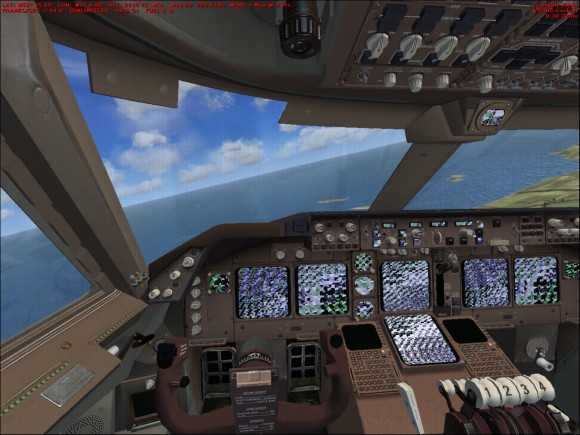
Re: Panel Problem
Posted:
Sun Jun 10, 2007 8:05 pmby JonMich
Well that is not looking good. Unfortunately, I don
Re: Panel Problem
Posted:
Mon Jun 11, 2007 11:31 pmby jay2ie
Well Thank F**k For That!!!!
Got the Problem Sorted, in the end it was my Rubbish Nividia Card Driver, still cant Figure out How it happened in the First Place, and even though i had updated(uninstall/Reinstall) the Driver TWICE, i still had no result, had a quick chat with Hager and try'd all other sorts of stuff, Could'nt Figure it out, jst as i was about the plug on FSX on my Machine i said i'll try the Graphic Driver One More Time, BINGO!! It works, very Happy at the Minute, but (touchwood) it could all go Pear shaped Again, Anyhoo, thats how i Resolved that Issue,
Any Good ta ya??
Re: Panel Problem
Posted:
Tue Jun 12, 2007 6:10 amby ATI_7500
Upon the next driver change...
- Download and install this tool:
http://downloads.guru3d.com/download.php?det=745- Uninstall your display driver like you always do.
- Run Driver Cleaner (NVidia users use "NVidia"; ATI users *might* have put a tick into "Select multiple filters" and select "ATI" and "ATI CCC") and click "Start"
- The Tool cleans all remaining .dlls and registry entries that the uninstallation program might have left over.
- Install your new display driver.
Re: Panel Problem
Posted:
Tue Jun 12, 2007 8:03 amby UU
Thanks for the link
Well, maybe I can force catalyst 7.5 to work, 7.4 doesn't run perfekt with FSX