Page 1 of 1

planes disassembled

PostPosted: Wed Jul 29, 2015 4:33 am
by Sinkrate
Hi folks,

I'm new here, so please don't blast me if this has been covered before - I've done a search of the forum and couldn't find anything.

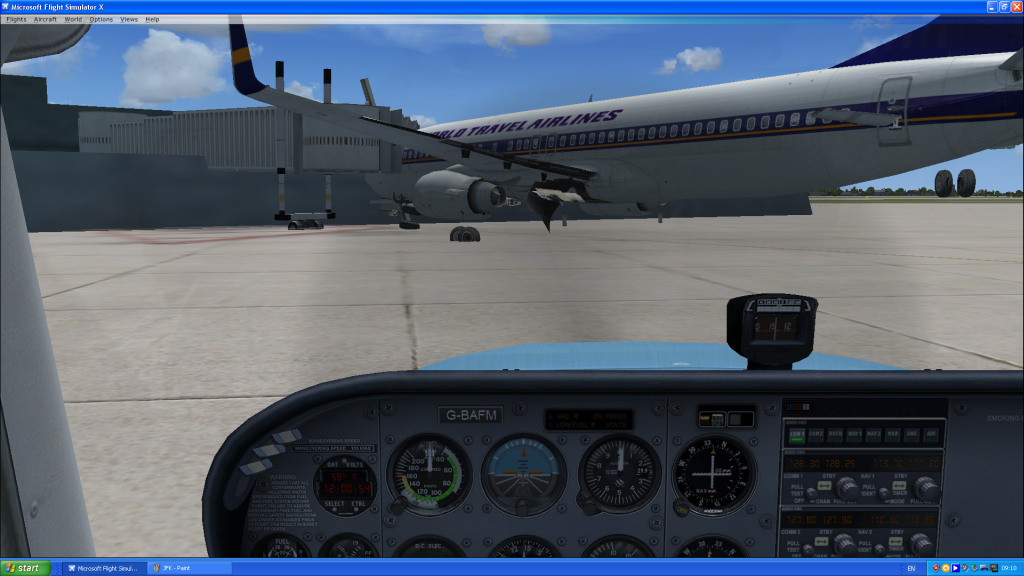
Problem is, some of my aircraft (default and added) appear as a disassembled jumble of components, as do some of the AI planes. They all seem to fly OK and the view from the cockpit is normal. Has anyone else had this sort of thing?

Best regards,

Sinkrate

Re: planes disassembled

PostPosted: Wed Jul 29, 2015 5:30 am
by pete
Hi and welcome to the forum. :)

Can you be a bit more specific? Maybe provide a screenshot?

Re: planes disassembled

PostPosted: Wed Jul 29, 2015 5:41 am
by Hagar
Which version of FSX do you have installed? Can you give an example of the aircraft affected by this problem. A file name would help.

If this affects only some addon aircraft I suspect you might need to install the SP1 & SP2 official updates.

Re: planes disassembled

PostPosted: Wed Jul 29, 2015 1:53 pm
by papituwall
Maybe DirectX 10 activated and non compatible planes?

Re: planes disassembled

PostPosted: Wed Jul 29, 2015 8:23 pm
by Flacke
Sinkrate wrote:Hi folks,

I'm new here, so please don't blast me if this has been covered before - I've done a search of the forum and couldn't find anything.

Problem is, some of my aircraft (default and added) appear as a disassembled jumble of components, as do some of the AI planes. They all seem to fly OK and the view from the cockpit is normal. Has anyone else had this sort of thing?

Best regards,

Sinkrate
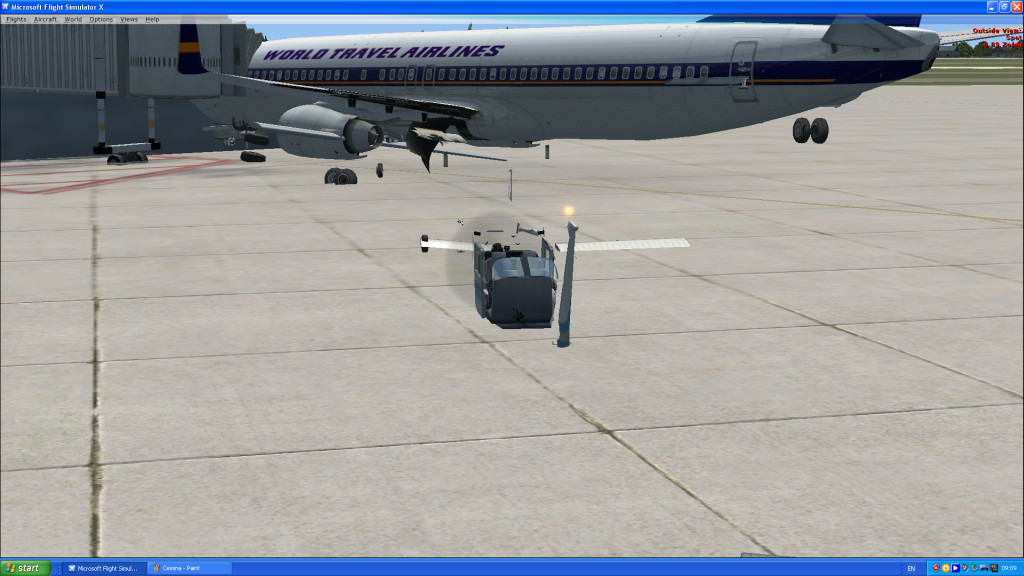
Hello Sink, that happens when you have been flying for a while and are beginning to run out of memory. The airplanes sometimes redistribute various components like flaps, tail, gear, etc etc. all over the airplane. When it happens to me I close FSX and reboot the 'puter to get all my memory back online. Then when I run FSX again all is well.
I think this is more common with older or lower-spec. computers with minimal Ram and video memory.

Re: planes disassembled

PostPosted: Thu Jul 30, 2015 5:05 am
by Sinkrate
Thanks for your replies folks.

Sorry for the delay in responding; I’ve been playing around with various settings to try and find the cause, but so far, no luck. Unfortunately, I can’t pin down an exact time when the problem started so I’m unable to associate it with any alteration I might have made.

My computer has 3.0 GHz Pentium3 processor with 4 GB RAM and NVIDIA GTX 285 video card. OK, I know I’m due for an upgrade, but it has performed well up to now. I am running WinXP sp3, DX9c, and my FSX has patches 1 & 2 applied. I have a 24” LED monitor and normally run at its native resolution of 1920 x 1080. I’ve tried other settings but it doesn’t make any difference.

I’ve been trying to upload some screenshots to illustrate the effect; I’ll have another go:

Image

Image

Did that work? Stroll on; I think I cracked it!

The fact that only some of the planes are affected is strange. If it were only the addons, I might suspect some kind of mod conflict, but it affects the default planes as well. I'm beginning to think that FSX itself has become fundamentally crippled and I might have to reinstall it. I have a lot of mods, so I'm dreading having to do that!

Regards,

Sinkrate (now completely sunk)

Re: planes disassembled

PostPosted: Thu Jul 30, 2015 7:47 am
by garymbuska
Four gigs of ram is right at the limit for FSX I would check out your display and scenery sliders you will have to put them no more than half way. I started out with just four gigs of ram and would get the old out of memory error message after running FSX for a while. As you can see by my signature I now have 12 gigs and no longer have any issues and have every thing maxed out.
<<s

Re: planes disassembled

PostPosted: Thu Jul 30, 2015 10:03 am
by Capt_Cronic
you might try updating directx

Re: planes disassembled

PostPosted: Mon Aug 10, 2015 11:03 am
by Daube
This bug is usually solved by adding the "HIGHMEMFIX" tweak in the FSX.cfg, if I'm not mistaken :)