Page 1 of 2

Douglas C117D V2 install problem.

PostPosted: Fri May 01, 2015 10:58 pm
by Eagle eye
Have recently installed the Douglas C117D V2. I see the usual com 1 & com 2 etc buttons but no radios to enable frequency changes. What have I done wrong with my install? I'm no expert but I am used to seeing the radio panels, can anyone give me a hand?

Re: Douglas C117D V2 install problem.

PostPosted: Mon May 04, 2015 7:14 am
by garymbuska
Eagle eye wrote:Have recently installed the Douglas C117D V2. I see the usual com 1 & com 2 etc buttons but no radios to enable frequency changes. What have I done wrong with my install? I'm no expert but I am used to seeing the radio panels, can anyone give me a hand?

Not quite sure what you are saying here. If you can not change the frequency of the radio(s) you have than the problem is in the aircraft cfg file.
The entry you are looking for looks something like this
[Radios]
// Radio Type=availiable, standby frequency, has glide slope
Audio.1=1
Com.1=1, 1
Com.2=1, 1
Nav.1=1, 1, 1 This is the line you need to be able to control the radio
Nav.2=1, 1, 0 This line is for a second radio which not every aircraft has so might not be needed
Adf.1=1
Transponder.1=1
Marker.1=1
If you are missing the entire radio(s) than you are either missing a gauge or the person that uploaded the aircraft forgot to include it .
But you can easily add any gauge to any aircraft providing that there is a place to put the gauge at.
<<u

Re: Douglas C117D V2 install problem.

PostPosted: Wed May 06, 2015 3:58 pm
by Eagle eye
Thanks Gary for your extensive reply. I have been a bit busy of late but will try this out and let you know. That model is very interesting as we have never seen it in NZ. We have a few beautifully restored flying DC-3's here though.

Re: Douglas C117D V2 install problem.

PostPosted: Thu May 07, 2015 8:29 am
by garymbuska
Eagle eye wrote:Thanks Gary for your extensive reply. I have been a bit busy of late but will try this out and let you know. That model is very interesting as we have never seen it in NZ. We have a few beautifully restored flying DC-3's here though.


No problem I know that there are other things going on in the real world that keeps us from having fun.
One other thing I had thought if you are missing the entire radios you could either download a new panel or copy one from a existing plane.
Or the other option is to ALIS it to another panel. I do not like this method myself I will just copy the panel file from the one I would have ALISED it from
If you do not know what I mean by ALIAS if you open a panel folder from a aircraft you will find a line that looks like this
[fltsim]
alias=Airbus_A321\panel
This is using the panel from the Airbus_A321
The sim will run quicker if you just copy the panel folder from the Airbus_A321 to the plane you wish to put it in.
<<s

Re: Douglas C117D V2 install problem.

PostPosted: Thu May 07, 2015 9:47 am
by jandjfrench
Hi eagle,
I don't know what you're referring to when you say "I see the usual com 1 & com 2 etc buttons". In the accompanying Documentation folder there are complete instructions for using the GARMIN GNS530; both Comm and Nav frequency selection, switching between main and standby etc., as well as using the included GPS.
What confuses me is why they have both the GNS430 and the GNS530 installed. It would be helpful if there were abbreviated instructions as to there use on the Reference tab of the kneeboard.
Jim F.

Re: Douglas C117D V2 install problem.

PostPosted: Thu May 07, 2015 9:53 am
by Modlerbob
If this is the same as the C-117 that I downloaded I was never able to get the 2D instrument panel to work. As I am basically using FSX fo my own personal entertainment and not as an authentic simulator I don't use the C-117

Re: Douglas C117D V2 install problem.

PostPosted: Thu May 07, 2015 10:34 am
by jandjfrench
Hi Modler,
I don't know which 2-D instrument panel you're referring to. There is no 2-D cockpit. I'm not that familiar with the aircraft. Here's were I found it:
http://www.sim-outhouse.com/sohforums/l ... 7&id=17615
Jim F.

Re: Douglas C117D V2 install problem.

PostPosted: Thu May 07, 2015 1:19 pm
by Modlerbob
I read more and you are correct, they do not provide a 2D panel, just a checklist. So, has anyone made a 2D panel for this plane? Or would a 2D panel from a standard DC-3/C-47 work?

Re: Douglas C117D V2 install problem.

PostPosted: Thu May 07, 2015 3:52 pm
by jandjfrench
Hi,
I don't know of a 2-D panel available for the plane but I haven't looked. It looks like it would be simple to use the one from the default DC-3. It seems that by renumbering the existing Window00 to the next highest available number and moving it so it occurs in sequence and then copying the default DC-3 window 00 to the C117 panel.cfg in the place of the old and copying all of the other files from the DC-3 panel folder to the C117 panel folder, with the exception of the DC-3 panel.cfg, would do the trick.
As the C117 window00 is not simply passive but reflects current conditions of various aircraft systems, as well as having clickable hot spots, I'd have to try it to see what the effects would be. I think I'd just back-up the entire aircraft folder or just not worry about it as it would be simple enough to re-install.
Jim F.

Re: Douglas C117D V2 install problem.

PostPosted: Thu May 07, 2015 4:30 pm
by Eagle eye
In answer to your first reply 'Garymbuska' you are correct I am missing both Com1 & Com2 Radios. They just don't appear in the instrument panel. My stack has just the following from top to bottom, Audio control panel, Autopilot, ADF, DME, & the Transponder. I checked your Radios CFG file against mine and the only difference was my Transponder =0 so I changed that. Do you actually have the Douglas C117D V2 on your system with the complete set of radios? I downloaded the aircraft from Simvation and installed it with no problem so I can't understand what's happened. Love the aircraft model though, great job. :doh:

Re: Douglas C117D V2 install problem.

PostPosted: Thu May 07, 2015 7:04 pm
by jandjfrench
Hey eagle,
I wasn't able to locate a Douglas C117 V2 on Simviation. What is the exact file name? The only "Douglas C117D V2" that I could find was at SOH. It seems we're referring to different aircraft.
Jim F.

Re: Douglas C117D V2 install problem.

PostPosted: Thu May 07, 2015 9:41 pm
by Eagle eye
Hi Jim, try this address http://simviation.com/1/search?submit=1 ... d&x=21&y=9 it works for me.

Re: Douglas C117D V2 install problem.

PostPosted: Thu May 07, 2015 11:01 pm
by jandjfrench
Hi eagle,
Turns out it's the same plane.

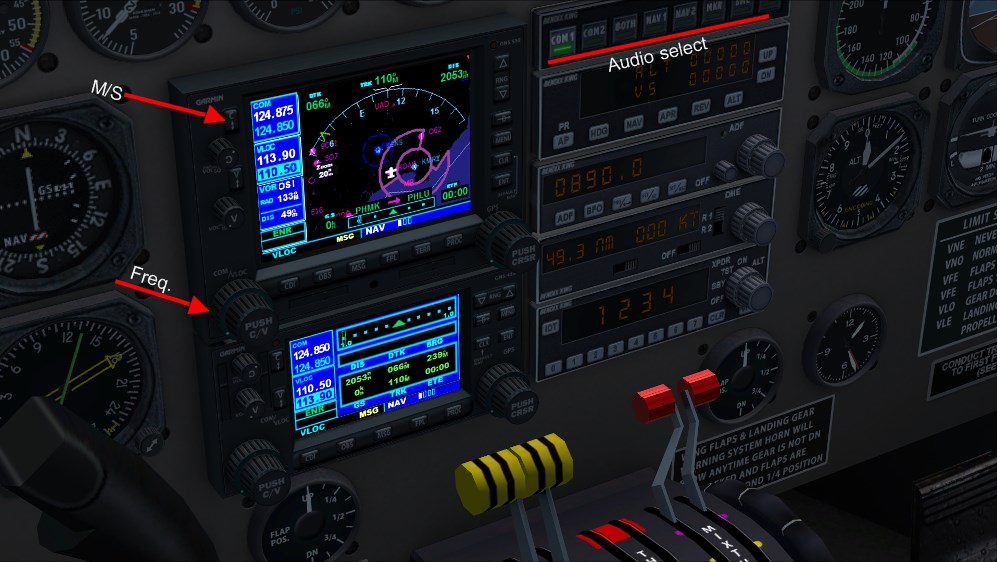
Maybe this picture will clarify:
https://www.simviation.com/phpupload/upl ... 072735.jpg

The Com and Nav buttons that I have underlined only select which audio is heard. The Main/Standby switch and Frequency knobs are pointed to. Hope this helps.
Jim F.

Re: Douglas C117D V2 install problem.

PostPosted: Thu May 07, 2015 11:32 pm
by Eagle eye
Thanks for that Jim, it was just what I was missing. I feel a bit stupid now and I can only say in my defence that I am a bit new to the Garmin Nav platforms. I have the TBM 850 and have been having trouble getting to grips with it given I don't get much time to devote to the learning cycle. Thanks again Jim.

Re: Douglas C117D V2 install problem.

PostPosted: Thu May 07, 2015 11:59 pm
by jandjfrench
Hi eagle,
I was glad to be of help. And thanks to you I learned quite a bit about using those Garmins. Still not sure why both are installed; seems that one would be enough. I may just add some of the info from the included docs to the ref file to show up on the kneeboard. Just the image and the basics. Taking the time to condense things sensibly tends to help me remember things better.
Jim F.